We have all been there. It is 2:00 PM, you are in the middle of a busy day, and your phone icon turns that dreaded shade of red. Low battery anxiety is real, and it drives us to do some strange things to keep our devices alive. Because we care so much about staying connected, a lot of misinformation has spread regarding how to treat our smartphones. You might have heard advice from a friend, read a forum post from 2012, or just assumed that “saving” your battery meant closing every single app.
But here is the truth: modern smartphone batteries are smarter than you think, and many of the “rules” you are following are actually outdated. In fact, some of these habits might be doing more harm than good. At Mobile Fix Experts, we see devices come in every day with degraded batteries that could have lasted years longer with the right care. Whether you are looking for reliablephone repair Bradenton or just want to make your current phone last, understanding the chemistry inside your device is the first step.
In this guide, we are going to strip away the technical jargon and look at the real science behind Lithium-Ion batteries. We will bust the five biggest myths that are silently shortening your device’s lifespan and give you the actual steps to fix them.
The Science: Understanding Lithium-Ion Technology
Before we get into the myths, you need to understand what is powering your phone. Almost every modern smartphone, whether it is an iPhone, Samsung, or Pixel, runs on Lithium-Ion (Li-Ion) batteries.
Unlike the old nickel-cadmium batteries of the 90s, Li-Ion batteries are incredibly efficient. They charge faster, last longer, and pack a higher power density for better battery life in a lighter package. However, they are also chemical components. This means they inevitably degrade over time. Think of your battery like a car tire; it wears down a little bit every time you drive. You can’t stop the wear completely, but you can drive smoothly to make the tires last longer, or you can do burnouts and ruin them in a month.
The myths below are essentially “burnouts” for your battery. Let’s stop doing them.
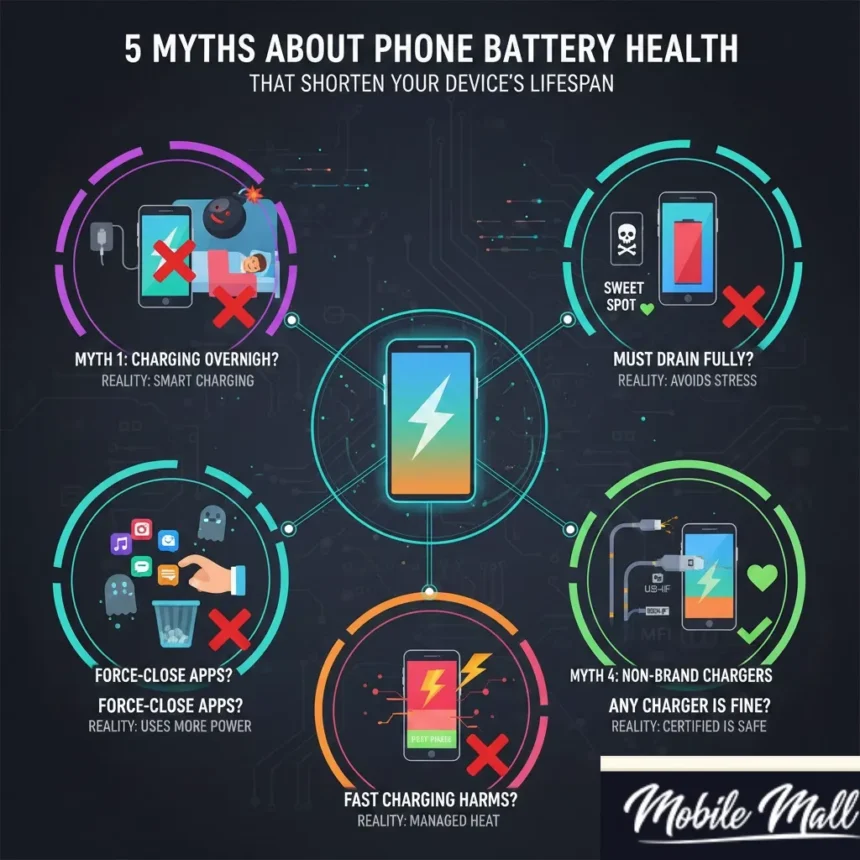
Myth #1: “Leaving Your Phone Charging Overnight Will Explode the Battery”
This is arguably the most persistent myth in the tech world. The fear is that if you plug your phone in at 11 PM and leave it until 7 AM, the battery will “overfill,” overheat, and eventually degrade or even explode.
The Reality: Your smartphone is smart. It has a dedicated chip inside known as a Power Management Integrated Circuit (PMIC). This chip acts like a bouncer at a club. Once your battery hits 100%, the PMIC cuts off the flow of electricity. It physically stops the battery from taking in more energy than it can handle.
What Actually Happens: When you leave your phone plugged in overnight, it hits 100% and stops charging. However, your phone is still on. It’s checking for emails, refreshing background data, and searching for a signal. This causes the battery to drop to 99%. The charger senses this drop and provides a tiny “trickle charge” to bump it back to 100%.
While this trickle charging does generate a tiny amount of heat, for the vast majority of users, it is negligible. Modern phones even have software features (like Apple’s Optimized Battery Charging) that learn your schedule. They will charge to 80% and wait to deliver the final 20% until right before you wake up.
The Verdict: You can sleep soundly while your phone charges. The danger of “overcharging” is a relic of the past.
Myth #2: “You Should Always Drain Your Battery to 0% Before Charging”
This advice comes from the era of “memory effect” in older nickel-based batteries. The idea was that if you didn’t drain the battery fully, it would “forget” its total capacity and only charge partially the next time.
The Reality: Lithium-Ion batteries hate extremes. They do not have a “memory” in the way older batteries did. In fact, fully discharging a Li-Ion battery (letting it die completely) puts it under a massive amount of chemical stress.
Think of your battery like a rubber band. If you stretch it to its absolute limit (100%) or let it go completely slack (0%), it wears out faster. The “sweet spot” for a Lithium-Ion battery is actually between 20% and 80%.
The “Deep Discharge” Danger: If you constantly let your phone hit 0%, you are eating into its “cycle count.” A charge cycle is defined as using 100% of your battery’s capacity (whether in one go or over several days). If you continually deep discharge, you reach the maximum cycle count of the battery much faster.
Actionable Advice: Plug your phone in when it hits the “Red Zone” (around 20%). Don’t wait for it to shut down. “Topping up” your phone throughout the day is actually healthier for the battery than the cycle of starving and stuffing it.
Myth #3: “Closing All Background Apps Saves Battery Life”
We have all seen people do it. They double-tap the home button or swipe up and furiously swipe away every single app card until the screen is empty, thinking they are doing their phone a favor.
The Reality: This is one of those habits that actually hurts your battery more than it helps. When you minimize an app on a modern smartphone (iOS or Android), the operating system freezes that app. It isn’t running in the background; it is suspended in the RAM (Random Access Memory). It is not using the CPU, and therefore, it is not using the battery.
Why Closing Apps Hurts: When you force-close an app, you are completely killing the process. The next time you open Instagram or WhatsApp, your phone has to load the entire code from scratch into the memory. This requires a significant burst of processing power from the CPU.
Imagine you are a chef.
- Leaving apps open: You have your knife and cutting board on the counter, ready to use.
- Force closing apps: You put the knife in the drawer, wash the board, and put it away. When you need to chop an onion 10 seconds later, you have to get everything out again.
That extra effort of “getting everything out again” burns more battery than just letting the app sit frozen in the background.
Exceptions: The only time you should force-close an app is if it is frozen, glitching, or if it is an app specifically designed to run in the background (like a GPS map or a music player that won’t stop). Otherwise, let the operating system manage the RAM. It’s better at it than you are.
Myth #4: “Using Non-Brand Chargers Will Destroy Your Phone”
Manufacturers love to tell you that you must only use the cable and brick that came in the box (or that they sell separately for a premium price). While there is a grain of truth here, it is largely a marketing tactic.
The Reality: There is a massive difference between “Third-Party” and “Counterfeit.”
- Third-Party (Safe): Brands like Anker, Belkin, or Mophie make high-quality chargers. As long as the charger is certified (MFi for Apple, or USB-IF for Android), it communicates perfectly with your phone’s internal software to deliver the right voltage.
- Counterfeit/Cheap (Unsafe): The $3 charger you bought at a gas station or a nameless online bin store? That is dangerous. These cheap cables often lack the safety chips that regulate current. They can deliver inconsistent power, leading to overheating and frying the logic board.
When Damage Occurs: If you have used a cheap charger and noticed your battery isn’t holding a charge like it used to, the damage might already be done. In these cases, you might need a professionaliPhone repair Bradenton to diagnose if the issue is just the battery or if the charging port itself has been damaged by a poor-quality cable.
The Rule of Thumb: You don’t need to buy the official Samsung or Apple cable, but you must buy from a reputable brand. Look for “Made for iPhone” (MFi) logos or trusted electronics brands. If the charger costs less than a cup of coffee, it’s probably going to cost you a new phone eventually.
Myth #5: “Fast Charging Will Ruin Your Battery”
Fast charging is a miracle feature for heavy users. Plugging your phone in for 15 minutes and getting 50% battery feels like magic. But skeptics claim that pumping that much power into a battery so quickly must be damaging it.
The Reality: Fast charging works in two distinct phases to protect your battery.
- Phase 1 (0% to ~70%): This is the blast phase. The charger pumps as much power as possible into the empty battery. Because the battery is empty, it can absorb this charge without overheating.
- Phase 2 (70% to 100%): Once the battery fills up, the charger drastically slows down the speed. This is why the last 10% takes so long to charge. It switches to a slow mode to prevent heat buildup.
The Heat Factor: The only real enemy here is heat. Fast charging does generate more heat than slow charging. However, manufacturers have built massive cooling solutions and software limiters into phones to manage this. Unless you are fast-charging your phone while leaving it on the dashboard of a hot car in direct sunlight, the degradation caused by fast charging is minimal compared to the convenience it offers.
If you are planning to keep your phone for 5+ years, maybe stick to a standard charger overnight. But for the average user upgrading every 2-3 years, fast charging is perfectly safe.
The Real Enemy: Heat and Cold
If the myths above aren’t the main culprits, what actually kills batteries? Temperature.
Batteries have a comfortable operating temperature, usually between 62° to 72° F (16° to 22° C).
- Extreme Heat: leaving your phone in a hot car or using it while it charges in a hot room is the fastest way to permanently degrade battery capacity. Heat speeds up the chemical reaction inside the battery, causing the electrolytes to break down.
- Extreme Cold: If you are out in freezing temperatures, you might notice your phone shuts off even if it says 30%. This is usually temporary. Once the battery warms up, performance returns. However, consistently charging a frozen battery can cause permanent plating on the anode, which ruins the battery.
Pro Tip: If your phone feels hot to the touch while charging, take the case off. Thick rubber or leather cases can trap heat, preventing the phone from cooling down naturally.
How to Check Your True Battery Health
You don’t need to guess if your battery is dying. Your phone tells you.
For iPhone Users:
- Go to Settings.
- Scroll down to Battery.
- Tap on Battery Health & Charging.
- Look at the Maximum Capacity.
- 100-90%: Perfect condition.
- 89-80%: Average wear. You might notice slightly less usage time.
- Below 80%: The battery is significantly degraded. Apple (and we) recommend replacement at this stage to prevent unexpected shutdowns and performance throttling.
For Android Users: Android is a bit more fragmented, but you can usually find this in Settings > Battery > Battery Usage. Some Samsung phones have a “Diagnostics” menu in the Samsung Members app. If you cannot find it, apps like AccuBattery can measure your health over a few days of usage.
Conclusion
Your smartphone is an investment, and the battery is its lifeline. By ignoring these myths and following the science, you can extend the life of your device significantly. Stop stressing about overnight charging, stop force-closing your apps, and please, throw away that gas station charging cable.
However, no battery lasts forever. Chemistry eventually wins. If you have followed all the tips but your phone still dies by noon, or if it jumps from 40% to 10% in seconds, it is time for a professional replacement. Replacing a battery is affordable, environmentally friendly, and gives your phone a second life.
If you are experiencing battery issues, do not wait until the battery swells or damages the screen. Visit our local experts for phone repair Bradenton. We can test your battery health in minutes and get you back to 100% capacity safely.
Treat your battery right, and it will keep you connected when you need it most.
Frequently Asked Questions (FAQs)
A: Generally, yes, but not for the reason you think. Using the phone while charging generates extra heat. Since heat is the battery’s worst enemy, doing intensive tasks like gaming or video rendering while plugged in can overheat the device and degrade the battery health over time. Checking a text is fine; playing a 3D game is not recommended.
A: Battery calibration (draining to 0% and charging to 100%) is mostly a myth for modern phones. The phone’s software is very good at reading the voltage. You only need to do this if your battery percentage reading is wildly inaccurate (e.g., the phone dies at 20%).
A: Yes, but only if you have an OLED screen (which most modern Samsung and iPhones have). On an OLED screen, black pixels are actually turned off completely. This saves a significant amount of energy compared to lighting up the whole screen for a white background.
Disclaimer
The information provided in this blog post is for educational purposes only. While we strive to provide the most accurate and up-to-date technical advice, Mobile Fix Experts is not liable for any damages resulting from DIY repair attempts or the use of third-party accessories. Always consult a professional technician for hardware issues.