Ever watched a video where someone’s serious voice suddenly turns into a squeaky cartoon tone, or a slow-motion deep bass sound that makes you burst out laughing? That’s the magic of voice changers. They can instantly transform a normal video into a funny, shareable clip. And the best part? You don’t need expensive tools to do it—CapCut’s Voice Changer feature does it all for free.
CapCut, known for being one of the most beginner-friendly yet powerful editing software, has added features that make creativity accessible to everyone. Among them, the Voice Changer stands out because it gives you an instant way to inject humor into your videos. Whether you want to prank your friends, spice up your TikToks, or create comedy skits for Instagram Reels, this tool can turn even the dullest clip into pure entertainment. Let’s dive into how you can take advantage of CapCut’s Voice Changer and start making your audience laugh in seconds.
Why Use the Voice Changer Feature for Comedy?
- Instant Humor – Changing a regular voice into something exaggerated makes even mundane conversations hilarious. Imagine narrating your grocery list in a high-pitched chipmunk tone—it’s automatically funny.
- Engagement Boost – Funny videos tend to get more likes, comments, and shares. People love sharing clips that make them laugh.
- Creativity Without Limits – You don’t have to be a comedian to make people laugh. The voice effects do most of the work for you, and you can pair them with everyday moments for maximum impact.
- Great for Any Platform – TikTok, YouTube Shorts, Instagram Reels, or even casual WhatsApp group shares—funny clips made with voice changers fit everywhere.
Funny Situations Where Voice Changer Shines
- Gaming Clips: Imagine your character dying in a game while your voice shifts to a robotic “Game Over” tone. Comedy gold.
- Storytelling: Narrate childhood stories in a squeaky voice for extra laughs.
- Everyday Fails: Tripping on the sidewalk? Add a slow-motion deep voice effect.
- Mock Interviews: Pretend to be a celebrity with an auto-tuned voice.
How to Turn Normal Clips into Comedy Gold with CapCut’s Voice Changer
Turning clips into funny masterpieces is easier than you think. Just follow the CapCut Desktop Video Editing Software‘s easy steps:
Step 1: Import Your Clip into CapCut

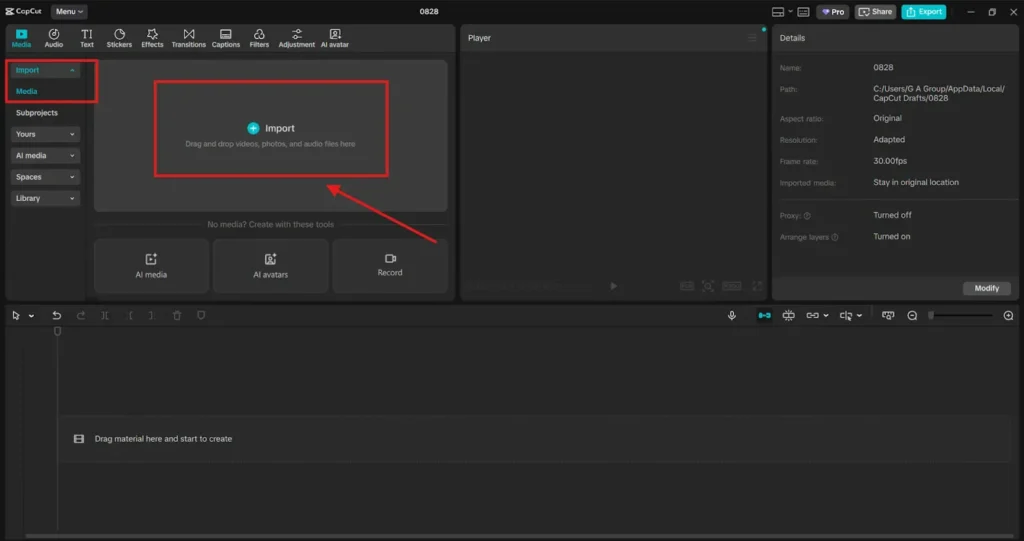
First things first, open CapCut Desktop Video Editor. Import the video you want to transform. This could be anything—a vlog, a casual clip with friends, or even a recording of your pet. Tap New Project and select the clip from your gallery or files. Drag and drop it onto the timeline. Choose clips with clear dialogue or sound. Voice changers work best when they have something to modify.
Step 2: Apply the Voice Changer Effect
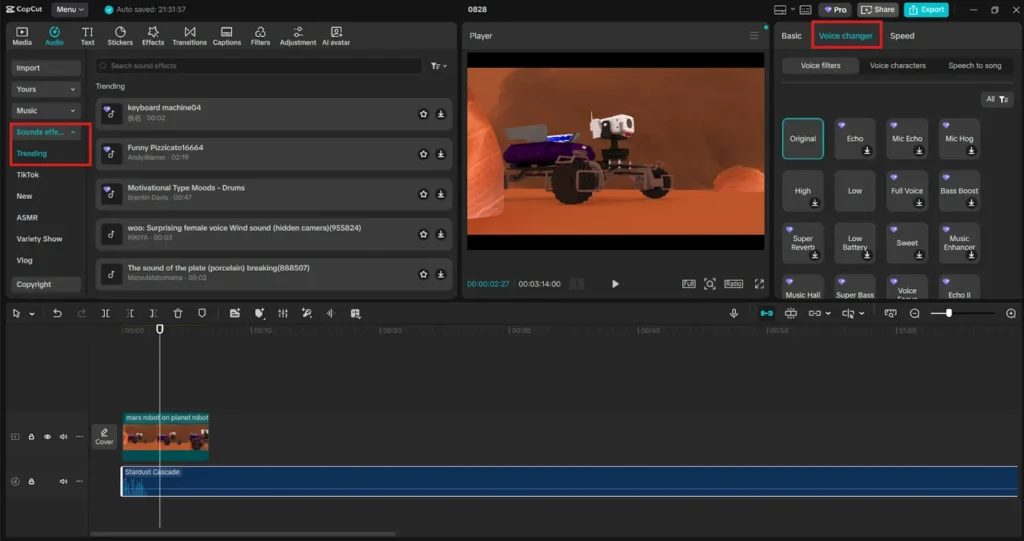
Now the fun begins. CapCut offers multiple voice-changing styles you can experiment with. Select the audio or video track on your timeline.
Go to Audio Settings > Voice Changer.
Browse the available options (robot, deep voice, high-pitch, chipmunk, echo, etc.). Preview each effect until you find the one that makes your clip hilarious. Mix and match different clips with different voices. For example, one person may have a squeaky voice, while another responds with a super-deep, robotic tone. The contrast is always funny.
Step 3: Enhance the Humor with Edits
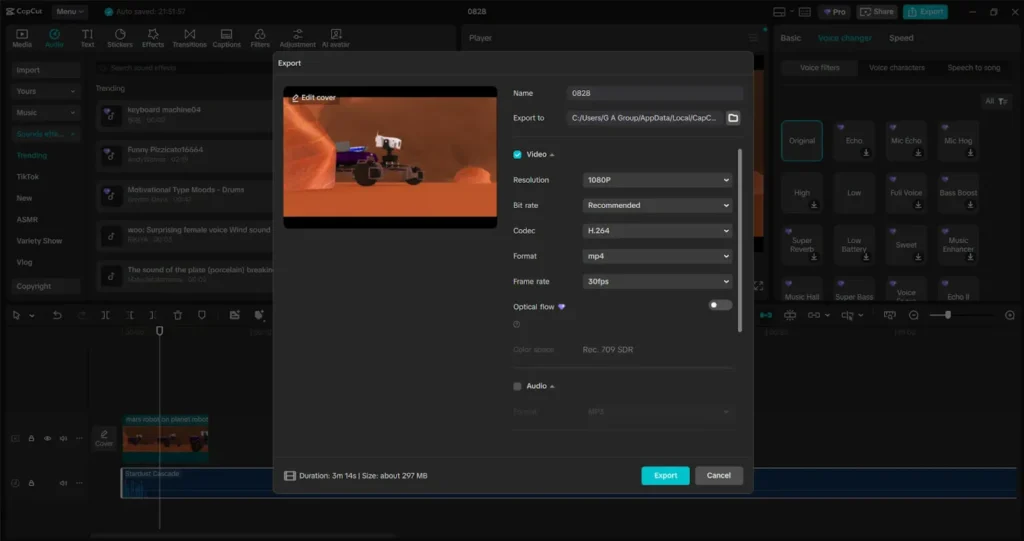
Don’t stop at the voice. Comedy works best when visuals match the sound. Add text captions for exaggerated moments (“When you realize it’s Monday again…”). Use stickers and emojis to highlight funny reactions—cut and repeat clips for comedic timing (like looping someone’s laugh in a high-pitched voice). Add background music to enhance the joke—consider using funny soundtracks, drum rolls, or meme sounds. Once you’re satisfied, export your video and share it. CapCut allows you to export directly in formats optimized for TikTok, YouTube, and Instagram.
Pro Tips for Comedy Gold
- Timing is Everything: Short, snappy edits are funnier than long pauses.
- Unexpected Twists: Use the Voice Changer at surprising moments for the biggest laughs.
- Relatable Content: Everyday situations + funny voice = guaranteed audience connection.
- Don’t Overdo It: Too many effects can overwhelm. Stick to one or two strong jokes per video.
Real-Life Examples
- A student recorded himself complaining about homework, but used the chipmunk filter. It got over 50,000 likes on TikTok because it turned frustration into comedy.
- A gamer added a robotic voice to his “game rage moments,” and it made the clip funnier than the gameplay itself.
- A pet owner narrated their cat’s daily routine with different voices—it went viral because people could relate and laugh at the silliness.
Conclusion
Comedy is one of the most powerful tools for online content. People love to laugh, and with CapCut’s Voice Changer feature, you don’t need to be a professional comedian to deliver laughs. Just grab a standard clip, apply the right effect, and suddenly you’ve got content that’s meme-worthy and viral-ready. So the next time you capture a random video, don’t just let it sit in your gallery. Open CapCut, apply the Voice Changer, and watch your normal clip transform into comedy gold. Your friends will laugh, your audience will share, and you’ll discover just how fun content creation can be. You can also use CapCut’s Online Photo Editor to edit your photos.