
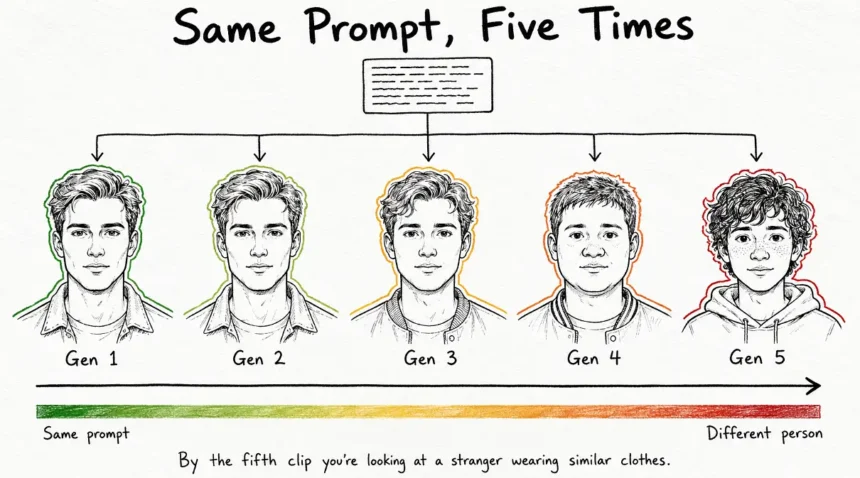
So you generate the first clip and it’s actually good, the face is right and the jacket is right and the lighting does what you wanted, so you write the next prompt and you keep the character description word for word identical and you hit generate again, and what comes back is a person who is nearly the same but not actually the same. Hair sits a bit differently. Jaw is slightly wider. By the fifth clip you’re looking at a cousin and by the twentieth it’s a stranger who happens to own similar clothes.
This is the thing that makes people quit AI video after about a week, and it’s not a prompting problem, so all the longer prompts in the world aren’t going to sort it out.
The Model Has No Memory Of What It Made Two Minutes Ago

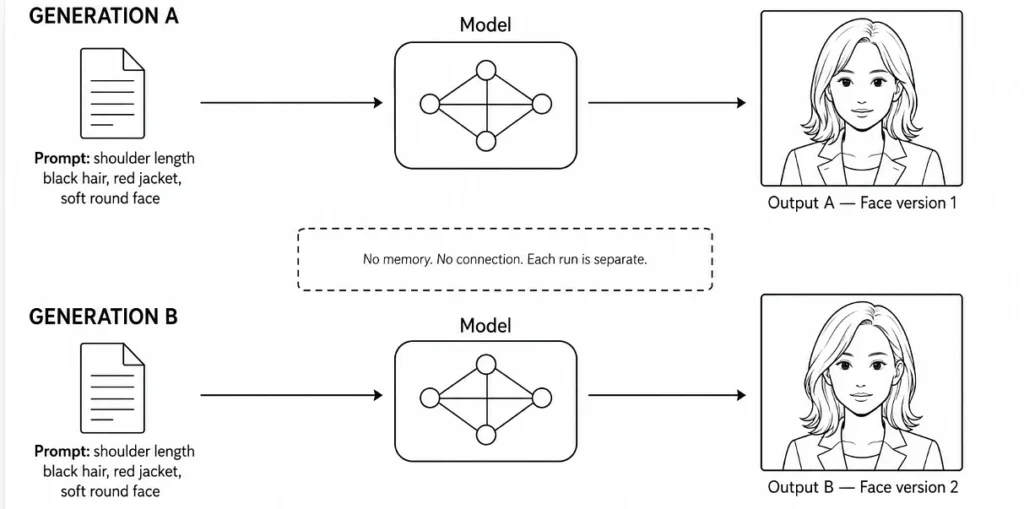
Every clip you generate is a police sketch artist who has never met you before. You sit down and describe a face, they draw something. Then you walk into a different room with a different artist and give the exact same description, and you get a different face back, because the description was never the face, it was only ever words pointing roughly at one.
That’s what’s happening on every generate.
The model isn’t holding anything from the last clip. It reads your text, builds frames from nothing, and because it samples a bit differently every run, the same words produce a slightly different person each time you press the button. Nothing in there is storing a face between jobs, which is why the industry calls it character drift, and it shows up on Kling and Seedance and Veo and Sora and Runway and Pika and Luma, all of them, because they all work the same way underneath.
The Clip Length Cap Is Half Of Why You Notice It
Most of these tools still cap one generation somewhere between five and fifteen seconds, so if you want anything longer you have no choice but to chain clips together, and chaining is exactly the situation where the drift becomes obvious.
There’s a mechanical reason it gets worse the longer the clip runs, which is that your first frame works as an anchor but its pull fades the further the model gets from it, so five seconds holds together tightly and thirty seconds visibly wanders off.
I say that in past tense on purpose though, because it changed about a week ago and I’ll come back to it further down.
Writing A Longer Prompt Barely Moves The Needle
The first instinct is always to describe harder. Character bibles, identity blocks, huge lists of traits, shoulder length black hair and soft round face and light freckles and red denim jacket and on and on.
And it does help a little, I’m not going to pretend it does nothing, but it doesn’t fix the problem because words can’t hold a face.
Try describing somebody’s exact eye spacing and jaw angle and hair texture in language precise enough that a stranger could draw the same face twice from it. You can’t, and honestly nobody can, which is the whole reason the sketch artist ends up drawing something different every time.
What you actually need is to hand the model a picture instead of a paragraph.
Build One Good Reference Image And Reuse It Everywhere

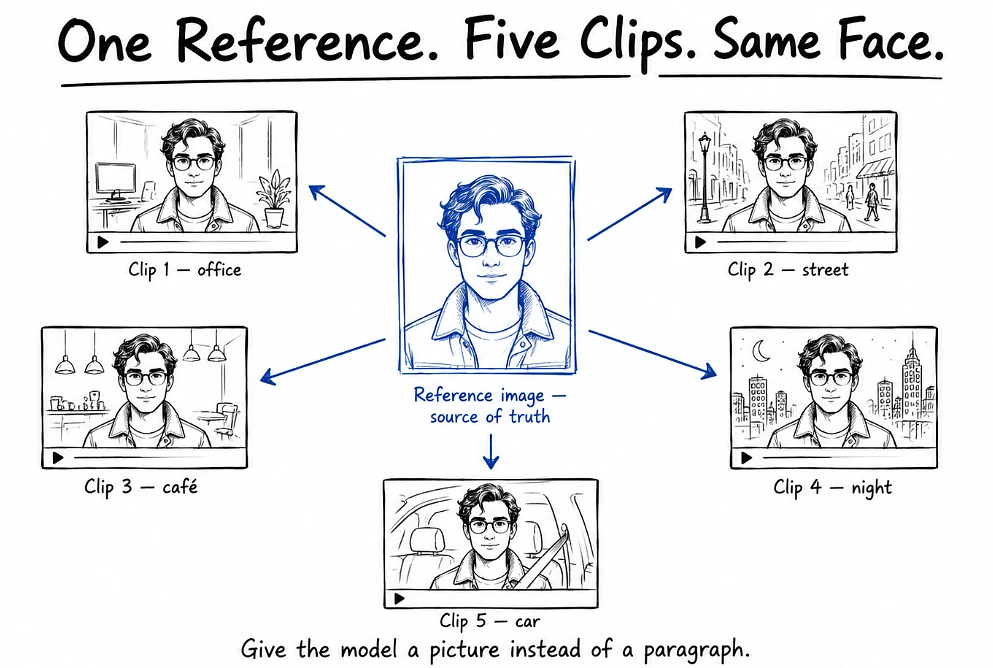
Build a single high quality still of your character before you generate any video at all, and then treat that image as the truth for the entire project so every clip after it is image to video pointing back at the same face.
The reference itself matters more than people expect and there are a few things about how you make it that genuinely change the results:
- Light it from the front or three quarters, and keep hard shadows off the face, because a shadow hides the exact features the model is trying to lock onto.
- Put the character in something distinctive it can track, a particular jacket or a scarf or odd glasses. Plain clothes give it nothing to hold onto.
- Keep the identity part of your prompt word for word identical every time and only change the scene part.
- Don’t ask for extreme motion that forces the model to invent an angle of the head it has never seen.
That last one trips people up constantly. Ask for a fast spin or a sharp turn away from camera and the model has to make up the side of a head it has no reference for, and it’ll make it up differently every single time.
Chaining Frames Works, And It Stops Working At About Forty Seconds

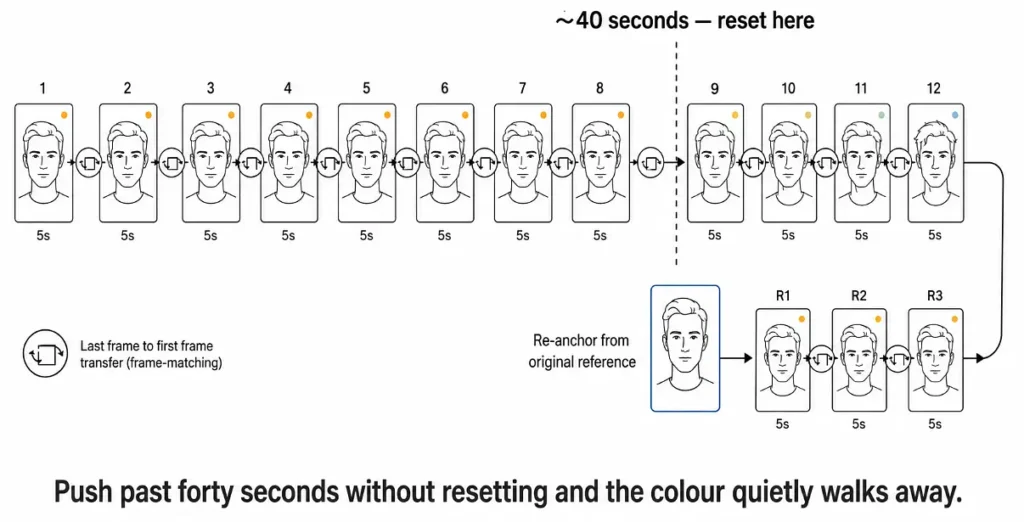
The standard technique for anything longer than one clip is that you take the last frame of clip A, export it as a still, and feed that in as the opening frame of clip B, so the join disappears because both clips actually share a real frame rather than a description of one.
Some tools let you pin both ends as well, and when you give it a first frame and a last frame it stops guessing forward and starts filling in between two known points, which is a much easier job for it and comes out steadier.
The bit that doesn’t get said enough is that you’re photocopying a photocopy. Every handoff is slightly off, and slightly off compounds, so by the eighth copy the colour has quietly walked somewhere you didn’t ask it to go and you can’t point at which clip did it.
GenLovers found they could stitch to roughly forty seconds before colour started visibly shifting from where the sequence began. Another team put the ceiling at eight to twelve clips, so somewhere around sixty to ninety seconds, before it needed a fresh reference.
So build around that instead of fighting it. If your piece needs to run past a minute, put a real scene change in around that mark, cut to a different angle or a different room, and re-seed from your original reference image on the far side of the cut. You reset the drift and it reads like an edit rather than a mistake.
Few things that stretch the chain a bit further:
- Keep the camera move the same the whole way through, so dolly stays dolly, don’t swap to a pan halfway.
- Keep lighting and time of day locked across every prompt in the chain.
- Drop motion strength down to somewhere around 0.25 to 0.35, which cuts the melting you get at the joins.
Kling 3.0 And Seedance 2.5 Went Straight At This Problem
Everything above is the manual fix and you’ll still need it on most tools. But the two big releases this year both attacked this directly, and if you haven’t looked since last year the picture has genuinely moved.
| Model | Released | Longest single take | What it does for character consistency |
|---|---|---|---|
| Kling 3.0 | 4 Feb 2026 | 15 sec, with 2 to 6 shots inside it | Elements 3.0 builds reusable characters and props that hold across separate jobs. Multi-Shot AI Director handles cuts and camera moves without you stitching. Motion Brush lets you draw the path you want. |
| Seedance 2.0 | 8 Feb 2026 | around 15 sec | Takes roughly a dozen mixed reference files in one job, images and video and audio together, instead of one still |
| Seedance 2.5 | 31 Jul 2026 | 30 sec in one continuous take | Up to 50 reference inputs at once, 30 images plus 10 video clips plus 10 audio files |
| Veo 3.1 | updates through early 2026 | short, built for extending | Leans on extend and transition stitching rather than giving you a proper end frame field |
Seedance 2.5 is the one that actually moves the goalposts, because thirty seconds in a single pass is longer than the whole forty second chaining ceiling most people have been working inside, done with no handoffs at all, so nothing accumulates.
The genuinely irritating part of all this is that every model calls the same feature something different. One wants image_tail, another one calls it frame1, Runway hides first frame under a Frame panel with the keyframes living in a completely separate app, Seedance ships it inside image to video, and Veo doesn’t really give you the field at all. You end up carrying a mental map of which tool wants which name while you’re five clips deep into a chain, and that’s usually where I’ve fumbled it.
Which is a fair chunk of why ai video platforms that bundle several models behind one interface have caught on, because you upload your reference once and try the same frame pair on Seedance or Kling or Veo without going and relearning where each one hid the button.
What I’d Do
I’d stop writing longer prompts. I mean it barely does anything and it’s the first thing everyone reaches for, myself included when I started.
I’d put all that effort into the reference image instead, get it lit properly, put the character in something visually distinctive, and then point every single generation back at it. On most tools I’d keep clips at five seconds even when it offers me ten, chain by last frame, and cut and re-seed somewhere near the minute mark.
But check what your tool is actually running first, because if you’ve got Seedance 2.5 sitting there then thirty seconds native means the chaining problem doesn’t even apply at that length, and if you’re on Kling 3.0 then Elements is holding the character for you rather than making you rebuild it by hand every time.
And if you’re choosing between tools, pick the one with a proper character reference system over the one with the prettiest single clip. The pretty single clip is easy. Getting the same person to turn up twice is the hard part, and that’s the thing that decides whether you ever finish anything.