
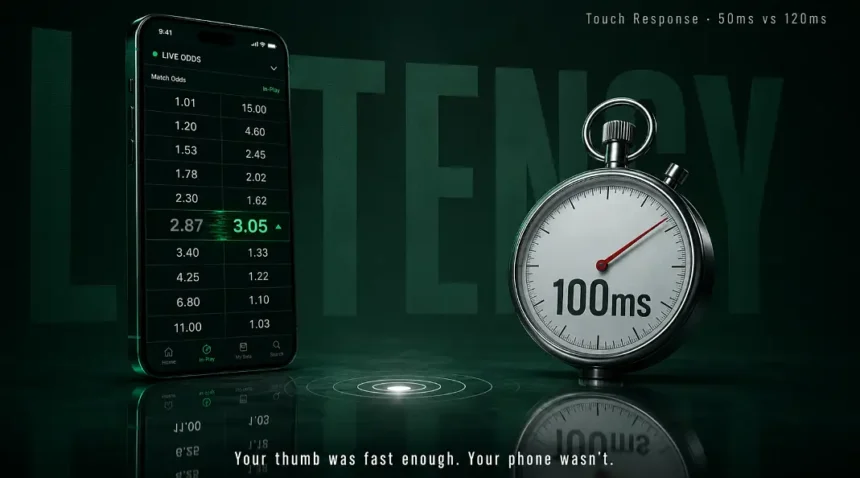
You are watching a match. The odds are moving. You see the number you want, you tap it, and by the time the screen registers your finger the line has already shifted. You did not hesitate. You did not second-guess. Your thumb hit the glass at the right moment. But the phone took 100 milliseconds to process that tap, and in live betting, 100 milliseconds is enough for the odds engine to update twice.
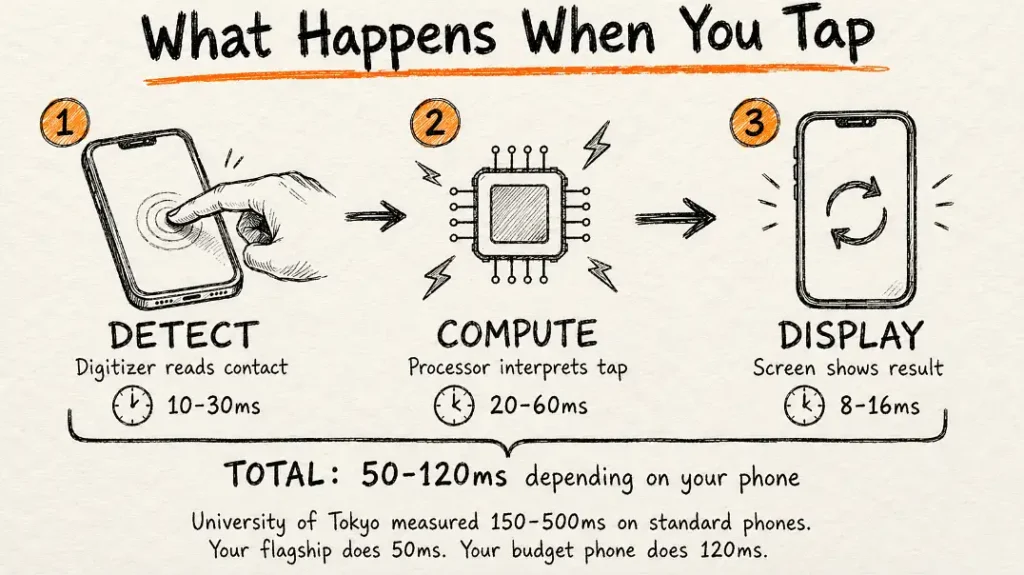
That is not a hypothetical. DXOMARK — the same lab that benchmarks smartphone cameras — has been measuring touch-to-display response time across devices for years. They break it into three stages: the screen detecting your finger, the processor computing what should happen, and the display actually showing the result. The total time varies wildly depending on which phone you are holding. Some devices sit below 50ms. Others push past 120ms. And a forum thread on Android Central had a user pointing out that his brand new Samsung S10 Plus had the exact same 120ms latency as the Note 2 he upgraded from — years apart, same lag.
For scrolling through Instagram or tapping a WhatsApp message, nobody notices the difference between 50ms and 120ms. For tapping a live odds button that refreshes every two to three seconds, that gap is the difference between locking in the number you saw and getting whatever number replaced it while your phone was still thinking.
What Touch Latency Actually Is and Why Some Phones Are Worse Than Others
So when you tap your screen, three things happen in sequence and all of them take time.
First — the touch sensor detects that your finger made contact. This is the digitizer layer under the glass reading the change in the electrostatic field. Dirt, moisture, a cheap screen protector, even electromagnetic noise from nearby electronics can slow this step down.
Second — the processor interprets the tap coordinates and figures out what action to trigger. A faster chipset running fewer background processes handles this quicker. A phone with thirty apps running in the background, the processor already sweating, will take longer to compute “user tapped button at these coordinates, load this action.”
Third — the display refreshes to show the result. This is where refresh rate comes in — a 120Hz screen can update the visual 120 times per second, a 60Hz screen half that. So even if the touch sensor and processor both did their jobs fast, a 60Hz display might wait an extra 8ms for the next refresh cycle before you see anything change.
Add all three together and you get your total touch-to-display response time. University of Tokyo researchers found that standard single-tap detection on most phones takes somewhere between 150 and 500 milliseconds depending on the device, the OS, and what else is running. They built a machine learning system that cut that to 12-17ms, but that is a research lab, not your pocket.
In real life the phones most people carry sit somewhere between 50ms and 120ms for touch response. The ones at the faster end — generally iPhones and flagship Android devices with current-gen processors — register taps noticeably quicker than budget phones running older chipsets with heavy UI skins on top. DXOMARK’s testing equipment uses high-speed cameras synchronized to the millisecond to capture exactly when a tap happens and when the screen reacts. The gap is measurable, repeatable, and it varies enough between devices that the phone you pick genuinely affects how responsive any real-time app feels.
Your Screen Brightness Determines Whether You Can Even Read the Odds Outside
This one sounds basic until you have actually tried to use a betting app at a stadium, in a park, or just sitting outside a cafe during a daytime match. A phone with a peak brightness of 500 nits — which covers a lot of budget and lower-mid-range devices — becomes a mirror in direct sunlight. You are squinting, cupping your hand around the screen, tilting the phone at weird angles trying to catch a shadow. Meanwhile odds are updating and you literally cannot read them.
A phone with an AMOLED panel hitting 1,800 nits or higher stays readable in the same conditions without any of that hassle. The difference is not subtle either. It is the difference between seeing numbers clearly and seeing your own reflection staring back at you looking annoyed.

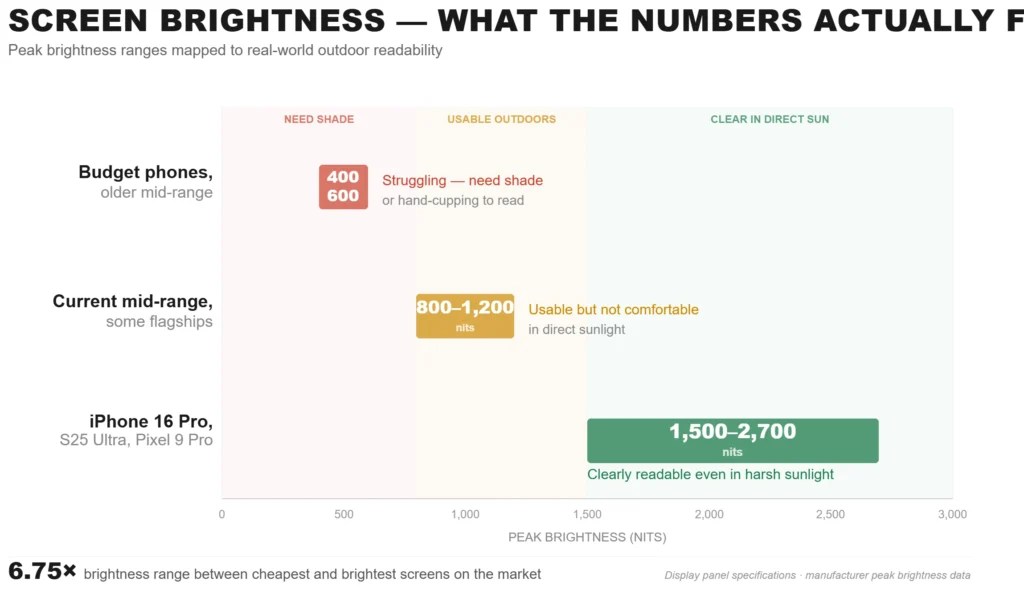
If you are someone who uses live apps outdoors regularly — not just betting but live scores, streaming, real-time anything — peak brightness is one of those specs that does not sound exciting until the moment it saves you from missing something because you could not see your own screen.
Battery: Why a 5,000mAh Phone Dies Before the Match Ends and a 4,500mAh Phone Doesn’t
A match runs 90 minutes plus extra time. If you are following it on a betting app with live odds updating, you have got the screen on the entire time, data connection pulling constant updates, the processor rendering UI changes every few seconds, and probably your brightness cranked up because see the previous section about sunlight. That is a heavy workload and it is sustained, not intermittent.

Elevate’s research into app battery consumption found that video streaming alone drains roughly 20% of a full charge per hour. A live betting app with constant data refresh is not streaming video but it is doing something similarly demanding — maintaining a persistent server connection, processing incoming data, refreshing the UI, and keeping the screen active. Figure somewhere between 12-18% drain per hour depending on the app and the phone.
Over a 90-minute match that is potentially 18-27% of your battery gone on the app alone. Add normal background drain from WhatsApp, email, system processes, and you could be looking at 30-35% total. On a phone that started the match at 60% charge because you were using it all day, you are now in the red zone before the final whistle.
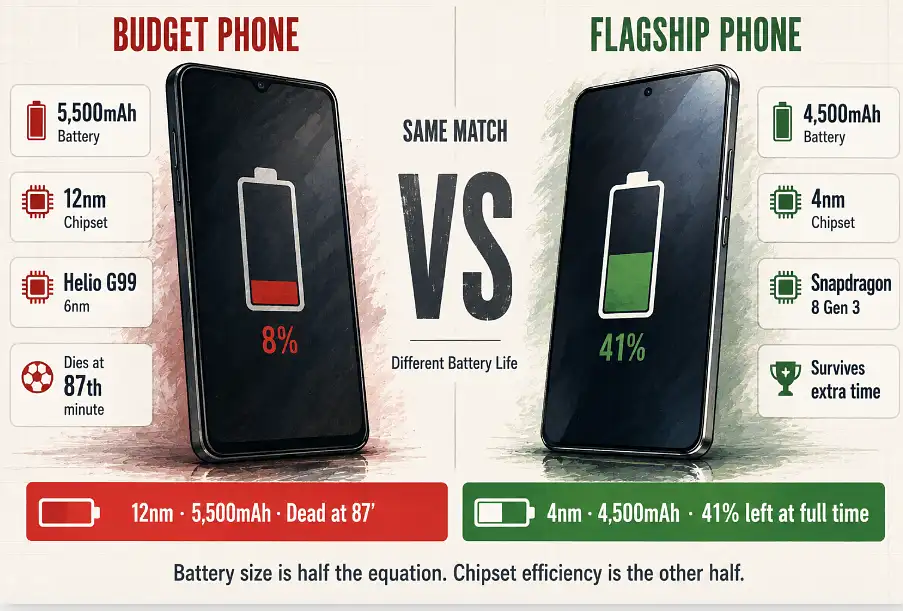
Here is where the chipset matters as much as battery size. A 4nm processor (Snapdragon 8 Gen 3, Dimensity 8200, Tensor G4) does the same work using measurably less power than a 6nm chip (Helio G99, Snapdragon 685) or a 12nm budget processor. The manufacturing process determines how efficiently transistors switch, and efficiency translates directly into battery life under sustained load.
So a phone with a 4,500mAh battery and a 4nm chip can genuinely outlast a phone with a 5,500mAh battery and a 12nm chip during a 90-minute live session. The battery number on the spec sheet is not the whole story. It is the chipset efficiency multiplied by the battery capacity that determines whether your phone survives the match or dies during stoppage time when things are actually getting interesting.
120Hz vs 60Hz — It Is Not About Gaming, It Is About Reading Numbers That Keep Changing
The refresh rate conversation usually gets framed around gaming. “You need 120Hz for smooth gameplay.” Sure. But there is a completely different use case where refresh rate matters and nobody talks about it — reading rapidly updating information.
A live odds feed on a betting app updates multiple numbers every few seconds. At 60Hz, each frame of that update is rendered every 16.6 milliseconds. At 120Hz, it is every 8.3 milliseconds. The practical difference is that scrolling through a feed of live markets at 120Hz looks smooth and readable, while the same feed at 60Hz has a slight judder that makes moving text harder to track, especially when the numbers themselves are changing as you scroll past them.
It is not a dramatic difference for casual browsing. But when you are scanning a screen looking for a specific market in a list of forty or fifty options, all of which are updating in real time, that extra smoothness makes the information easier to process visually. Your eyes track moving elements more comfortably. You find what you are looking for a beat faster.
Which Phones Handle Real-Time App Performance Best Right Now
Putting all of this together — touch latency, screen brightness, battery efficiency under sustained load, and display refresh rate — here is how the current phone landscape breaks down for anyone using fast real-time apps regularly.

You do not need a flagship to use a betting app. But if you are someone who follows matches live, taps in-play markets, and does this regularly across multiple matches a week, the accumulated difference between a budget phone and a mid-range one is noticeable. Not because the budget phone can not run the app — it can — but because the touch is slower, the screen is harder to read outside, the battery is tighter, and the UI scrolls less smoothly. Each thing on its own is minor. Together they add up to a worse experience over time.
Across global markets people search for these apps in their own languages — English, Hindi, Urdu, Arabic queries like تنزيل 1xbet الأصلي — and the app they download is the same app regardless of the language they searched in. But the phone they run it on is not the same, and that hardware gap affects every tap, every scroll, every glance at the screen during a live match more than most users realize.
The phone is not a neutral window into the app. It is a filter that either helps or slows down every interaction you have with real-time information. A 100ms tap delay does not sound like much until the odds moved in that 100ms. A dim screen does not matter until you are outside and cannot read the number you are about to commit to. A battery that dies at the 80th minute does not ruin your day until the match-winning goal happens at the 89th and you missed it because your phone was showing a charging icon instead of a scoreline.
The specs that matter for this are not the ones on the poster at the shop. They are touch latency, sustained battery performance, outdoor brightness, and refresh rate. Check those four before you buy and the phone will do its job properly when the moment actually matters.