Last week I published the post about the Enhance button and the four tiers behind it and you guys showed a lot of love, we received 5k+ views in one week, thank you guys. So I also received some questions, and from those one of the most interesting ones was about ChatGPT, like when you upload a photo and ask GPT to enhance it or unblur it, what is it doing, is it the same tier 1 maths or something else. Fair question, because I put GPT in tier 4 last week in one line and did not explain it, and OpenAI has just shipped a new image model on top, so the timing is right.
As a techy geek who runs product photos through these things for a living, I wanted to know for sure.


Did It Sharpen My Photo Or Draw It Again
Instant answer, it drew it again. It did not sharpen anything.
I asked GPT straight, did you modify the pixels of the original file or did you generate a new image using the photo as a reference. Its answer, word for word:
“I generated a new image using your photo as a reference; I did not overwrite your original file.”
Now look at the two pictures. The beard is crisper, the seams on the jacket are drawn in, the rings on the hand in front are sharper, the wood grain is cleaner. None of that was in the original file. A sharpening filter, the tier 1 unsharp mask from last week, can only push pixels that exist, it cannot know what a sharp beard hair looks like. GPT does know, because it has seen a million beards, so it drew one on this guy’s face. Same cap, same jacket, same pose, because the photo was the reference. But a drawing.
Is he looking nice guys? Honestly yes, better than the original, and that is sort of the problem, because he never looked like that.
What GPT Said It Ran
First time I asked it to print the call it makes, it gave me this:
image_gen({
  referenced_image_paths: [
    "/workspace/scratch/081859c93256/upload/image(20261008-111709).png"
  ],
  transparent_background: false,
  prompt: "Conservatively enhance this photograph. Reduce mild blur and noise, gently lift deep shadows, and soften harsh highlights. Improve clarity in the eyes, beard, cap, and jacket seams. Preserve the person's identity, expression, pose, body proportions, clothing, foreground hand, background, and original portrait framing. Keep natural skin texture and the original sunlight direction. Avoid invented facial detail, beauty retouching, waxy skin, sharpening halos, added objects, or text."
})
See what is missing in there, right. I typed two words, enhance it, and GPT turned my two words into that whole paragraph on its own, then handed the paragraph plus the photo to the image model. No sharpen amount anywhere, no radius, no denoise strength, nothing you could call a setting. A file path and some English, that is it.
It took a bit of pushing but on a later run it gave me the full thing, the tool name, the prompt it sent that time, and the metadata that came back. The tool is image_gen.text2im. Text to image. The same function that draws you a dragon from a sentence, with the photo attached as a reference. And the prompt it wrote for itself that time was a different paragraph again:
Edit the provided image to create an enhanced,
higher-quality version of the same photo.
Image A is the direct edit target.
Preserve the person's identity, pose, clothing,
cap, beard, crossed arms, and the overall
rustic outdoor setting.
Improve the image in a natural, realistic way:
- Correct the harsh lighting
- Lift deep shadows on the face and jacket
- Reduce blown-out highlights from direct sunlight
- Improve overall exposure and white balance
- Increase clarity and detail
- Reduce noise and compression artifacts
- Sharpen the subject gently
Keep the image looking like a real photograph,
not overly airbrushed or stylized.
Two enhances, two different briefs, both written by GPT, not by me. So it is improvising the instructions every time as well as the picture.
Now I know you guys would wonder, especially those with a bit of coding knowledge, ok fine it wrote a prompt, but surely at the back it is running the basic Python stuff, OpenCV or Pillow, the things from last week’s tier 1. No. I asked it that exactly, and it said in its own words it did not run Python, OpenCV, Pillow, Photoshop, ImageMagick or FFmpeg on the photo. It even listed the real OpenCV functions people would expect, cv2.detailEnhance, cv2.fastNlMeansDenoisingColored, cv2.createCLAHE, and said those are examples of real image processing functions, not commands it ran. So the ImageMagick convert guess, no. The FFmpeg filter guess, also no. The whole tier 1 toolbox from last week, none of it touched this photo. The sentence went in, a new picture came out.
This is the metadata it returned for that run, pasted as it came:
{
  "edit_op": null,
  "gen_id": "8d5f8796-815f-49e1-b8bf-201f1f426810",
  "parent_gen_id": null,
  "prompt": "",
  "seed": null
}
Read those nulls one by one, because they say more than the prompt does.
seed: null. No seed, so no way to reproduce the run. Which is why the second run came out different, more on that below.edit_op: null. No edit operation recorded. It was logged as a generation, not an edit.parent_gen_id: null. It is not recorded as a child of the original photo. New asset, its owngen_id.prompt: "". Empty in the record, even though a paragraph was sent. What got logged and what got done do not match, which is a bit funny for a tool people are using as a photo editor.
Output that time was 941 x 1672. The earlier runs came back 762 x 2065 from the same 590 x 1600 input. Three runs, three canvas sizes. A filter does not pick a different canvas size each time it runs.
And the controls. Anywhere else, Lightroom, the gallery app, a Python script, every one of these is a number you can see. Model version, input fidelity, seed, denoise strength, sharpening radius, exposure in EV, face restoration strength. GPT’s own table against every one of them: not specified, not exposed, not configured. In ChatGPT each of those is a word inside a paragraph the model wrote for itself.
Its closing line when I asked it to sum up, which I had to read twice: “this operation was generative, rather than a reproducible, pixel-preserving sharpening pipeline.” Generative. Its word.
Same Photo Twice, What Changed
Then I ran the exact same prompt on the exact same photo a second time, because if you do one test before trusting any of this it should be this one.
A sharpening filter is maths, same input same output, every pixel identical on the second run. GPT came back with two different pictures. GPT’s own comparison of run 1 against run 2:
- Both outputs 762 x 2065
- 99.79% of pixels differed
- Mean absolute channel difference 9.56 out of 255
- Beard texture and background details visibly differ
99.79%. I had to read that twice.
Two enhances of one photo and basically every pixel is different, right, because each time it is generating, and generating has randomness in it, which token comes next. Two runs are two drawings of the same guy by the same artist on two different days.

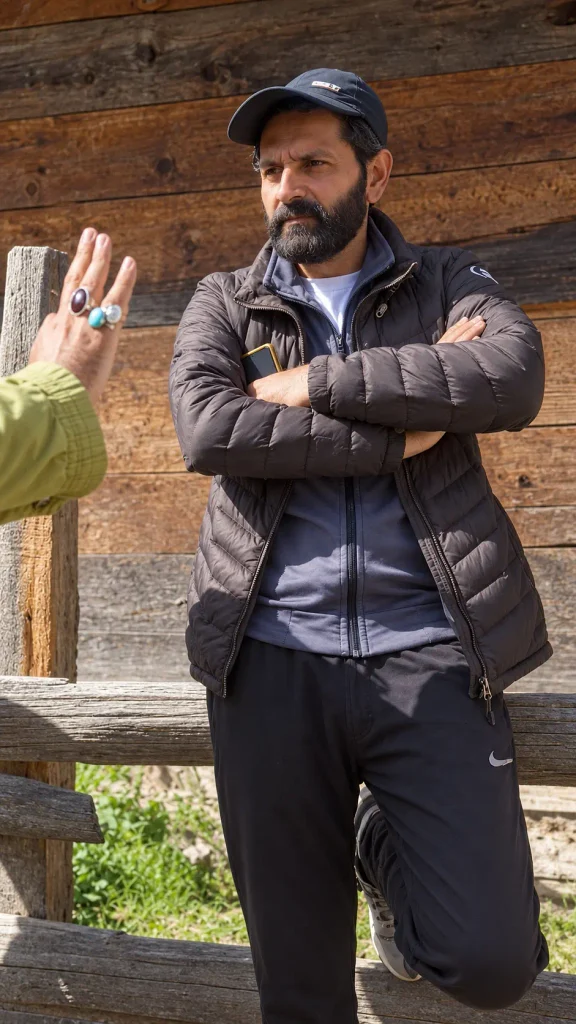
Then I tried to be clever. I told it to enhance only the beard and leave everything else pixel identical, wood grain, cap, rings, grass, dimensions, all of it. It failed before it started. My input was 590 x 1600 and the output came back 762 x 2065. It cannot keep pixels it does not have, it rebuilt the frame at its own working size. GPT even flagged that the top wood strip differed after resizing back, and to be fair it also said that comparison includes resampling so it does not prove every background pixel was regenerated. Fine. But a filter would not have changed the size of my image.
How It Works At The Back, As Far As Anyone Outside OpenAI Knows
Now I am not here to prove OpenAI’s architecture, neither is it the agenda, they have not published it. But enough is reported and enough is in their own docs to tell the logic.
- Your photo gets turned into tokens. It does not stay a JPEG. An encoder chops it into patches and each patch becomes a number the model reads, same as a sentence becomes tokens. OpenAI bills image input at $8 per million tokens, you are literally paying per token for a picture, so on their side a picture is tokens.
- Your prompt and the picture tokens go into one model together. This is the difference from Stable Diffusion or Flux. GPT Image is one model reading text and image in the same stream, so “leave the rings alone” is an instruction it understands, not a mask you drew.
- It writes the new picture out as tokens, one after the next. This is the reported bit, not confirmed. GPT’s image generation is widely reported to be autoregressive, predicting the next image token from the ones before it like text, instead of diffusion which starts from noise and cleans it up in passes. The tell you can see yourself, watch ChatGPT draw an image, it comes in from the top down in bands. Diffusion comes in as one blurry frame that sharpens all over.
- A decoder turns those tokens back into pixels. New pixels, all of them, at the model’s size. That is the 762 x 2065. The model has no instruction for “keep pixel 412, 900”, it only has “make an image where this bit looks like that”.
So “enhance” in GPT means describe then redraw. The sharpness is not recovered, it is predicted.
Flare, Sunburst And The Setting ChatGPT Hides
OpenAI shipped GPT Image 2.5 on 8 September 2026, on every plan including free, and it comes as two models on the API, Flare and Sunburst. Flare is the fast one, default, about 50 percent lower latency than Image 2. Sunburst is slower and built for edits where precision matters, quality levels from low up to max, and it supports inpainting, which is the only real “leave the rest alone” mode because you hand it a mask and it only regenerates inside the mask.
I asked GPT which one ran on the photo. It cannot select one and the tool does not report which one ran. So in ChatGPT you get whichever the app picks, no mask, whole frame.
The other thing in the API that ChatGPT does not show you is input_fidelity. OpenAI’s own cookbook says set it to high for faces, logos and fine details, and that faces are “preserved far more accurately than in standard mode”. It costs more input tokens and only the first image you send gets the full treatment. GPT confirmed the call it ran had no input_fidelity in it at all, the tool does not expose it. 2.5’s release line, “better preserves the subjects in your reference photos”, is that setting getting better. In ChatGPT it is on whatever default they chose. In the API you can turn it up and pay for it.
On cost, the tool did not show a token count, so I cannot tell you what the two runs cost. The API rates are public, $8 per million image tokens in, $30 per million out. An enhance is one image in and one image out, so it is cents, but it is cents of generation, not cents of filtering.
If You Are Enhancing Photos For Listings
- Enhance in ChatGPT is tier 4 from last week. Not tier 1. The word is the same, the thing is not.
- Anything printed in the photo, a storage badge, a price sticker, a model number, check it after, because it was redrawn not recovered. I did not get round to the receipt test this week, next post maybe.
- Run it twice if you want to see for yourself. If the two outputs differ, it generated. On a real filter they will not differ.
- Want the face held, use the API with
input_fidelity: "high"and Sunburst with a mask. ChatGPT gives you neither. - For a listing photo that is just a bit dull, the gallery app Enhance is still the safer button, it cannot invent a lens.
The beard does look good though.