


If you use WhatsApp on Android and keep read receipts switched on, there’s no simple way to read a new message without the sender seeing the blue ticks. You can read it from the notification, but that stops working once you’ve swiped the notification away or a pile of newer messages has buried it. WhatsApp is now working on a way to preview a chat by pressing and holding it, without sending a read receipt.
iPhone Users Have Had This for a While
On an iPhone, you can press and hold a conversation in the chat list and a small window pops up with the latest messages, and the person who sent them won’t get the blue ticks. The window doesn’t scroll, though, so if someone sent a long message or several in a row, you can only see part of it. On Android, pressing and holding a chat today just selects it and brings up the bar at the top with the pin, archive, mute and delete buttons.
The Android Version Will Let You Scroll Back Through Older Messages
The new feature was found in the code of WhatsApp beta for Android version 2.26.44.12. Pressing and holding a conversation will open a floating card with the most recent messages in that chat, and an updated menu will sit underneath it.

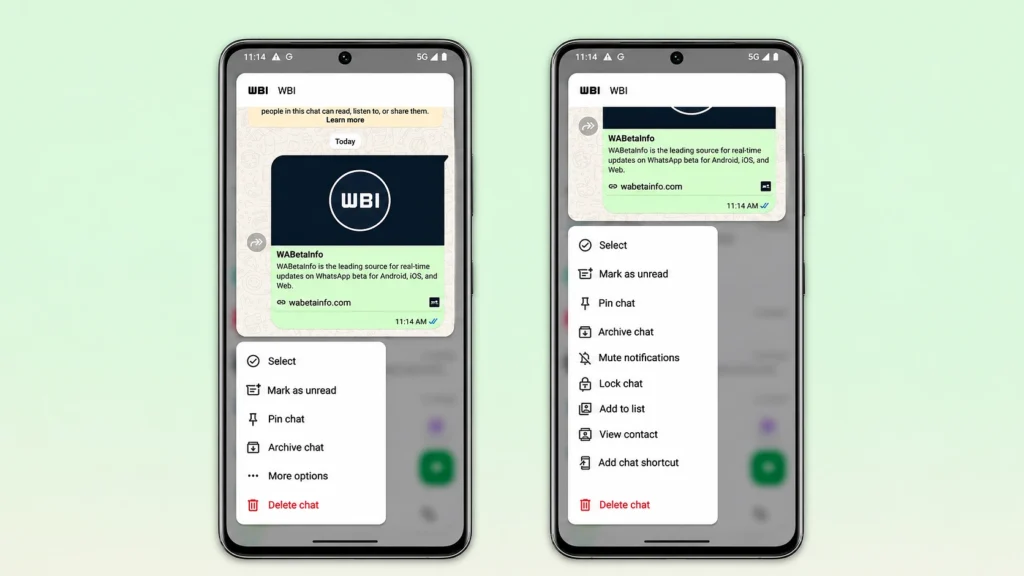
Peeking at a chat this way won’t send read receipts, and the Android version goes one step further than the iPhone app, because you’ll be able to scroll up inside the preview to read older messages without the blue ticks showing up for any of them.
There’s No Release Date Yet
The feature isn’t available yet, not even to public beta testers, since it’s still being built. WhatsApp hasn’t said when it will reach the regular version of the app, and features that turn up in beta code don’t always make it out. If this one does, Android users will get the same quiet way to check their chats that iPhone users already have.


