

Mobile users have high expectations when it comes to app quality. When someone opens an app to find a nearby restaurant or track a parcel, the accuracy of their location is the make-or-break factor. If the interface throws up a map loading error, the user experience falls apart completely. A disappointed customer will delete that product and move straight to a competitor. For QA engineers, verifying features that rely on location data can become a real headache when you’re stuck in a standard office environment. The office Wi‑Fi or regular emulators simply don’t reveal how the system behaves in other countries or regions. To get around this, developers turn to mobile proxies. They let you see the app through the eyes of an end user who connects from any city in the world. It’s a fundamental step towards a stable release.
What Are Mobile Proxies in the Context of Mobile App Development?

To build an effective validation process, it’s important to tell the difference between network routing tools.
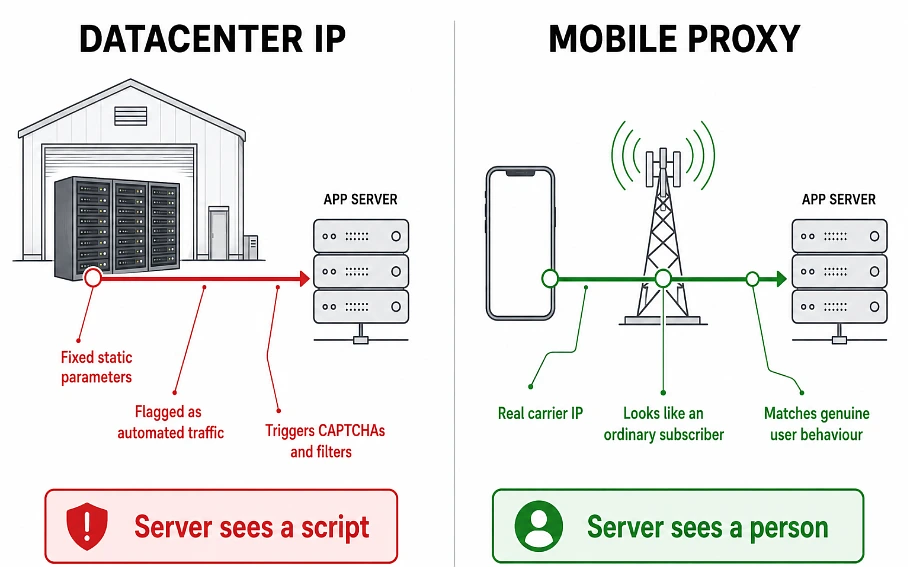
- Ordinary datacenter IPs are created in large server farms. They carry fixed, static parameters that mobile platform security systems easily flag as automated scripts or artificial requests.
- Mobile proxies, on the other hand, operate on the back of real mobile network infrastructure. They use actual smartphones or portable 4G/5G modems connected to the internet via ordinary cell towers. Every one of these devices gets its own mobile IP directly from the mobile operator. When you route your test traffic through these channels, the request looks completely natural to your product’s server. All data exchange happens across a real carrier infrastructure. That perfectly matches the behavior patterns of an ordinary subscriber in the chosen location.
Modern mobile development demands precise interaction with geographic parameters. Analytics show that location services have become part of almost every digital product. They’re essential for banking apps, local marketplaces, and fitness trackers. A user’s location determines the interface language they see, the currency they pay in, tax rules and service delivery costs. Accurately analyzing these factors before a release is a must for a successful launch.
Why Location-Based Testing Needs Real IPs

These days, app quality assurance covers a lot of complex ground. Assessing just how buttons look or how fast screens switch over isn’t enough anymore. When your system’s logic depends on geolocation, the development team needs to be certain that the backend correctly processes data from every corner of the planet.
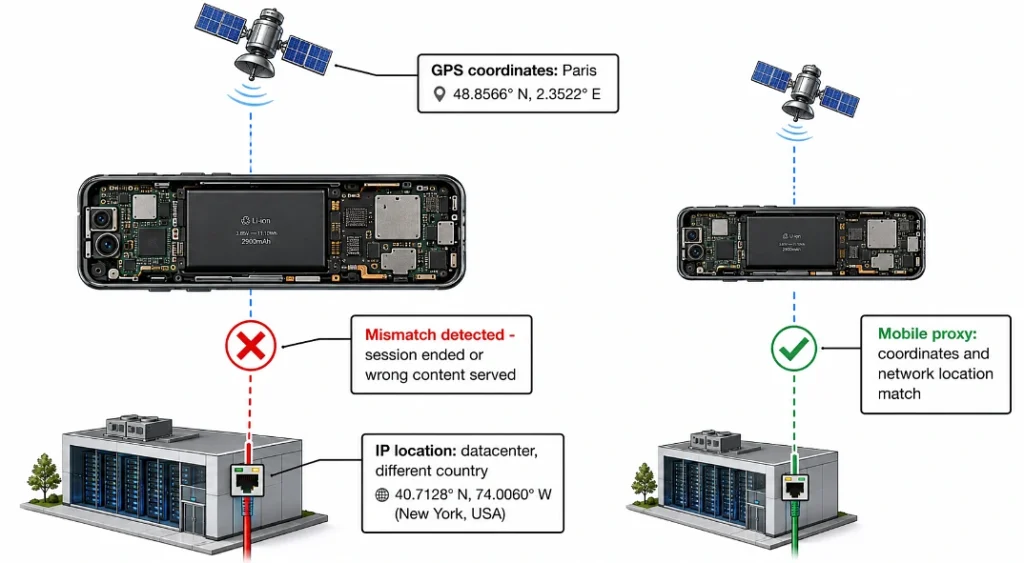
Modern algorithms compare satellite coordinates with the geolocation of the device’s internet connection. If a mismatch pops up – say the satellite points to Paris but the IP belongs to a hosting provider in Kyiv – the system starts behaving oddly. It might forcibly end the session or display incorrect content.
That’s why you need mobile proxies for these tasks. They create conditions where the phone’s coordinates and its network location match perfectly. This allows you to properly carry out processes such as:
- App localization. Auditing translations, local currency display, number formats, measurement units, and date formats for a specific region. This matters especially for financial tools.
- Regional testing. Analyzing server response speeds for users in different cities. This includes monitoring whether local content delivery networks (CDNs) are working correctly.
- Geolocation testing for notifications. Checking that push messages are sent according to the user’s local time so they aren’t disturbed at night.
How Mobile Proxies Enable Accurate Real-Device Testing
Emulators are useful tools during the early coding stages. Even so, final mobile QA always needs to be run on real smartphones and tablets. When you carry out real device testing, connecting over the office Wi-Fi creates artificial conditions. The office internet is always stable with low latency, but in real life the average user faces very different circumstances.
People open apps while traveling in a car, on public transport, inside large shopping centers, or outside cities. In these situations, connection quality constantly changes, and the device switches between different mobile operator base stations. Mobile proxies route traffic through the cellular channels of a specific region and see how the app handles delays or temporary packet loss.
Platform-Specific Audit Quirks
The quality control process has its own technical differences depending on the chosen platform. Android testing, for example, involves working with gadgets from dozens of different brands. Each manufacturer uses its own skins and power‑saving settings that may forcibly turn off location services in the background to conserve battery. iOS testing, on the other hand, demands strict compliance with Apple’s rules on collecting user location data in the background.
By connecting test devices through mobile proxies, the team can analyze how both operating systems behave under identical real‑world cellular network conditions. This helps you catch specific bugs (tied to geodata updates when a phone goes into sleep mode) and optimize battery usage.
Mobile Rotating Proxies: Automating QA Processes

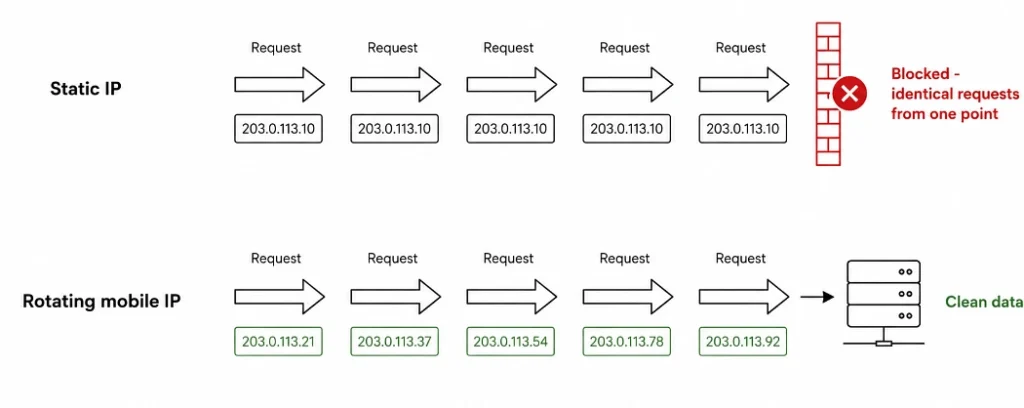
When a mobile product expands its presence into dozens of new cities or countries, manually analyzing each location eats up far too many of the team’s working hours. To speed things up, teams turn to mobile automation. Special automated scripts run hundreds of scenarios in a matter of minutes. But for these tasks, ordinary static network identifiers won’t do – security servers will quickly spot a flood of identical requests from a single point. The best choice for these processes is a mobile rotating proxy. This tool automatically changes the IP after a set period of time or after each new call to the server.
Thanks to automatic IP rotation, app quality assurance becomes faster and more effective. Automation engineers can:
- Run parallel tests to monitor content in different geographic zones at the same time.
- Embed network response validation into daily CI/CD pipelines.
- Carry out stress tests of geolocation features without the risk of being blocked by your own server security systems.
Using these tools regularly guarantees that automated scripts get clean data and that specialists don’t waste time manually tweaking connection settings.
Common Mistakes When Organizing Geolocation Testing
Plenty of teams make mistakes as early as the planning stage for their automation architecture.
The most widespread is using ordinary commercial VPN services or ISP proxies. ISP options are fast and highly trustworthy, but they are static and belong to home internet providers, so they cannot capture the phone’s specific behavior on the go when parameters are constantly changing. A VPN, in turn, changes your IP, but most of those IPs belong to large hosting providers or datacenters. Mobile platforms recognize this traffic as potentially risky. They may trigger extra filters or ask for a CAPTCHA.
The second mistake is ignoring the technical parameters of cellular networks. Office broadband has minimal ping. Mobile internet on the move always comes with higher latency and periodic packet loss. If you don’t audit your software’s behavior under high-ping conditions via mobile proxies, users in remote regions will face constant interface freezes when loading maps.
The third mistake is focusing on just one major city – the one where the development office is physically located. The product might work flawlessly in the capital but show serious failures when trying to determine coordinates in smaller regional centers where base station density is far lower.
Comparing Test Traffic Routing Methods
| Method | How it works | Pros for the QA team | Limitations and drawbacks |
| Emulators (Mock GPS) | Changes coordinates at the smartphone’s operating system level | Quick to launch, costs nothing, suitable for simple layout tests | Doesn’t change the IP, raises suspicion with server security |
| Datacenter IPs | Routes traffic through large hosting servers | High connection speed, low tool cost | IPs don’t belong to mobile operators, which skews analysis results |
| Mobile proxies | Sends traffic over telecom networks | Maximum accuracy; matches the connection patterns of a regular smartphone | Needs automatic rotation setup for large‑scale automated tests |
The table clearly shows that for deep logic validation, where geodata accuracy is critical, mobile proxies provide the best conditions. They completely remove the technical errors that arise from a mismatch between a device’s coordinates and its type of connection.
How to Pick a Technical Solution for Your Project

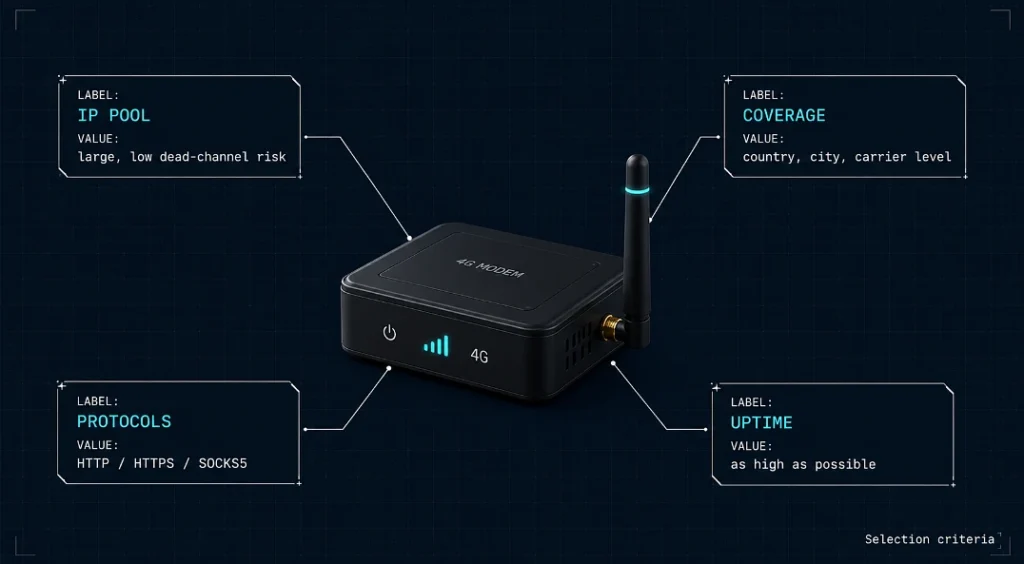
When a team decides to bring this tool into their daily workflows, the next question is how to choose a reliable service provider. Quality mobile proxies should meet several technical criteria:
- IP pool size. The more nodes a provider has at its disposal, the lower the chance of hitting a dead channel while running an important task.
- Wide geographic coverage. For products that work in the international market, you need access to IPs in specific countries, cities, and even individual regional operators. This guarantees full coverage of your target audience.
- Modern protocol support. The tool must work reliably with HTTP, HTTPS, SOCKS5 for easy integration with automation scripts and test frameworks.
- Stability. Connection dropouts while running automated scenarios can lead to false results, so the service’s uptime should be as high as possible. Release velocity depends on it.
Conclusion
By using mobile proxies, you gain the ability to work under the real conditions of cellular networks in different countries around the world. This lets you spot and fix hidden architectural errors in time, before thousands of customers download the updated app. Such an approach guarantees stable system performance and a high probability of positive user feedback. Investing in reliable infrastructure today paves the way for steady growth of your digital business tomorrow.