MobileMall BlogMobileMall BlogMobileMall Blog
  • #Explore
  • Business
  • Technology
    • Gaming
    • Headphones
    • Laptops
    • Mobile Accessories
    • Home Networking
    • PCs
    • Printers
    • Smart Watches
    • Speakers
    • Tablets
    • Wearables
    • Smart Office
  • Security
  • Buying Guides
  • Contribute
Reading: Find My Device Network For Android By Google
Share
Font ResizerAa
MobileMall BlogMobileMall Blog
Font ResizerAa
  • #Explore
  • Business
  • Technology
  • Security
  • Buying Guides
  • Contribute
  • #Explore
  • Business
  • Technology
    • Gaming
    • Headphones
    • Laptops
    • Mobile Accessories
    • Home Networking
    • PCs
    • Printers
    • Smart Watches
    • Speakers
    • Tablets
    • Wearables
    • Smart Office
  • Security
  • Buying Guides
  • Contribute
2025 © Mobilemall. All Rights Reserved.
Home » Blog » Find My Device Network For Android By Google
Google

Find My Device Network For Android By Google

Peter Brandt (Google Guy)
Last updated: November 11, 2025 9:55 am
Peter Brandt (Google Guy)
Share
Find My Device Network For Android By Google
SHARE
Add MobileMall Blog as a preferred source on Google

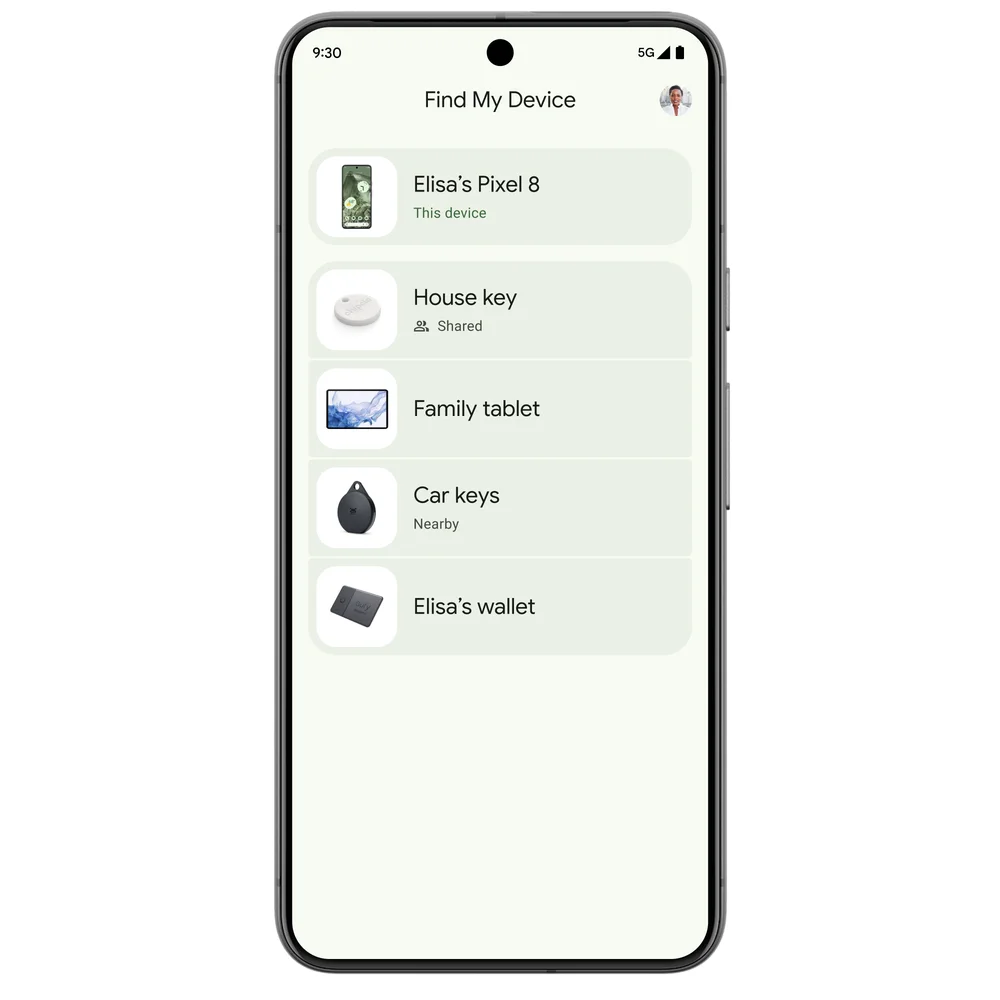
Google has officially launched its updated Find My Device network for Android today. This new feature works even when devices are offline, and it’s rolling out to devices running Android 9 and later, starting in the US and Canada.

The network will include over a billion devices, making it easier to locate yours, even when they’re offline. For the Pixel 8 and Pixel 8 Pro, these phones will be trackable even when they’re powered off or the battery is dead, thanks to specialized hardware.

  1. Locate Offline Devices
  • Find your Android phone or tablet on a map, even when it’s offline.
  • Pixel 8 and 8 Pro can be located even when powered off or battery is dead.
  1. Track Everyday Items with Bluetooth Tags
  • From May, use Bluetooth tags from Chipolo, Pebblebee to locate keys, wallet, luggage.
  • Tags work with unknown tracker alerts on Android and iOS.
  1. Find Nearby Items
  • If you’re close to a lost item, use the “Find Nearby” button to pinpoint its exact location.
  • Works for devices and Bluetooth tags (from May).
  1. See Home Location with Nest Devices
  • The app shows your lost device’s proximity to your Nest devices at home.
  1. Share Devices with Family/Friends
  • Share a device or accessory in the app, so others can help locate it if lost.
  • Share keys with roommates, TV remote with friends, luggage on trips.

Starting in May, new Bluetooth tracker tags from Chipolo and Pebblebee will become available. These tags are built specifically for the new Find My Device network and will be locatable in the Find My Device app. They will also work with unknown tracker alerts across Android and iOS, to protect against unwanted tracking. Additional Bluetooth tags will arrive later this year from Anker’s eufy, Jio, and Motorola.

If you’re close to a lost device but can’t see it, a “Find nearby” button will appear to help pinpoint its exact location. This feature will work with the new Bluetooth tags from May onwards.

If you’re at home and have Nest devices, the Find My Device app can show a lost device’s proximity to those Nest devices. You can also ‘share’ devices with others, making it easier to find them if they go missing.

Google says it has implemented multi-layered protections to keep you safe and your personal information private. Location data is end-to-end encrypted, and there’s a safety feature that provides protection against unwanted tracking back to a home or private location.

In the near future, software updates for headphones from JBL, Sony, and others will allow them to join Google’s new Find My Device network.

Google’s launch of this new Find My Device network was delayed for months while waiting for Apple to implement unwanted tracking protections into iOS. It seems like this will be live in the upcoming iOS 17.5 release, which is why the new Find My Device network is now going live.

Google Maps Now Lets You Ask Gemini Anything About Any Place, Plus a Full Navigation Redesign
Google Assistant dies September 4, and there’s no going back
Google Pixel 8 Will Get Gemini Nano AI
Google I/O: Annual Developers Conference to be held on May 10 at Shoreline Amphitheatre
Google Extends OS Upgrade Support to Five Years for Pixel 6, Pixel 7, and Pixel Fold

Sign Up For Daily Newsletter

Be keep up! Get the latest breaking news delivered straight to your inbox.
[mc4wp_form]
By signing up, you agree to our Terms of Use and acknowledge the data practices in our Privacy Policy. You may unsubscribe at any time.
Share This Article
Facebook Copy Link Print
Share
ByPeter Brandt (Google Guy)
Follow:
Peter Brandt - Group Product Manager - Pixel ML Software. With years of experience in the tech industry, Peter has established himself as a top-notch writer with a passion for all things Google. Peter's articles are packed with valuable information and actionable advice, helping readers stay ahead of the curve in this ever-changing digital landscape.
Previous Article Whatsapp Down WhatsApp Down – Experiencing Service Disruptions on April 3, 2024.
Next Article Honor MagicOS 8.0 Update With Android 14 Rolling Out Honor MagicOS 8.0 Update With Android 14 Rolling Out

Latest News

Infinix HOT 70 Pro 5G launched in India.
Infinix Hot 70 Pro Goes On Sale In India From Rs 22,999
Phone Launch
POVA 8 Pro 5G Tonino Lamborghini Limited Edition
Tecno Pova 8 Pro Tonino Lamborghini Phone Looks Different But Runs The Same Hardware
Phone Launch
The Xiaomi 18 Fold
Xiaomi’s New Folding Phone Is Out On 7 September, And It Runs Xiaomi’s Own Chip
Data Science Phone Launch
Mivi One 5G
Mivi’s First Phone Arrives This Month In India
Phone Launch
Empty racetrack at dusk under editorial cover typography reading replay
Del Mar Horse Racing on Your Phone: Three Apps That Actually Work After the Telegram Links Stopped
Apps
Older Filipina woman squinting at a phone held at arm's length in bright afternoon light
Your Tita Switched to Bingo on Her Phone During Lockdown. The Screen Has Been Giving Her a Headache Ever Since.
Smartphone
One UI 9 Beta For S25
Samsung Starts Testing Android 17 On The Galaxy S25 and Last Year’s Foldables
News Samsung
John Ternus Apple CEO
Apple Has a New CEO Today: John Ternus Replaces Tim Cook
Apple Tech News

You Might also Like

Google Pixel 11 Pro Fold leaks
GoogleNews

Google Pixel 11 Pro Fold Surfaces in Leaked Renders

Peter Brandt (Google Guy)
1 Min Read
Google Pixel 6a Available For Pre Orders
Google

Google Pixel 6A Available For Pre-Orders Globally

Peter Brandt (Google Guy)
1 Min Read
googles-windows-ai-app-goes-global
GoogleNews

Google’s Windows AI App Goes Global

Peter Brandt (Google Guy)
2 Min Read

About us

Mobilemall.co blog is an informative and engaging platform that offers readers the latest news and insights on mobile phones and accessories. The blog covers a wide range of topics, including product reviews, industry trends, and tips on how to get the most out of your mobile device.

Contact Us:
[email protected]

Categories Link

  • Business
  • Mobile
  • Technology
  • Gaming
  • Phone Review
  • Android

Must Read

Tongits Go
Tongits Go: Everything You Need to Know Before Playing
Gaming
Top Five Resorts with Casinos in the Philippines
Top Five Resorts with Casinos in the Philippines You Need to Know About
Entertainment

Quick Links

  • Privacy Policy
  • Tech Write For Us
  • Contact Us
  • Facebook
  • Instagram
  • YouTube
  • LinkedIn
2026 © Mobilemall. All Rights Reserved.
Go to mobile version
Welcome Back!

Sign in to your account

Username or Email Address
Password

Lost your password?

Not a member? Sign Up