
Untidy photos strike every photographer. A small store front, a pile of laundry on the living room floor, a cafe table that has too many cups on it — these are the everyday facts that can derail a brand image in one scroll. Photo background change is the quick creative shortcut that transforms an off-the-buffet snapshot into a sleek asset without the need to reshoot. With Pippit, you can swap out distracting scenes, color match brand colors, and export ready-to-post images in minutes, which means entrepreneurs and creators waste less time doctoring photos and more time building their business.
This is a guide for small teams, solopreneurs, and community builders who want practical, repeatable methods to make everyday imagery feel considered. I’ll teach you how to strategize shoots for effortless swaps, select backgrounds that build brand voice, refine edges without over-editing, and repurpose a single session across platforms. Look for templates, fast workflows, and real-world advice you can implement today.
Why cleaning the background matters more than you think
Your audience decides about your brands in an instant. A messy background telegraphs carelessness, but a styled backdrop telegraphs quality and reliability. An edited background not only conceals mess, it clarifies message, confirms tone, and adds perceived value to your product or service. That perception directly influences trust, clicks, and conversions.
- Tidier photos reduce mental effort so your audience gets your message quicker.
- On-brand backdrops make pricing and value more believable.
- Consistent backgrounds throughout posts create a visual identity that fans immediately recognize.
Background fixing is not narcissism; it is brand hygiene.
Shoot once, edit many: plan your shoot for easy swaps
You don’t have to have a full studio. A couple of simple rules of shooting make background replacement quick and convincing.
- Use even, neutral lighting so that shadows are simple to match in post.
- Use a plain or single-color backdrop when possible to make the mask easy.
- Capture several poses and angles to provide each exchanged background with natural context.
- Shoot short video loops or boomerangs for narratives and animated posts.
These little shooting routines reduce edit time and expand creative options.
Three friendly steps to modify different backgrounds with Pippit
Step 1: Access the background change tool
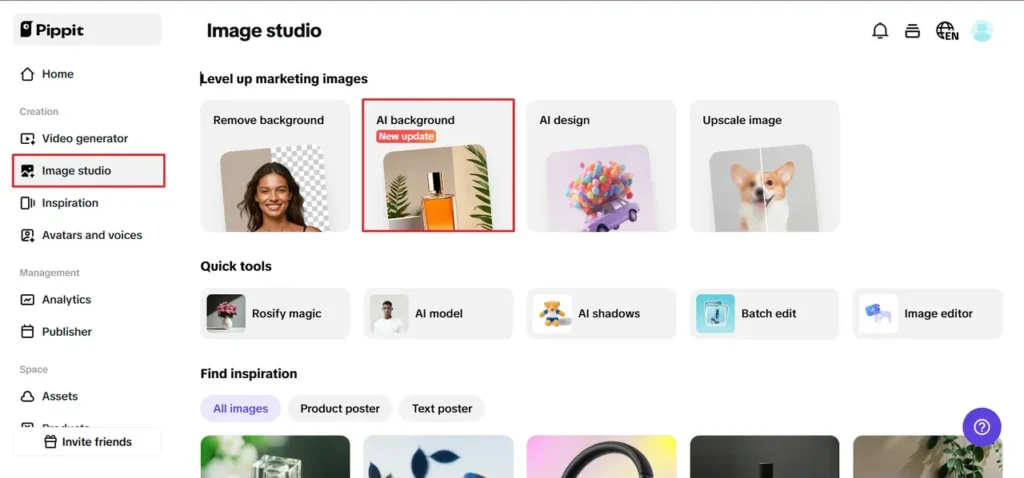
Visit Pippit and enter your login information. To begin modifying your image, navigate to the Image Studio area and select the AI Background tool from the menu. Whether for artistic or commercial photographs, this tool is ideal for smoothly changing backdrops. Once you’re inside, you may easily modify your photo and be ready to travel.
Step 2: Add an image and select a background
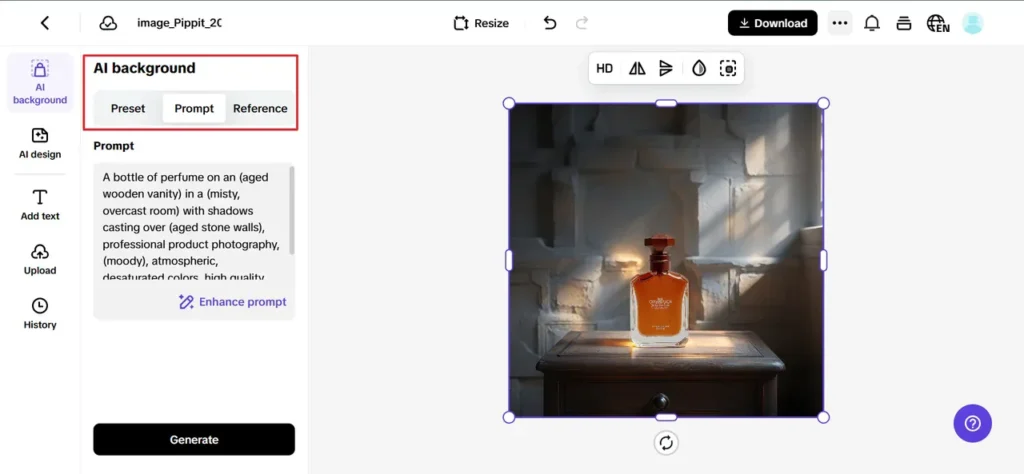
Click the Upload option to import your image from your media library, product assets, or device. The AI Background tool will automatically remove the existing background for a new look. You can either choose from the available presets or provide a prompt to have AI generate a new background for you. This ensures that your creative needs will be well-met by your new background.
Step 3: Download and share
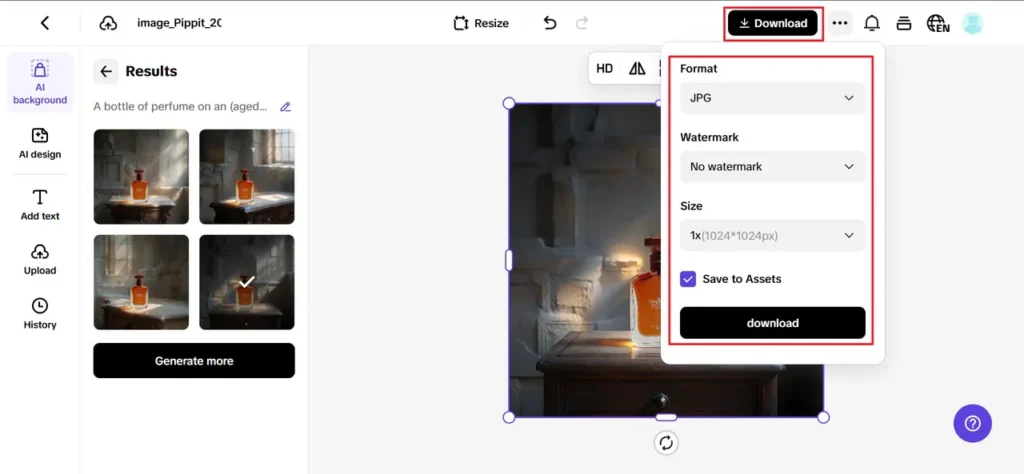
Use the customisation options to make your design perfect by changing the backdrop colour, adding items, or editing the background that has been substituted. To make sure your final design lives up to your expectations, preview it. Once you’re happy, click the Download button to save your high-quality picture. For best results, select your favourite format and resolution.
Rapid templates for frequent small business photos
Below are pre-designed background ideas that are effective for most niches.
- Product hero: Generic studio with a single accent color that’s matched to brand swatches.
- Founder portrait: Warm office or bookshelf with a light blur to read professionalism.
- Service in action: Cozy living room for home services or a trendy kitchen for food brands.
- Seasonal promos: Festive backgrounds that switch by campaign without a full reshoot.
Templates eliminate decision fatigue and accelerate content calendars.
Matching edits to sound and motion for video-ready material
Once a picture is integrated into a short video or reel, synced cuts are important. If you are editing a short clip that features a trimmed interview or demo, an accurate online video trimmer assists in synchronizing visual hits to beats so the background transition and motion have a cohesive feel. Apply consistent color grading and timing so static posts and clips exist in one common visual world.
Audio accessibility and authenticity: keep viewers in on the process
Transparent creativity inspires trust. Post behind-the-scenes shots revealing before and after swaps, or cheekily tag the edited state of a shot in captions. Not only does this guard against credibility loss, but it encourages engagement by learning followers something practical.
Keep viewers on their toes with high and low tempo audio adjustments. Use Pippit’s audio speed changer to create an interactive experience for the audience.
Low-cost production hacks that avoid reshoots
You can correct a surprising amount of problems without a new shoot.
- Crop tighter to cut out pesky edges and shift narrative emphasis.
- Swap only the pesky part of the frame instead of the whole background.
- Employ shallow depth of field or imitation blur to cover up mismatched details.
- Switch to stylized graphics or gradients when a realistic background feels off-brand.
These adjustments cost less and maintain momentum in high-speed content calendars.
Brand consistency: create a backdrop library
Build a library of 8 to 12 vetted backgrounds that match seasonal requirements and campaign moods. Categorize them in terms of mood, color scheme, and aspect ratio so social managers and designers can select a match in seconds. Repeating a set of backdrops maintains feeds consistency and minimizes creativity friction.
Actual workflows for individual creators and small teams
These are concise workflows based on the size of your team.
- Solo creator: Shoot against a neutral background, batch swap with Pippit, and prepost with steady captions.
- Small team: Record a content day, have one editor batch swap backgrounds and another batch resize and caption.
- Agency or store: Have a shared library of backgrounds and templates for product, lifestyle, and campaign levels.
Making these steps standard converts ad-hoc editing into a repeatable pipeline.
Simple metrics to know if swaps work
Monitor these indicators to confirm your edits.
- Engagement boost: Benchmark likes and saves vs. previous similar posts.
- Time on post: For carousels and reels, view retention between frames.
- Conversion signals: Clicks to product pages or signups following campaign posts.
Small enhancements in perceived quality tend to yield disproportionate increases in these metrics.
Last push: make messy photos a growth driver
Translating disorganized shots to refined content is a high-leverage activity for small brands. By maintaining regular shooting patterns, a lean backdrop library, and the use of tools such as Pippit to background-replace automatically, you’re able to maintain your feed clean without repeat reshoots. Pair the imagery with crisp edits and periodic tempo play with your photos and short videos so they have the feeling of being part of the same narrative.
Ready to break up, apologizing for your background? Open Pippit, replace your first backdrop, and share cleaner, more on-brand content today.