MobileMall BlogMobileMall BlogMobileMall Blog
  • #Explore
  • Business
  • Technology
    • Gaming
    • Headphones
    • Laptops
    • Mobile Accessories
    • Home Networking
    • PCs
    • Printers
    • Smart Watches
    • Speakers
    • Streaming Devices
    • Tablets
    • Wearables
    • Smart Office
  • Security
  • Buying Guides
  • Contribute
Reading: Moisture Detected on Samsung? Causes, Safe Fixes & When to Repair
Share
Font ResizerAa
MobileMall BlogMobileMall Blog
Font ResizerAa
  • #Explore
  • Business
  • Technology
  • Security
  • Buying Guides
  • Contribute
  • #Explore
  • Business
  • Technology
    • Gaming
    • Headphones
    • Laptops
    • Mobile Accessories
    • Home Networking
    • PCs
    • Printers
    • Smart Watches
    • Speakers
    • Streaming Devices
    • Tablets
    • Wearables
    • Smart Office
  • Security
  • Buying Guides
  • Contribute
2025 © Mobilemall. All Rights Reserved.
Home » Blog » Moisture Detected on Samsung? Causes, Safe Fixes & When to Repair
Samsung

Moisture Detected on Samsung? Causes, Safe Fixes & When to Repair

Cody Gipson (Phone Repair Expert)
Last updated: November 11, 2025 9:22 am
Cody Gipson (Phone Repair Expert)
Share
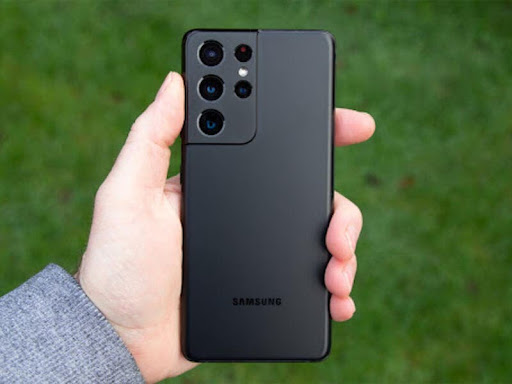
Moisture Detected on Samsung
SHARE

Contents

  1. What’s Really Causing This
  2. Getting Your Phone Working Again
  3. When DIY Stops Working
  4. Keeping This From Happening Again
  5. Bottom Line

Your Samsung phone just threw up the “Moisture Detected” warning and now it won’t charge. Great.

This isn’t just your phone being dramatic—there’s actually water or humidity stuck in the charging port, and Samsung built this alert to stop your device from frying itself. The sensor kicks in when it detects moisture and blocks charging completely to prevent short circuits.

You’re probably wondering how this even happened. Could’ve been anything: dropping it near the sink, using it while cooking (steam counts), getting caught in rain, or just living somewhere humid where moisture creeps into everything.

Samsung phones like Galaxy S24/25 have IP67 or IP68 water resistance, which sounds impressive until you realize it’s not actually waterproof. Those seals weaken over time too, so what used to bounce off water might not anymore.

What’s Really Causing This

Water in the port is obvious, but humidity alone can trigger it. Even tiny amounts of condensation will set off that sensor. Sometimes the port itself gets damaged—cracks or corrosion can make the phone think there’s moisture when there isn’t.

Your charging cable might be the problem too. Wet cables send weird signals. Or it could be a software glitch making your phone paranoid about water that doesn’t exist.

Getting Your Phone Working Again

Turn the phone upside down and give it a gentle shake. Water might just fall out. Wipe around the port with something soft and lint-free, but don’t go jamming anything inside there. Air drying works if you’re patient. Find somewhere with good airflow—near a fan helps, but keep the phone away from direct heat. Hair dryers will cook your phone.

Here’s something that actually works better than rice: silica gel packets. Toss your phone in a sealed bag with a few packets for several hours. They suck moisture out way more effectively. Check your charging cable while you wait. Dry it off completely and make sure both ends are bone dry before plugging anything in.

Try wireless charging if your phone supports it. The port might be blocked but wireless still works. Sometimes restarting in safe mode helps figure out if this is a software problem pretending to be hardware.

When DIY Stops Working

If you’re still seeing that warning after 24 hours, something’s actually wrong. Maybe there’s corrosion you can’t see, or the moisture sensor got damaged, or water made it deeper into the phone than you thought.

Don’t keep trying home fixes at this point—you might make things worse. Professional repair shops can actually open the device safely, clean everything properly, and replace parts if needed.

Signs you need help: the warning won’t go away, you can see discoloration in the port, wireless charging stopped working too, or your phone keeps throwing false alarms when it’s definitely dry.

Keeping This From Happening Again

Stop charging your phone in bathrooms and kitchens. Steam is sneaky. Keep it away from rain and humid air when possible. Stick with original Samsung chargers—they’re built to work with your phone’s safety systems.

Clean your charging port occasionally with a dry brush. And if you live somewhere humid, a decent waterproof case isn’t a bad investment.

Bottom Line

The moisture warning exists for a reason—ignoring it can kill your phone permanently. Quick home fixes work for simple cases, but persistent problems need professional attention.

Thanks to the wegowefix.com phone repair in miami, repair specialists who provided technical insights for this guide—their expertise helped identify the most effective solutions for stubborn moisture detection issues.
Samsung Galaxy F42 Gets Android 13 Update
Samsung Galaxy Note 20 Series Launch Date
Samsung Galaxy S22 Ultra shown in more leaked renders – Four Different Colors
iPhone 12 Pro Max vs. Samsung Note 20
Samsung Galaxy Z Fold3 and also Z Flip3 hands-on-updates

Sign Up For Daily Newsletter

Be keep up! Get the latest breaking news delivered straight to your inbox.
[mc4wp_form]
By signing up, you agree to our Terms of Use and acknowledge the data practices in our Privacy Policy. You may unsubscribe at any time.
Share This Article
Facebook Copy Link Print
Share
Previous Article Ghost Touch on Your Phone Screen? Fixes for iPhone Ghost Touch on Your Phone Screen? Fixes for iPhone
Next Article iPhone 17 Air cases Fresh Leaks on iPhone 17 Series Cases Drop Just Before the Big September 9 Reveal

Latest News

samsung-galaxy-z-fold8-ultra
Samsung Z Fold8 Ultra Reportedly Jumps to 5,000mAh Battery — No Extra Weight
News Samsung
alphabet-80-billion-raise
Alphabet Raised $80 Billion in One Move. Berkshire Was Part of It.
Google News
crypto-casinos
Crypto Casinos Pulled In $81 Billion Last Year, and That’s Five Times What They Made in 2022
Business Entertainment
How AI Room Redesign Apps Turn a Phone Photo Into a Photorealistic Makeover
How AI Room Redesign Apps Turn a Phone Photo Into a Photorealistic Makeover in Under 10 Seconds
Artificial Intelligence
The Truth About Megapixels
The Truth About Megapixels: Why a Higher Number Does Not Mean a Better Camera
Camera & Photo Innovation
WHEN ADS STOP WORKING
Brand Recall From Digital Ad Screens Stops Climbing Around the 8th Exposure — Here’s What the Habituation Data Actually Shows
Digital Marketing
Your Phone's Touch Latency Might Be Costing You Bets You Thought You Placed in Time
Your Phone’s Touch Latency Might Be Costing You Bets You Thought You Placed in Time
Phone Review
Comparing AI Strategies in Betting Platforms
Esports Betting Platforms Now Run on AI — From Odds to Support Tickets to Fraud Detection
Data Science

You Might also Like

GalaxyS23Series
NewsSamsung

Samsung Brings One UI 8 and Android 16 to Galaxy S23 Phones Worldwide

Anxious Holly (I Love Samsung)
6 Min Read
One UI 8
NewsSamsung

Galaxy S25 Series Snags Stable One UI 8: Now Live in India, Germany, and UK for Beta Crew

Anxious Holly (I Love Samsung)
3 Min Read
s21
Samsung

Samsung Galaxy S21 Ultra long-term Update review

Anxious Holly (I Love Samsung)
3 Min Read

About us

Mobilemall.co blog is an informative and engaging platform that offers readers the latest news and insights on mobile phones and accessories. The blog covers a wide range of topics, including product reviews, industry trends, and tips on how to get the most out of your mobile device.

Contact Us:
[email protected]

Categories Link

  • Business
  • Mobile
  • Technology
  • Gaming
  • Phone Review
  • Android

Must Read

s27-pro-camera
Samsung Galaxy S27 Pro camera leak
Phone Leak Samsung
Why Your TikTok Videos Are Not Getting Views (And How to Fix It)
Social Media

Quick Links

  • Privacy Policy
  • Tech Write For Us
  • Contact Us
  • Facebook
  • Instagram
  • YouTube
  • LinkedIn
2026 © Mobilemall. All Rights Reserved.
Go to mobile version
Welcome Back!

Sign in to your account

Username or Email Address
Password

Lost your password?

Not a member? Sign Up