


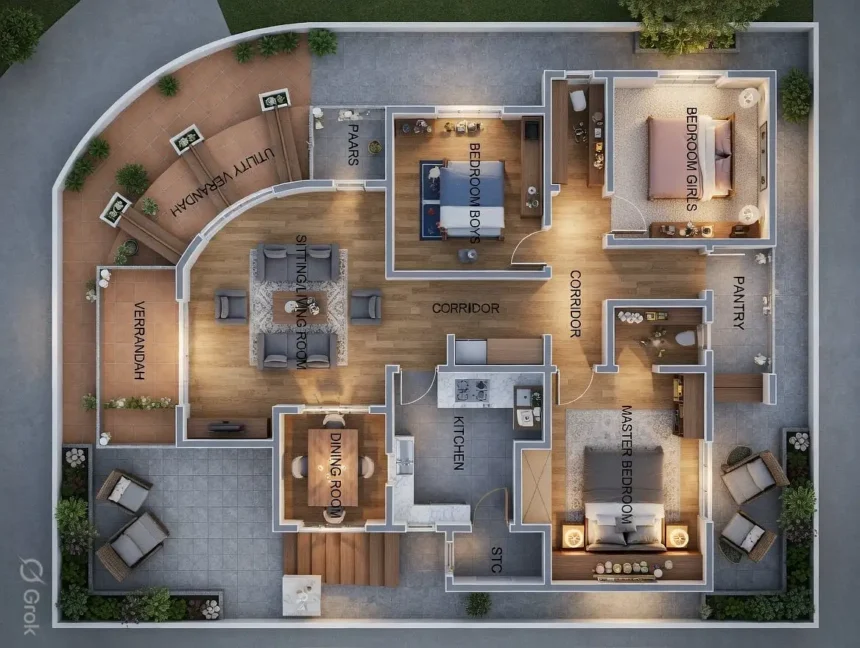
Give Grok a simple prompt — “create a floor plan for a family home with three bedrooms, kitchen, living area, and outdoor space.” Nothing too specific, no detailed architectural brief, just a general idea of what the house should have. What came back looked stunning. Top-down 3D render, warm wood floors, ambient lighting in every room, furniture placed like an interior designer spent a week on it, even little plants on the balcony seating area.
Look at this floor plan. It was generated by Grok — you give it a description of what you want, something like “3-bedroom family home with a pantry, living room, dining, and verandah,” and it creates this gorgeous top-down render that looks like it came straight out of an architecture studio. Warm wood floors, ambient lighting, furniture placed thoughtfully, even little plants on the balcony.
Now look at it again and try to find a bathroom.
There is not one. Three bedrooms — a master, one labeled “Bedroom Girls,” one labeled “Bedroom Boys” — a full kitchen, a dining room, a sitting room, corridors, a pantry, a utility verandah, outdoor seating, even something called “PAARS” which I still have not figured out. But zero bathrooms. Not one toilet in the entire house. A family of four or five living here would need to walk outside and find a tree apparently.
This is AI room design right now. It is genuinely impressive and genuinely broken at the same time, and knowing where the line sits between those two things is the difference between getting real value from these tools and wasting an afternoon on pretty pictures that make no practical sense.
How AI Room Design App/Logic Works?
At a glance:
- You upload a photo of your room (or describe what you want in text)
- Computer vision scans the structure — wall positions, floor, ceiling height, where light comes from, depth and perspective
- A diffusion model (same tech behind Midjourney and DALL-E) “destroys” parts of your image and regenerates them in the style you picked
- The structural bones stay intact — wall angles, window positions, room proportions — while surfaces, furniture, colors, and textures get swapped
- Output in under 10 seconds in most apps. Some do it in 3-4.
That is the simplified version. What is actually going on under the hood is a bit more involved but worth knowing if you want to understand why the bedroom redesign worked perfectly and the floor plan gave me a house with no toilets.
So most of these apps run on something called a diffusion model — same family of tech that Midjourney and DALL-E use. Trained on billions of interior photos, furniture shots, lighting setups, the works. When your photo goes in, the AI does this thing called inpainting where it keeps the structural bones of your room — wall angles, window positions, floor boundaries, the perspective of the photograph — and regenerates everything on top. New textures, new furniture, new colors, but the geometry stays locked. That is why the result looks like a photograph and not like someone drew over your picture in MS Paint.
The reason it gets the shadows right, the reflections right, the way light falls on a new couch — all of that comes from having seen millions of rooms from every angle during training. Your brain reads the output as a real photo because the AI has basically memorized what real photos look like at the pixel level and it reconstructs accordingly.
Some apps take a slightly different route using GANs Generative Adversarial Networks — two neural networks where one generates and the other criticizes, going back and forth until the output looks convincing enough. Tends to produce sharper results but with less variety than the diffusion approach. Either way you end up at the same place — upload, pick a style, get a result that would have taken a human designer hours to render manually.
Where This Actually Works and Feels Like Magic
Single room visualization is where these tools genuinely deliver. And by deliver I mean you get results that are useful enough to make actual decisions from, not just pretty pictures for Instagram.
Want to see how dark green walls would look in your bedroom before you buy five gallons of paint?
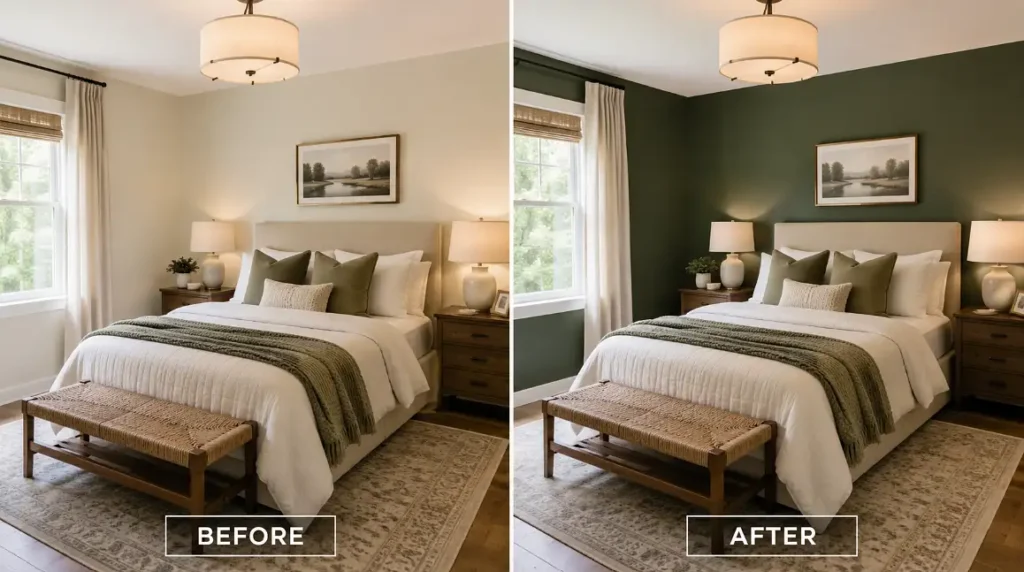
Upload a photo, tell the AI “dark forest green walls, keep everything else the same,” and you get a preview that is close enough to reality that you can confidently walk into a paint store and commit. That alone used to require either paying a designer, spending hours in Photoshop, or just guessing and hoping it would not look terrible. Now it takes about twelve seconds.
And see what AI replied when I asked
I generated this before/after bedroom visualization using an AI image generation model.

Backend flow:

1. User Intent Parsing
   The system understood the request as:
   - Create a bedroom comparison image
   - Keep both rooms in the same frame
   - Left side should show the original neutral/light wall color
   - Right side should show the same bedroom with dark green walls
   - Add BEFORE and AFTER labels

2. Prompt Construction
   A structured image-generation prompt was created describing:
   - Same bedroom on both sides
   - Same camera angle
   - Same furniture, lighting, bedding, rug, window, and décor
   - Only the wall color changes from light neutral to dark green
   - Split-screen layout
   - Photorealistic interior design style

3. Image Generation
   The prompt was sent to an AI image generation system.
   The model generated a new photorealistic bedroom scene based on the text prompt.

4. Visual Consistency Control
   The prompt instructed the model to preserve:
   - Room layout
   - Bed placement
   - Furniture
   - Lighting
   - Décor
   - Camera angle

   This made the image look like a realistic before-and-after comparison instead of two unrelated bedrooms.

5. Before / After Composition
   The output was generated as one wide image with two panels:
   - Left panel: BEFORE, light beige walls
   - Right panel: AFTER, dark green painted walls

6. Final Output
   The final image shows how dark green walls could look before buying paint, giving a visual preview of the color change.

Technology used:
- Natural Language Processing to understand the user request
- Prompt engineering to convert the request into detailed image instructions
- Generative AI image model to create the bedroom visualization
- Text-to-image generation to produce the before/after design mockup
- Visual layout control through prompt instructions such as “same frame,” “split screen,” “before and after,” and “same bedroom”
If your goal is to design my room in a way that lets you try different styles visually before committing any money, any of these will get you to a useful starting point.
Furniture placement and scale is another area where AI actually helps. Ever bought a couch online and it showed up either way too big or weirdly small for the space? These tools let you see roughly how a piece fits before you order. Not perfectly — the proportions can be slightly off — but close enough that you avoid the worst mistakes.
The Photoshop comparison is actually the right one here. These apps are essentially Photoshop for people who do not know Photoshop, except instead of learning layer masks and adjustment curves you just describe what you want in words. For single-room decisions — colors, furniture, curtains, shelving, lighting mood — that is genuinely powerful.
Where It Breaks Down and Why
Now the floor plan thing. The bathroom-less house I showed at the start is not a bug specific to Grok. It is a fundamental limitation of how these models work, and it shows up in every tool that tries to generate architectural layouts from text prompts.
Why? Because diffusion models understand what things look like, not what things are for. The AI knows that a kitchen has countertops and a stove because it has seen millions of kitchen photos. It knows bedrooms have beds. It knows living rooms have sofas. But it does not understand that humans need bathrooms the way an architect does. It does not reason about plumbing routes or building codes or the basic fact that people who sleep in beds also need showers. It just generates what statistically looks like a floor plan based on the visual patterns it learned.
This is also why AI-generated floor plans often have:
- Doors that open into walls or into other doors
- Windows in places that would face interior walls if you actually built the structure
- Rooms with no clear entry point — sealed boxes that look nice from above but have no way to walk into them
- Proportions that feel slightly wrong — a bedroom sized like a closet next to a corridor wider than the kitchen
- Missing utility spaces — no laundry, no storage, no consideration for HVAC or electrical panels
A published study from Macau University of Science and Technology (Frontiers of Architectural Research, 2025) specifically noted that current diffusion models “struggle to generate indoor layouts in pixel-level alignment with the indoor structure.” They proposed a fix called an Interior Design Control Network that keeps generated designs structurally anchored to real room geometry, but that research has not made it into consumer apps yet.
The gap is this: AI can redesign what a room looks like. It can not yet reliably design what a room is. One is a visual problem. The other is a spatial reasoning problem. Current models are built for the first one. The second one requires a different kind of intelligence that these tools do not have.
What You Can Actually Use Right Now
Here is the practical breakdown based on what actually works today versus what makes for a nice demo but falls apart in practice.
Use AI for:
- Previewing wall colors, flooring materials, and lighting changes before spending money
- Comparing furniture styles and layouts in your actual room photo
- Getting design inspiration when you have a vague “I want it to feel different but I do not know how” situation
- Quick before-and-after visuals to show a partner or contractor what you are thinking
- Testing curtain and window treatment options without buying samples
Do not rely on AI for:
- Floor plans that need to be structurally accurate (always have an architect or civil engineer review)
- Anything involving plumbing, electrical, or load-bearing walls
- Exact furniture dimensions — the visual representation is approximate not measured
- Final design decisions on expensive renovations — use it as a starting point then bring in a professional
- Multi-room flow and how spaces connect to each other practically
The technology is moving fast. Houzz reported that 31% of design firms already use AI in daily workflows, and 66% believe it will change the industry within five years. The tools are getting better at understanding spatial relationships, not just visual patterns. But right now, the honest assessment is that AI room design is excellent at helping you see possibilities and genuinely bad at helping you plan structures.
That Grok floor plan is still sitting in my gallery and I open it sometimes just because it looks nice. Would I build it? Obviously not unless the family agrees on an outhouse situation which, no. But the bedroom redesign I did using one of these apps — testing a wall color, seeing how a shelf unit would fit the empty wall — that actually helped me commit to a decision. Bought the paint, did the room, turned out close enough to the preview that I felt like the ten minutes I spent generating options saved me from a bad color choice I would have lived with for years.
So yeah. Rooms, absolutely. Houses, not yet. And if AI ever generates a floor plan that remembers bathrooms on the first try without being told, that is when I will start taking it seriously for the structural stuff too.














