
MobileMall BlogMobileMall BlogMobileMall Blog
  • #Explore
  • Business
  • Technology
    • Gaming
    • Headphones
    • Laptops
    • Mobile Accessories
    • Home Networking
    • PCs
    • Printers
    • Smart Watches
    • Speakers
    • Tablets
    • Wearables
    • Smart Office
  • Security
  • Buying Guides
  • Contribute
Reading: Exploring AI Features in FunTouch OS 15
Share
Font ResizerAa
MobileMall BlogMobileMall Blog
Font ResizerAa
  • #Explore
  • Business
  • Technology
  • Security
  • Buying Guides
  • Contribute
  • #Explore
  • Business
  • Technology
    • Gaming
    • Headphones
    • Laptops
    • Mobile Accessories
    • Home Networking
    • PCs
    • Printers
    • Smart Watches
    • Speakers
    • Tablets
    • Wearables
    • Smart Office
  • Security
  • Buying Guides
  • Contribute
2025 © Mobilemall. All Rights Reserved.
Home » Blog » Exploring AI Features in FunTouch OS 15
AndroidArtificial IntelligenceNews

Exploring AI Features in FunTouch OS 15

Mobilemall Staff
Last updated: November 11, 2025 9:31 am
Mobilemall Staff
Share
FunTouch OS 15
SHARE
Add MobileMall Blog as a preferred source on Google

Vivo announced FunTouch OS 15 last year, and it’s been rolling out to both Vivo and iQOO devices since then. In today’s tech world, Artificial Intelligence is becoming a major focus, and Vivo has packed several AI features into this update. Let me walk you through what’s new in FunTouch OS 15 and how these features can enhance your phone experience.
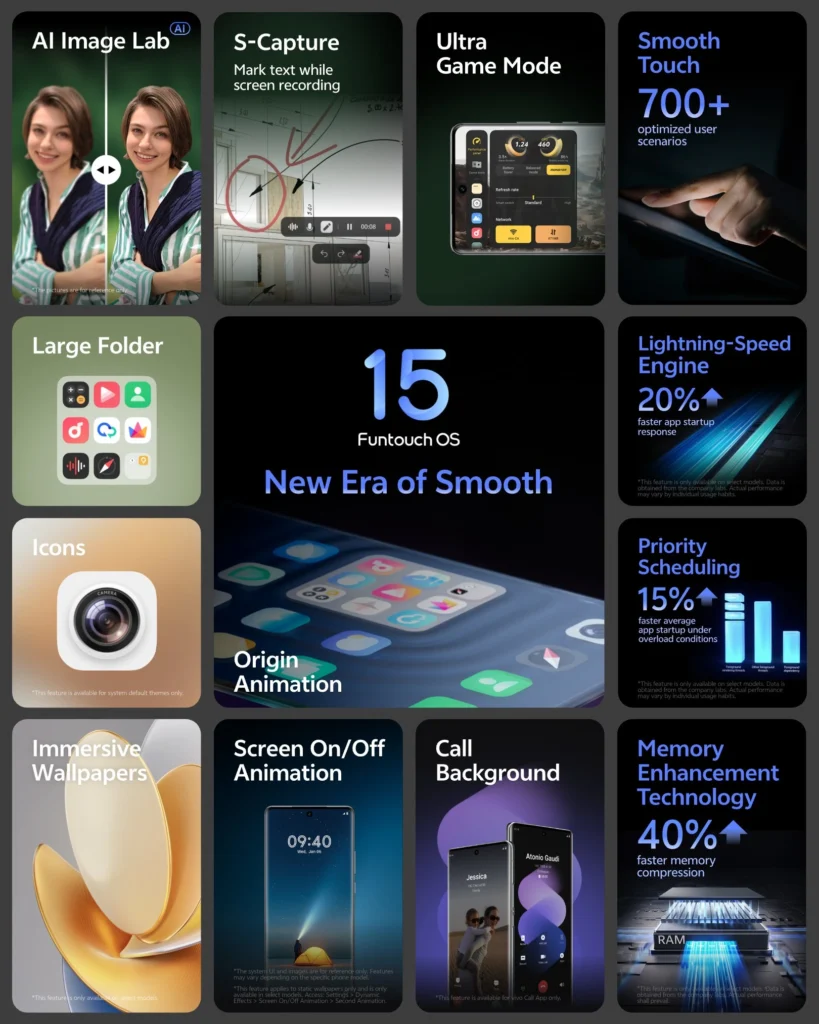
FunTouch OS 15

One of the standout features is AI Erase, which helps you remove unwanted objects or people from your photos. You can find it in the Edit section of the Albums app, and it’s a great tool for cleaning up your pictures quickly.

Another useful feature is AI Live Cutout, which lets you isolate subjects or objects from photos by simply pressing and holding on them. It’s a great way to highlight something or make custom edits.

For those blurry or imperfect photos, AI Photo Enhance will come in handy. It sharpens details, improves colors, and enhances facial features in photos, helping you turn a less-than-perfect shot into something clearer and more vibrant.

Circle to Search is another interesting feature that’s built into FunTouch OS 15. With this tool, you can simply draw a circle around any part of your screen, and the system will search for information related to that part of the screen. It’s a quick and handy way to get more details about something you’re looking at.

AI Call Translation is available in the Vivo Dialer app. This feature allows you to select your language and the other person’s language. When you receive a call, the system will automatically translate the conversation and inform the other person that the call is being translated. It’s a great tool for multilingual communication.

AI Screen Translation is another real-time translation feature, but this one works for on-screen content. You’ll need an internet connection to use it, but once connected, you can use the Screen Translation tool to instantly translate anything on your screen.

The Recorder app now comes with AI Transcript Assist. This tool automatically converts audio recordings into text. It also provides summaries and allows you to search for keywords within the transcription, making it useful for meetings, lectures, or interviews.

Lastly, AI Live Text uses Optical Character Recognition (OCR) to extract text from images or screenshots. You can copy this text to your clipboard and use it in other apps, making it easy to grab and share important information from photos.

And if you struggle to keep your notes organized, AI Note Assist is there to help. It turns your notes into organized bullet points, offers quick summaries, and can extract to-do items or translate text.
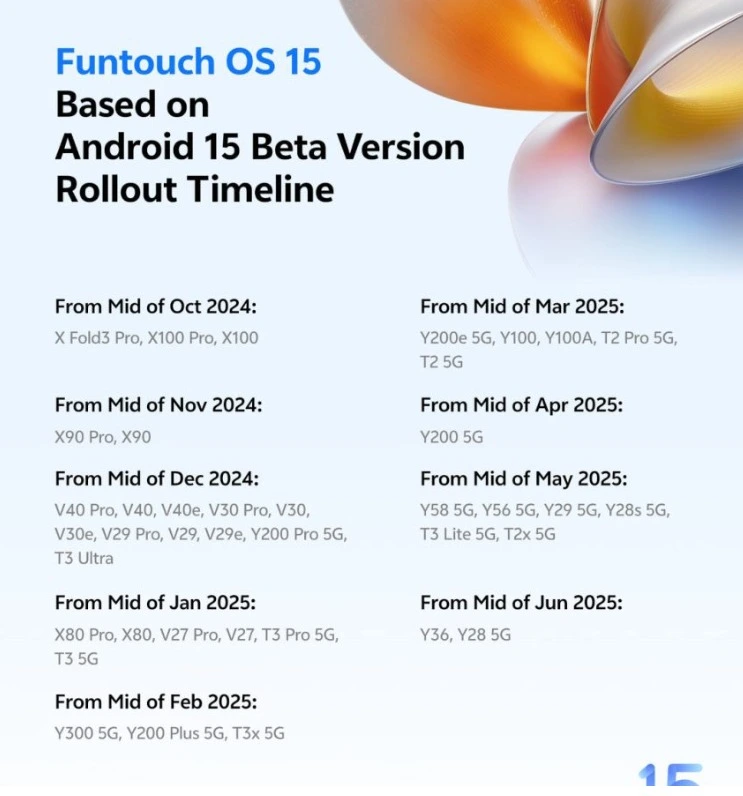
FunTouch OS 15

All in all, FunTouch OS 15 brings several practical and innovative AI features that improve both productivity and usability. If you’re using a Vivo or iQOO device, these features are worth exploring to see how they can enhance your daily smartphone experience.


iPhone 18 and iPhone 18e tipped for 9GB RAM, less than the 12GB everyone expected
Tecno’s Concept Phone Has No Black Border Around The Screen
Samsung is Making Five Folding Phones Next Year, and The Flip Isn’t Dead
Samsung Is Reportedly Betting Bigger on the Galaxy Z Fold8 Wide Than the Ultra and Flip8
Infinix Zero Mini Tri-Fold: A Bold Leap in Foldable Tech

Sign Up For Daily Newsletter

Be keep up! Get the latest breaking news delivered straight to your inbox.
[mc4wp_form]
By signing up, you agree to our Terms of Use and acknowledge the data practices in our Privacy Policy. You may unsubscribe at any time.
Share This Article
Facebook Copy Link Print
Share
ByMobilemall Staff
Follow:
From the latest smartphone releases to in-depth analyses of the hottest gadgets and latest technology trends, our, Mobilemall team is dedicated to delivering timely, accurate, and engaging news and reviews to our readers. At Mobilemall, we pride ourselves on delivering the most up-to-date and relevant tech news and reviews to our readers.
Previous Article The Role of Technology in Improving NBA Shooting Accuracy The Role of Technology in Improving NBA Shooting Accuracy
Next Article Poco F7 Poco F7 Global Launch Likely in May

Latest News

Tecno bezel-less concept phone
Tecno’s No-Bezel Phone Works, But It’s Nowhere Near Ready
Mobile News
Samsung M16 OLED
Samsung’s Brightest Phone Screen Yet Hits 10,000 Nits
News Samsung
Vivo X500 Pro Max
Vivo X500 Pro Max: Here Are All Four Colours
Phone Leak
iPhone Duo Fold
iPhone Duo: What Apple’s Foldable Still Gets Wrong
Apple
The A20 Pro
How Fast Is The IPhone 18 Pro? The First Benchmarks Are In
Apple
iPhone 18 Pro Series Battery capacities
iPhone 18 Pro Max Battery Jumps 12%, iPhone 18 Pro Barely Moves
Apple Tech News
iPhone Duo Fold In Just 1999
Apple’s First Folding iPhone Is Here, And It Starts At $1,999
Apple Phone Launch
SEEDANCE
Seedance 3.0 Is Not Out Yet – What the 2.5 Update Already Gives Away About It
Artificial Intelligence

You Might also Like

Poco C75
NewsPhone Launch

Poco C75 is here, but it’s not entirely new.

Sagar Bakre
Sagar Bakre
1 Min Read
android 13 oxygen os
Android

OxygenOS 13 Brings Android 13 with a Water-Inspired Look

Mohammad Ahsan
Mohammad Ahsan
2 Min Read
Vivo S20 Pro
NewsPhone Leak

Vivo S20 Pro’s Powerful Hardware Details Emerge

Sagar Bakre
Sagar Bakre
2 Min Read

About us

Mobilemall.co blog is an informative and engaging platform that offers readers the latest news and insights on mobile phones and accessories. The blog covers a wide range of topics, including product reviews, industry trends, and tips on how to get the most out of your mobile device.

Contact Us:
[email protected]

Categories Link

  • Business
  • Mobile
  • Technology
  • Gaming
  • Phone Review
  • Android

Must Read

RECOVERING DATA FROM A BROKEN ANDROID PHONE
How to Recover Data from a Broken Android Phone: A Complete Guide
Tips & Tricks
Vivo X500 Pro Max
Vivo X500 Pro Max Shown Off, Launching 21 September
Phone Launch

Quick Links

  • Privacy Policy
  • Tech Write For Us
  • Contact Us
  • Facebook
  • Instagram
  • YouTube
  • LinkedIn
2026 © Mobilemall. All Rights Reserved.
Go to mobile version
Welcome Back!

Sign in to your account

Username or Email Address
Password

Lost your password?

Not a member? Sign Up