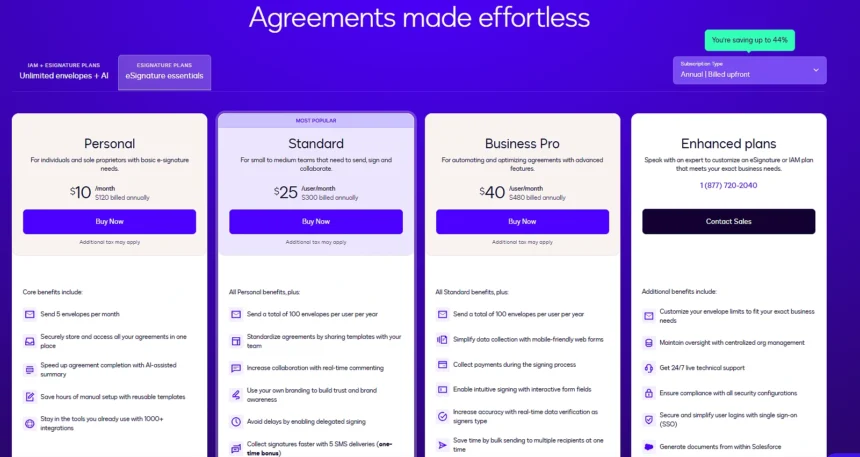
If you have looked at docusign pricing recently, the numbers on the pricing page seem reasonable. $10 a month for the Personal plan, $25 for Standard, $50 for Business Pro, all billed annually. Those are the numbers DocuSign puts in front of you and on the surface they look competitive enough for what you get.
The problem shows up after you sign up.
The Envelope Cap Is Where It Bites
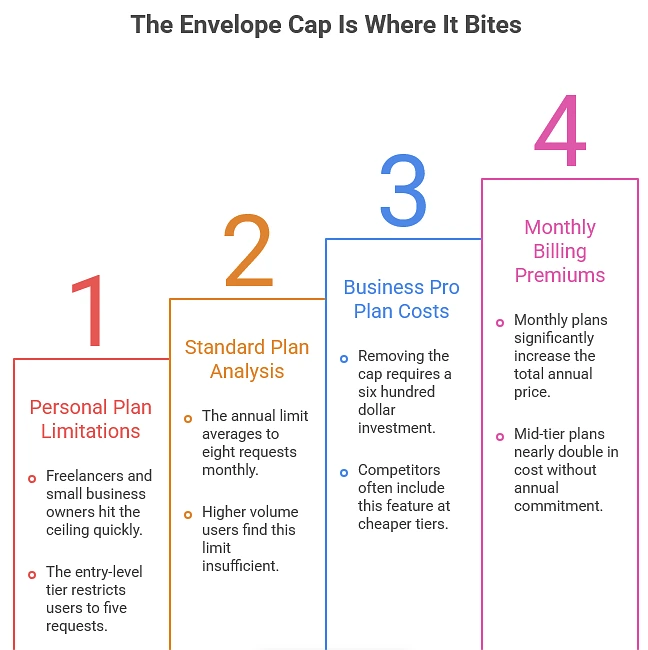
The entry-level Personal plan caps you at five signature requests per month. Five. If you are a freelancer or a small business owner who sends more than a handful of contracts a week, you hit that ceiling before the month is halfway done. The Standard plan raises the limit to one hundred signature requests per year, which sounds like more until you do the math and realise that is about eight per month. The Business Pro plan at $50 finally removes the envelope cap, but you are now paying $600 a year for a feature that some competitors include at their cheapest tier.
And if you chose monthly billing instead of annual, those numbers jump. The $10 plan becomes $15, the $25 plan becomes $45, and the $50 plan becomes $65. That is not a small premium for flexibility, that is nearly double on the mid-tier plan.
Where the Billing Complaints Actually Come From
Lok at Trustpilot, where 75% of 1,168 reviews are one star, and almost all of them are about the same two things: auto-renewal charges and difficulty reaching support when trying to cancel.
Users sign up for an annual plan, the year ends, the subscription auto-renews before they remember to cancel, and when they contact support they are told the renewal is non-refundable. One reviewer on Capterra in October 2025 wrote that DocuSign’s website and customer support gave conflicting information about refunds and that “they automatically renewed my subscription without any prior notice or clear warning.”
This is not unique to DocuSign, most SaaS products auto-renew, but the volume of complaints about it relative to other eSignature providers is noticeably higher (Trustpilot ratings):
I wonder why DocuSign is near the bottom alongside companies with far smaller user bases and far less brand recognition?
The Envelope System Confuses People More Than It Should
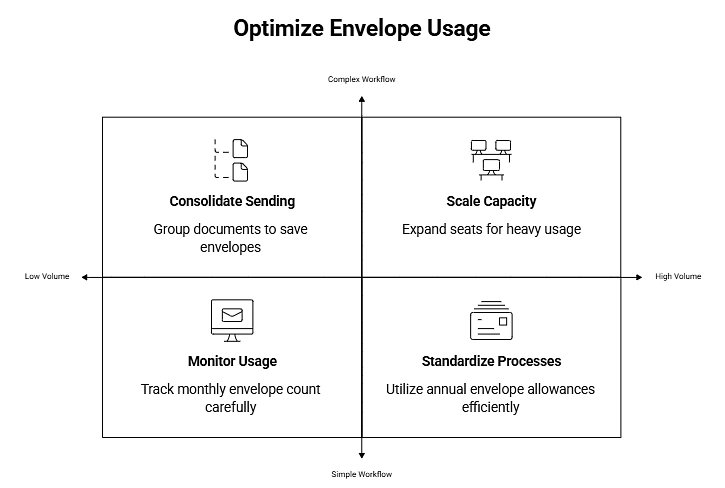
One thing worth understanding before you commit to any plan is how DocuSign counts usage. They use the term “envelope” and one envelope is not one document, it is one sending action. A single envelope can contain multiple documents going to multiple signers. So if you are sending a contract package with three documents to one client for signature, that counts as one envelope, not three.
That part actually works in your favour if you batch documents together. But the limits themselves are still tight on the lower plans. Five envelopes per month on Personal means five separate sending actions. If you are onboarding a new client and need to send an NDA, a service agreement, and a payment form as three separate envelopes because the signers are different, you just used three of your five monthly sends on one client.
Standard gives you one hundred per year with the option to buy additional user seats (up to five) to increase the pool, but each additional seat is another monthly cost. The “one hundred per year” figure is based on DocuSign’s Fair Use Policy and their calculation of average customer usage, which may or may not match how your business actually operates.
What the Alternatives Charge for the Same Core Features
The comparison changes depending on which tier you are shopping at, so here is how the entry-level and mid-tier plans stack up across the main competitors.
Entry-level plans compared:
| Provider | Plan | Annual Price | Monthly Price | Envelope Limit | Unlimited Users |
|---|---|---|---|---|---|
| DocuSign | Personal | $10/mo | $15/mo | 5 per month | No |
| SignNow | Business | $8/user/mo | $20/user/mo | 100 per year | Yes |
| Signeasy | Essential | $10/user/mo | $15/user/mo | 5 per month | No |
| Dropbox Sign | Essentials | $10/mo | $20/mo | Unlimited | No |
| PandaDoc | Starter | $19/user/mo | $35/user/mo | Unlimited | No |
SignNow at $8 a month with unlimited users and one hundred yearly sends versus DocuSign at $10 a month with five monthly sends and per-user pricing. Dropbox Sign matches DocuSign price but removes the envelope cap entirely. PandaDoc costs more but includes a document builder alongside unlimited sends.
Mid-tier plans compared:
| Provider | Plan | Annual Price | Monthly Price | Envelope Limit | Bulk Send |
|---|---|---|---|---|---|
| DocuSign | Standard | $25/mo | $45/mo | 100 per year | No |
| SignNow | Business Premium | $15/user/mo | $30/user/mo | 100 per year | Yes |
| Adobe Acrobat Sign | Standard (Teams) | $16.99/user/mo | Annual only | 150 per year | No |
| Dropbox Sign | Standard | $25/user/mo | $30/user/mo | Unlimited | Yes |
At the mid-tier, SignNow offers bulk send at $15 where DocuSign charges $25 and still withholds bulk send until the $50 Business Pro plan. Adobe comes in at $16.99 with a higher envelope limit of 150 per year. Dropbox Sign matches DocuSign’s price but includes unlimited sends and bulk send.
The “Unlimited Users” Question Is Bigger Than It Looks
Most eSignature providers charge per user per month. If your team has five people who need to send documents for signature, you multiply the per-user price by five. DocuSign, Adobe Sign, Signeasy, and Dropbox Sign all work this way.
SignNow does not.
Their Business and Business Premium plans include unlimited users, which means you pay for the plan tier and add as many team members as you need without the cost scaling up per person. For a company with a small core team this barely matters, but for a business with 10 or 15 people who occasionally need to send a document for signature, the per-user model can push the annual cost into a range that is hard to justify for a tool that fundamentally does one thing.
A solo consultant paying $300 a year for DocuSign and sending eleven contracts a month, documented by Zignt in a 2026 comparison, represents the kind of user who is paying for a market-leading brand when a cheaper tool would do exactly the same job. Three years of that adds up to nearly $900 spent on a single feature.
Review Scores Tell Two Different Stories Depending on Where You Look
| Platform | G2 | Capterra | Trustpilot |
|---|---|---|---|
| DocuSign | 4.5/5 | 4.7/5 | 1.3/5 |
| airSlate/SignNow | 4.6/5 | 4.6/5 | 3.2/5 |
| Dropbox | 4.4/5 | 4.5/5 | 1.3/5 |
| PandaDoc | 4.7/5 | 4.3/5 | 2.3/5 |
G2 and Capterra scores are high across every provider because those platforms attract users evaluating product functionality, and the core eSignature functionality works well across all of them. Trustpilot scores are lower because that is where people go when they are frustrated about billing, and the gap between DocuSign’s G2 score and its Trustpilot score tells you that the product itself is not the problem, the pricing and account management experience is.
Who DocuSign Is Actually Worth It For?
The signing experience is polished, the integrations are extensive (over 1,000 compared to SignNow’s 270), the compliance certifications cover enterprise requirements, and the brand recognition means your clients will not hesitate when they receive a DocuSign request. For large enterprises with complex agreement workflows and IAM needs, DocuSign’s platform goes well beyond basic eSignature into AI-powered contract analysis and lifecycle management that competitors have not matched yet.
For everyone else, the pricing math gets harder to justify the more closely you look at it. The envelope limits on the lower plans are restrictive, the per-user model scales costs quickly, the monthly billing premium is steep, and the auto-renewal complaints are loud enough and consistent enough to warrant setting a calendar reminder thirty days before your annual plan renews.
If your usage is straightforward, contracts and NDAs and standard business documents, the cheaper alternatives deliver the same core functionality at a lower price point with fewer billing surprises. DocuSign is not a bad product, it is an expensive one for a job that several other tools do at the same quality level for less money.
Pricing data from the public pricing pages of DocuSign, SignNow, Adobe, Dropbox Sign, PandaDoc, and Signeasy as of mid-2026. Review counts from G2 (2,594 reviews), Capterra (9,023 reviews), and Trustpilot (1,168 reviews). Solo consultant case study via Zignt’s 2026 DocuSign vs SignNow comparison.