MobileMall BlogMobileMall BlogMobileMall Blog
  • #Explore
  • Business
  • Technology
    • Gaming
    • Headphones
    • Laptops
    • Mobile Accessories
    • Home Networking
    • PCs
    • Printers
    • Smart Watches
    • Speakers
    • Tablets
    • Wearables
    • Smart Office
  • Security
  • Buying Guides
  • Contribute
Reading: How to Choose the Right DIY Fix Tools for Phone Repairs
Share
Font ResizerAa
MobileMall BlogMobileMall Blog
Font ResizerAa
  • #Explore
  • Business
  • Technology
  • Security
  • Buying Guides
  • Contribute
  • #Explore
  • Business
  • Technology
    • Gaming
    • Headphones
    • Laptops
    • Mobile Accessories
    • Home Networking
    • PCs
    • Printers
    • Smart Watches
    • Speakers
    • Tablets
    • Wearables
    • Smart Office
  • Security
  • Buying Guides
  • Contribute
2025 © Mobilemall. All Rights Reserved.
Home » Blog » How to Choose the Right DIY Fix Tools for Phone Repairs
Tips & Tricks

How to Choose the Right DIY Fix Tools for Phone Repairs

Cody Gipson (Phone Repair Expert)
Last updated: September 25, 2026 9:07 am
Cody Gipson (Phone Repair Expert)
Share
Phone Repair tools
SHARE

Contents

  1. Work Out Which Repair You’re Doing
  2. What Actually Goes In The Kit
    1. Heat, Static Protection And Light
  3. What Each Job Calls For
  4. What To Spend
  5. A Few Things Worth Knowing First
Add MobileMall Blog as a preferred source on Google

There’s a $12 repair kit on Amazon with about nine thousand reviews, and someone in this house bought it. Soft metal bits. Two screws were rounded off before the back panel came loose, and the shop that finished the job had to drill the heads out. Their bill was higher than a proper set of drivers would have been. So that Phone Screen Replacement ended up costing twice, once for tools that failed and once for the labour to undo it.

Work Out Which Repair You’re Doing

A screen job announces itself. Cracked glass, a dead corner, touch that works everywhere except one strip down the side.

Batteries are quieter about it. You charge overnight the way you always have, and somewhere around eighteen months in you’re at 40% by lunch and the back of the phone feels warm when it shouldn’t.

Charging ports don’t die, they get fussy. The cable works if it’s angled left. Then it only works if you press it. Each of these needs a different set of tools, and that’s the reason a general kit is usually money thrown away. Batteries are the easy one now that most phones use pull-tabs instead of solid adhesive. Screens are harder than people expect. Ports are the worst of the three, purely because everything down there is small.

What Actually Goes In The Kit
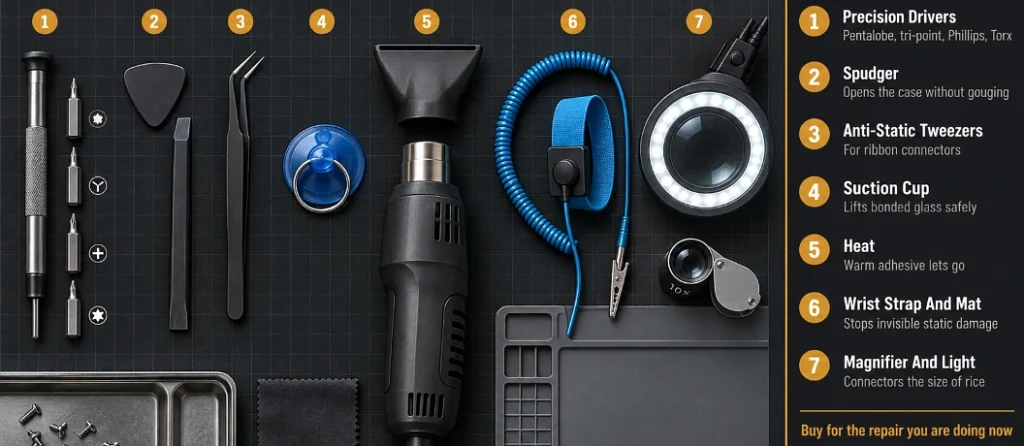
Top-down layout of phone repair tools numbered and defined in a key panel

Your household screwdrivers are no good. They’ll round a phone screw in two turns, and then you have a much bigger problem than the one you started with.

  • A precision driver set, with pentalobe in it. Apple uses pentalobe on the two bottom screws and tri-point on brackets inside. Samsung and most Android phones use Phillips and Torx, size varying by model. Magnetic tips are worth the extra dollar or two, since a dropped screw in carpet is a screw you’ve lost.
  • A spudger. Plastic, shaped like a guitar pick, used to work the case apart. Yes, a flathead screwdriver does the same thing. It also leaves a gouge along the edge of the housing that you’ll notice every day for the rest of the phone’s life.
  • Anti-static tweezers. Ribbon connectors are tiny and your fingers stop being any use two layers down.
  • A suction cup. Screen glass is bonded hard these days. Lever at it with metal and you’ll put a second crack next to the one you’re trying to fix.

Heat, Static Protection And Light

Heat is the bit beginners skip. Warm adhesive gives up in a couple of minutes, cold adhesive fights you for twenty. A hair dryer on its highest setting does the job for one repair. A proper heat gun makes sense if you expect more.

Static is the risk nobody takes seriously because nothing visible happens. You work, the phone goes back together, it runs fine. Then on Thursday it doesn’t turn on and there’s no way to connect that back to the moment you touched a board with a charged hand. A wrist strap and a mat cost about the same as a coffee.

And light. Proper light, not the ceiling. A magnifying lamp, or a loupe if you’d rather. Some of those connectors are the size of a grain of rice.

What Each Job Calls For

  • Screens: suction cup, spudger, drivers, heat. Order adhesive strips along with the panel, because old glue rarely sticks a second time and a lifting edge means opening it all up again.
  • Batteries: spudger and patience. Under the pull-tab, slow and steady, and never anything sharp near the cell.
  • Ports and speakers: fine tweezers, the lamp, and a clear hour. This is the job where good light stops being optional.

What To Spend

Professional kits go past $100. No one needs that for one cracked screen.

Buy for the repair you’re doing now. The collection builds itself over the years because phones keep breaking, and by the third repair you’ll own most of what you need anyway.

The cheap end is worse than the expensive end though. A small set of phone repair tools with real steel will outlast a thirty-piece kit of soft alloy, and when a bit strips halfway through a screen job you’re holding an open phone with no way to close it.

A Few Things Worth Knowing First
Cutaway comparison showing a correct short screw and a long screw pressing into the logic board

Get a video for your exact model, not the series. Brackets move, screws change length, adhesive gets stronger between generations. Being halfway in and watching a video show a component your phone doesn’t have is its own kind of stress.

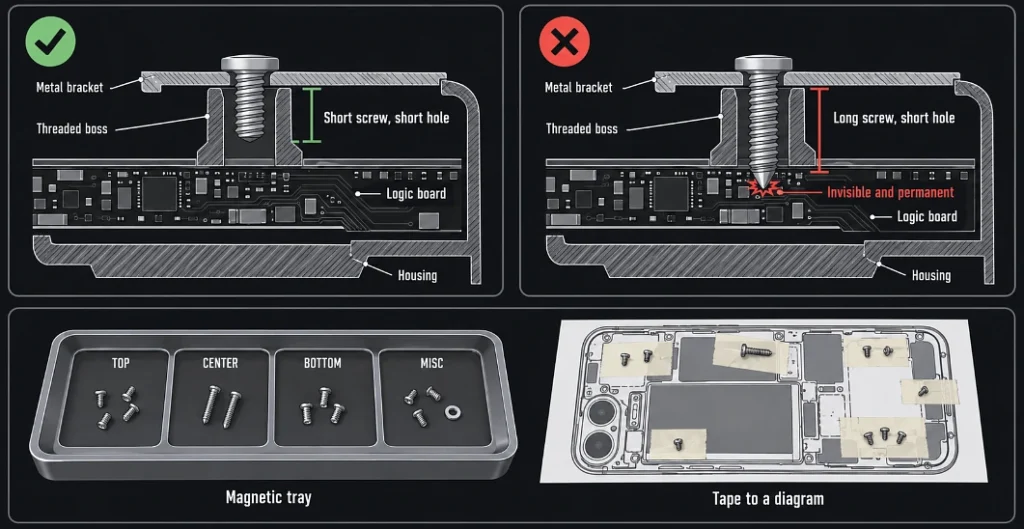
Track your screws as you go. Phones use different screw lengths in different holes, and a long one in a short hole pushes straight into the board underneath. That damage is invisible and permanent. A magnetic tray sorts it, or tape them to a printed diagram if you’re being careful.

Buy from sellers who take returns. Dud batteries and bad panels happen even with good suppliers, and you don’t want to be arguing over $30 by email.


Ghost Touch on Your Screen: Causes, DIY Checks & When to Repair
Dead Phone? How to Recover Your Data Safely and Effectively
Why Is My Phone Charging Slowly? 10 Hidden Causes & Fixes
Xiaomi Black Screen of Death: What Causes It and How to Repair the System
Petrol 100 Rs Subsidy – Guide To Send Message To 9771

Sign Up For Daily Newsletter

Be keep up! Get the latest breaking news delivered straight to your inbox.
[mc4wp_form]
By signing up, you agree to our Terms of Use and acknowledge the data practices in our Privacy Policy. You may unsubscribe at any time.
Share This Article
Facebook Copy Link Print
Share
Previous Article Xiaomi 18 Pro global launched Xiaomi 18 Pro And Pro Max Are Going Worldwide This Year
Next Article TenPayGo New App Lets Tourists Pay In China With Their Own Bank Card
Leave a Comment

Leave a Reply Cancel reply

Your email address will not be published. Required fields are marked *

Latest News

Qualcomm and Apple
Apple Will Keep Paying Qualcomm Even After It Stops Buying Its Chips
Apple Tech News
TenPayGo
New App Lets Tourists Pay In China With Their Own Bank Card
Apps
Xiaomi 18 Pro global launched
Xiaomi 18 Pro And Pro Max Are Going Worldwide This Year
Phone Launch
Find X10 Pro Series
Oppo Wants £49 Now for a Phone With No UK Price Yet
Deals Phone Launch
Snapdragon 8 Elite Extreme Gen 6
Which Phones Get Qualcomm’s New Snapdragon 8 Elite Gen 6 Chips
Hardware Smartphone
Every Galaxy S27 Will Start With 12GB Of RAM
Phone Leak Samsung
Xiaomi 18 Pro Max
Xiaomi 18 Pro Cameras Revealed A Day Before Launch
Camera & Photo Phone Launch
OnePlus 16
OnePlus 16 Colors And Storage Options Officially Revealed
Phone Launch

You Might also Like

Crib Bumper: The Essential Blend of Comfort, Safety, and Style

Jayshree Rajani Malhotra (Tech Lifestyle)
4 Min Read
Makes Festive Season Travel More Enjoyable
Tips & Tricks

Why Strategic Planning Makes Festive Season Travel More Enjoyable

Sagar Bakre
Sagar Bakre
6 Min Read
Phone Says “No SIM” or “No Service”? Quick Fixes That Work
Tips & Tricks

Phone Says “No SIM” or “No Service”? Quick Fixes That Work

Cody Gipson (Phone Repair Expert)
6 Min Read

About us

Mobilemall.co blog is an informative and engaging platform that offers readers the latest news and insights on mobile phones and accessories. The blog covers a wide range of topics, including product reviews, industry trends, and tips on how to get the most out of your mobile device.

Contact Us:
[email protected]

Categories Link

  • Business
  • Mobile
  • Technology
  • Gaming
  • Phone Review
  • Android

Must Read

itel A300C
itel A300C Is a $115 Phone Built to Survive Being Dropped
Phone Launch
Iphone 18 pro max teardown
iPhone 18 Pro Teardown Shows A Hidden Face ID Camera
Apple

Quick Links

  • Privacy Policy
  • Tech Write For Us
  • Contact Us
  • Facebook
  • Instagram
  • YouTube
  • LinkedIn
2026 © Mobilemall. All Rights Reserved.
Go to mobile version
Welcome Back!

Sign in to your account

Username or Email Address
Password

Lost your password?

Not a member? Sign Up