
Laptops aren’t small purchases, especially when they’re gaming laptops.
You must not make these mistakes, as laptop prices are already starting to inflate due to RAM prices keep rising. A major driver of this is the increased rate of development in AI technology. IDC is forecasting an 11.3% drop in PC shipments this year and a 20% fall in the final quarter alone, and they’ve said the memory shortage behind it has no meaningful relief expected before the end of 2027.
So today we will list major laptop-buying mistakes to avoid, whether it’s for office or entertainment purposes.
Assuming You Can Upgrade The RAM Later
This is the one that catches people out, and honestly a lot of buying guides still get it wrong.
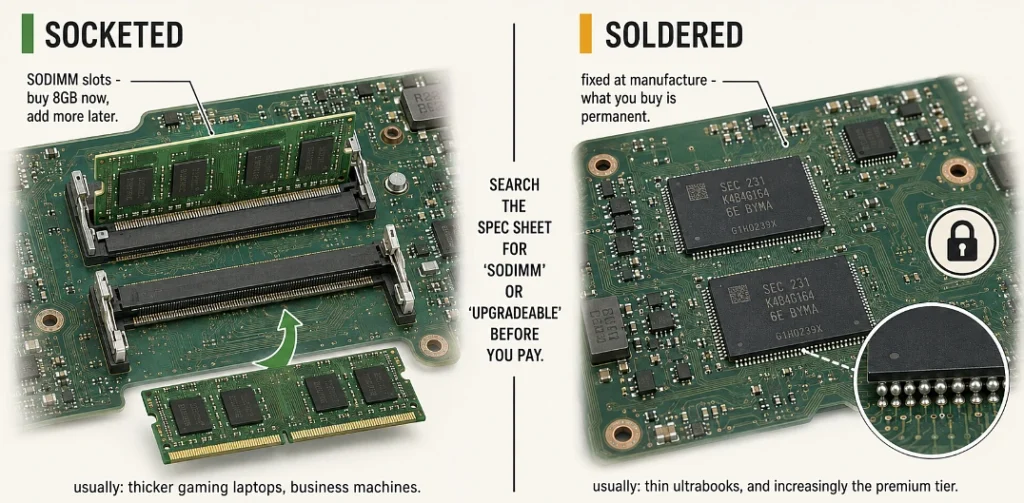
At Computex 2026, Dell’s XPS 14, Lenovo’s Yoga Slim 9i and ASUS’ Zenbook S 16 all launched with 16GB as the base config, and in most of those the memory is welded straight onto the motherboard, so there’s no slot to open and nothing to add later, which means whatever you buy on day one is what that machine has for the rest of its life.
So if you’re looking at an 8GB laptop and telling yourself you’ll just add more later, check first whether that’s even possible. Look for “SODIMM” or “upgradeable” in the specs. Thicker gaming laptops and business machines usually still have slots. Thin ultrabooks mostly don’t.
- Check soldered vs socketed before you pay, not after.
- 16GB is the sensible target if the RAM can’t be changed.
- If it has slots, buying 8GB now and upgrading later is genuinely fine.
8GB Isn’t Automatically Useless Though
Worth saying, because the internet gets hysterical about this.
Windows Central actually ran the test in 2026, put Windows 11 on an 8GB machine and used it properly for a while. Their verdict was that it’s “not only viable but quite enjoyable” for browsing, office work, streaming and light photo editing. The system idled around 3.8GB and the rest was enough for normal multitasking.
The catch is Windows 11 eats about 800MB more at idle than Windows 10 did, roughly 3.3GB against 2.5GB, and on a slower 8GB machine you can be sitting near 6GB used before you’ve opened anything. Microsoft knows. On 31 July 2026 the Windows president Pavan Davuluri listed “memory optimization for 8GB and above” as an official priority for the rest of the year.
So for email and documents and video calls and a sensible number of browser tabs, 8GB is fine, and for editing or gaming or properly heavy multitasking it isn’t, and most people know perfectly well which of those two they are before they walk into the shop.
Believing The Battery Number On The Box
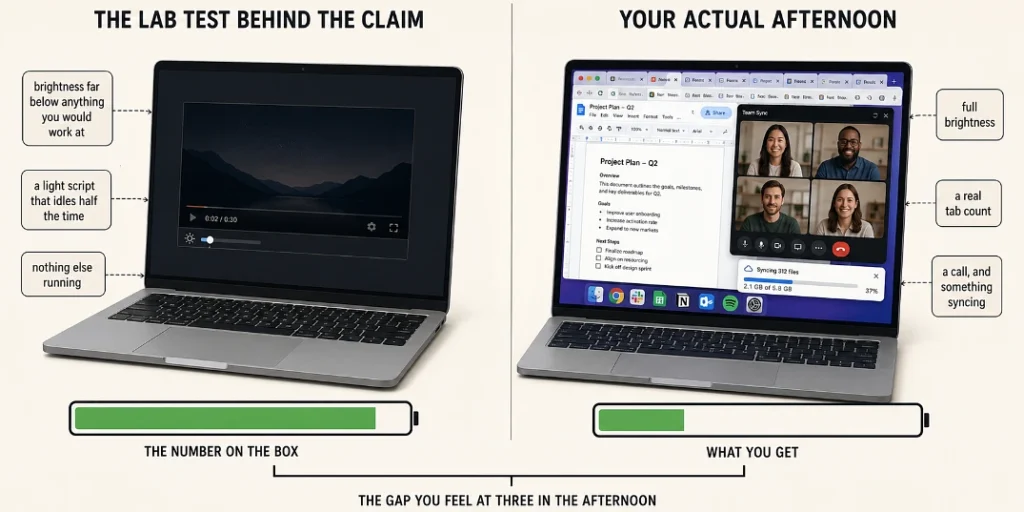
Battery is where the spec sheet and real life come apart the most, and you end up noticing it every single day because you’re the one hunting for a plug at three in the afternoon.
Consumer group Which? ran a test on 67 laptops from the major brands back in 2017, and the numbers are worth looking at even now because of how wide the gaps were. HP models claimed an average of 9 hours 48 minutes and actually ran for 5 hours 2 minutes. Dell claimed 9 hours 15 minutes, delivered 5 hours 12 minutes. Lenovo claimed 6 hours 41 minutes across 20 laptops and gave 4 hours 34 minutes.
Worst of the lot was a Lenovo Yoga 510 that promised 5 hours and quit after 2 hours 7 minutes.
Apple was the only one that held up, their MacBooks claimed 10 hours and actually averaged 10 hours 15 minutes, so they beat their own number which none of the others got anywhere near.
That test is a few years old now and the hardware has genuinely moved on since, mostly because ARM chips arrived properly. Apple Silicon and the Snapdragon X machines run at much lower power than the old Intel parts did, so real battery figures on those are a lot closer to what the box says than they used to be. On a normal x86 laptop though, the gap between the claim and your afternoon has not closed nearly as much as the marketing suggests.
The reason it exists at all is that brands run the test with the screen dimmed far below anything you’d actually sit and work at, on a light script that idles half the time, so what you’re reading on the box is a lab number rather than anything to do with your day. Check a review that measured it properly before you believe the spec sheet, and if you genuinely need eight real hours on an Intel or AMD machine then you’re shopping for something that claims a good deal more than eight.
Laptops With An Old GPU
For those who don’t know, there are still budget laptops being made with old graphics cards such as NVIDIA GTX 1650. Most people use laptops with RTX GPUs, which provide more performance for resource-intensive tasks such as video editing. Therefore, make sure you don’t buy a laptop just because it’s cheap.
- Dedicated GPUs are generally included with gaming laptops.
- An RTX GPU is better than a GTX GPU.
- A newer and up-to-date GPU is required for resource-intensive tasks.
- A gaming laptop is just a marketing term. They’re great for both gaming as well as video editing.
Not Knowing Why You Need One
So many people buy laptops without researching their specifications. Before you even think of buying a laptop, it is important to know why you need one in the first place.
If you are just looking for one to do basic tasks, then you can buy any non-gaming laptop. Gaming laptops offer great value if you’re a designer, content creator, 3D animation artist, or in any other creative role.
Pick one main use case, not three, and not “a bit of everything.” That single answer decides most of your specs for you. And avoid 2-in-1 laptops if you don’t actually need the touchscreen, since you’re paying extra for a hinge you’ll use twice.
Not Waiting For Sales
I don’t think it’s news that all major shopping platforms host seasonal sales. Timing your purchase matters, and even a small percentage can be significant on something like a laptop.
The Amazon Great Indian Festival typically kicks off around 22 September and runs through to Diwali, which makes September and October the two months worth waiting for if you can.
The discounts are real and not just banner marketing, an Asus TUF gaming laptop that normally retailed at ₹79,990 went for ₹54,990 during one of these sales which works out at a flat 31% off, so that’s twenty five thousand rupees for doing nothing except waiting a few weeks.
Festive sales beat flash sales almost every time, since flash sales are usually clearing old stock at a small cut while festive events have brands competing for the same customers on the same weekend.
Note: Always purchase from a seasonal sale, and the bigger the event, the better.
Googling For Coupon Codes
This one wastes more time than people realise.
Most of the codes floating around in search results are dead, and there’s data on how dead. Only 9% of shoppers say the codes they find online work 90% of the time, and for half of shoppers the hit rate sits somewhere between 10 and 50%. Most people spend five to ten minutes on this before they either find something or give up on it.
When one does work it’s worth the effort though, because the average successful coupon takes 17.2% off the checkout total, and on a laptop that is real money rather than loose change.
So the sensible move is checking somewhere the codes have actually been tested before they went up, since a working promo code applied at checkout gives you extra savings on top of whatever sale price you had already found.
- Most codes only work on selected products, so read the terms before you get your hopes up.
- Check for a code before you fill your cart rather than after.
- If nothing works in five minutes, it’s probably not there.
No Cross-Platform Comparison
Usually it’s best practice to compare prices on multiple shopping platforms, whether it’s a small or a big purchase.
Let’s say you found a laptop you wanted on a marketplace. You may well find a better price, or a brand-specific coupon code, on the brand’s own website. Most people don’t bother checking, and even a little bit of savings matters when you’re spending this much.
Compare the final price after every offer is applied, not the listed price. A laptop that looks ₹3,000 more expensive can end up cheaper once a bank offer and a working code go on top.
The Discounts You Qualify For And What They Actually Pay
Most people leave money here because they don’t check whether they’re eligible. But there’s something about bank offers that almost nobody mentions, so start there.
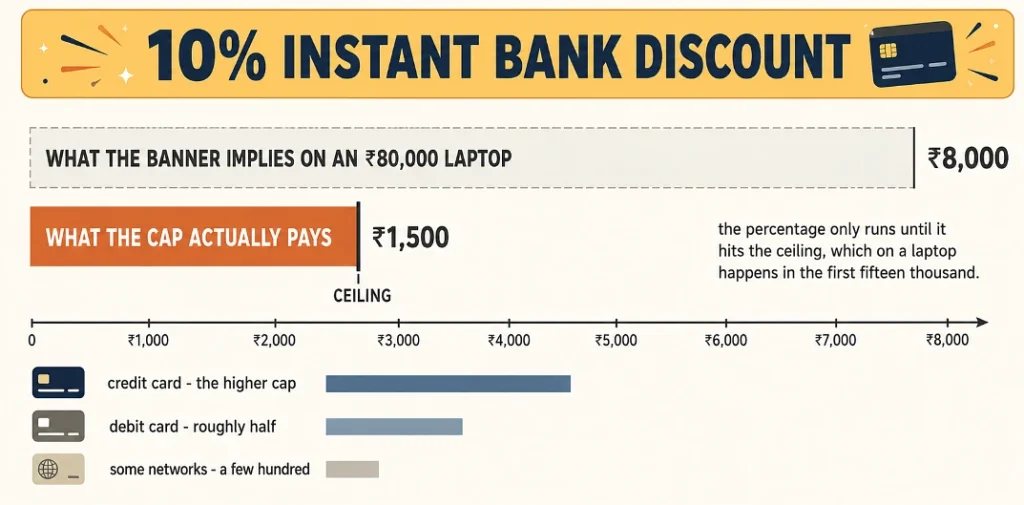
Instant bank discounts are capped, and the cap is small. You see “10% instant discount” sitting on the banner and you assume that’s eight thousand off an ₹80,000 laptop, except it isn’t, because during one Amazon festival the ICICI credit card offer was capped at ₹1,500 and the debit card version at ₹750, and RuPay was 10% up to ₹250. The percentage only runs until you hit that ceiling, which on something as expensive as a laptop you hit within the first fifteen thousand rupees of the price. Still worth taking, just don’t go budgeting around it. HDFC, SBI, Axis and ICICI cards are eligible most often, credit beats debit, and the caps do get more generous during the bigger festive events.
Student discounts. If you’re currently studying anything, most brands knock a chunk off laptops and tablets. You verify with your college ID through the platform. Value varies by brand and you do actually have to be enrolled.
Corporate employee programs. Visit the brand’s website, fill out their form, they verify you and apply the discount. Sometimes you get early access to launches and no-cost EMI for a set period.
Cashback. You get a percentage back after the purchase completes. Amazon gives 5% back to Prime members paying with the Amazon Pay credit card. If the cashback is small, check whether a no-cost EMI offer is worth more to you instead.
One warning on that last point, try to avoid Buy Now Pay Later apps for something this size.
Final Thoughts
Patience and doing your own research are the two main things if we were to combine the entire article in a few words.
Check whether the RAM is soldered before anything else, because that’s the one decision you can never undo afterwards. Look up a proper battery review rather than trusting the number on the box, especially if you’re buying an Intel or AMD machine. And give yourself five minutes on the coupon before you pay, since it either turns something up or it doesn’t and either way you’ll know.