MobileMall BlogMobileMall BlogMobileMall Blog
  • #Explore
  • Business
  • Technology
    • Gaming
    • Headphones
    • Laptops
    • Mobile Accessories
    • Home Networking
    • PCs
    • Printers
    • Smart Watches
    • Speakers
    • Streaming Devices
    • Tablets
    • Wearables
    • Smart Office
  • Security
  • Buying Guides
  • Contribute
Reading: FoneGeek iOS System Recovery Review: Fix Any iOS Issues on iPhone/iPad
Share
Font ResizerAa
MobileMall BlogMobileMall Blog
Font ResizerAa
  • #Explore
  • Business
  • Technology
  • Security
  • Buying Guides
  • Contribute
  • #Explore
  • Business
  • Technology
    • Gaming
    • Headphones
    • Laptops
    • Mobile Accessories
    • Home Networking
    • PCs
    • Printers
    • Smart Watches
    • Speakers
    • Streaming Devices
    • Tablets
    • Wearables
    • Smart Office
  • Security
  • Buying Guides
  • Contribute
2025 © Mobilemall. All Rights Reserved.
Home » Blog » FoneGeek iOS System Recovery Review: Fix Any iOS Issues on iPhone/iPad
Apple

FoneGeek iOS System Recovery Review: Fix Any iOS Issues on iPhone/iPad

Carter (Apple Boy)
Last updated: May 10, 2023 8:37 am
Carter (Apple Boy)
Share
FoneGeek iOS System
SHARE

Contents

  1. What Is FoneGeek iOS System Recovery?
    1. Is FoneGeek iOS System Recovery Safe?
    2. Why Choose FoneGeek iOS System Recovery?
      1. Conclusion 

As reliable as your iPhone can be, sometimes it does have issues with functionality. You may therefore find that you need to update, restore or boot to OS to fix the iOS device and get it to work normally again. 

But if you find these troubleshooting options too complicated, using a dedicated third-party recovery tool can be a good solution. These tools are designed to restore an iPhone or iPad to proper functionality by running the required troubleshooting procedures automatically. 

We recently had the chance to review one such third-party iOS recovery tool; FoneGeek iOS System Recovery. Here’s what we discovered. 

What Is FoneGeek iOS System Recovery?

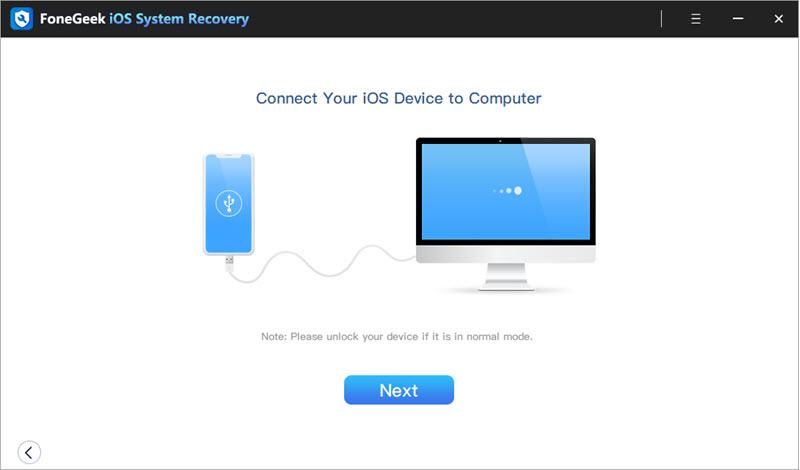
FoneGeek iOS System Recovery is an iOS system recovery program that can be used to fix the iOS system of any iOS device. It can come in handy when facing various problems with the device including a failed iOS update, a frozen device or a device that is stuck on the Apple logo, recovery mode, a boot loop, or iPhone black screen, etc. 

The main advantage of using FoneGeek iOS System Recovery is that it can repair the device without causing data loss. If the standard mode doesn’t work to fix the device, you can try using the deeper advanced mode.
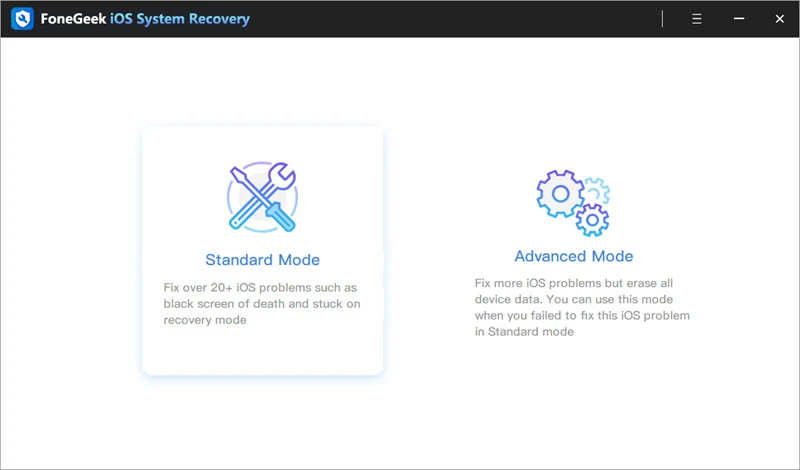
It is also one of the best ways to put your device in recovery mode if you are unable to use the physical buttons to do it. With FoneGeek iOS System Recovery, you can enter and exit recovery mode with a single click. 

You can also use this program to downgrade the version of iOS running on your device without needing to jailbreak the device first. 
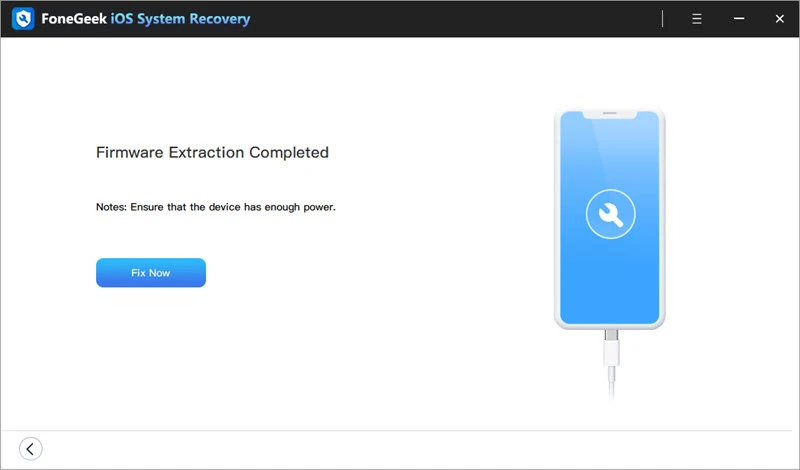
Is FoneGeek iOS System Recovery Safe?

FoneGeek iOS System Recovery is completely safe to use. To begin with, it has been developed by a reputable company that has taken all the necessary precautions to ensure its safety. It will therefore not affect any of the data on your device or even alter the function of the device in any way. Even downgrading the version of iOS on the device will not affect its data. 

But it is important to note that if you use the Advanced Mode to repair the device, you will likely lose the data on the device. 

Why Choose FoneGeek iOS System Recovery?

FoneGeek can be beneficial to you and your iOS device in numerous ways. It stands apart from its competitors due to its ease of use, high functionality, affordability, and customer satisfaction. 

  1. Easy to Use 

FoneGeek iOS System Recovery is the most ideal solution for both beginners and experts thanks to its simple functionality. Fixing even the most complex iOS issues is very easy with FoneGeek iOS System Recovery’s easy-to-navigate and straightforward interface. You can get the most out of the program even if you don’t have any technical expertise. 

  1. Affordable Price 

FoneGeek iOS System Recovery comes with a free trial version. But if you want to access all the features you need to fix the device, you will need to purchase the premium version. The good news is, FoneGeek offers the most affordable pricing tiers in the market. 

In comparison, Dr. Phone offers a $99.99 subscription for iOS devices, $79.95 for Android, and $139.95 for both. FoneGeek iOS System Recovery offers a more flexible plan, allowing you to choose from one of the following plans; 

  • $23.95 for monthly use.
  • $33.95 for yearly use.
  • $45.95 for lifetime use.
  1. Powerful Features 

As compared to other tools like Dr. Phone and Fixppo, FoneGeek iOS System Recovery is simpler, but with more powerful tools. Dr. Fone, for instance, is highly complex and has a much more complicated repair process. But FoneGeek iOS System Recovery’s simple UI and UX interface make it possible to repair any of the common iOS issues in a matter of minutes and just a few simple steps. 

With other iOS system repair tools and solutions, there is always the likelihood that you could lose the data on your device. But with FoneGeek iOS System Recovery, your data is very well protected. FoneGeek also offers additional programs such as iPhone Passcode Unlocker, iOS Location Changer, and many more. 

  1. High Customer Rating 

Software with a high customer rating has proven its trustworthiness and functionality. FoneGeek has a customer rating of 4.2 out of 5 on all the features it has to offer. In comparison, its closest competitor Dr. Fone has a rating of 4.1 which is a direct result of its complex functions. 

Conclusion 

The number one software to help you fix any issues you may have with your iOS device is FoneGeek iOS System Recovery. It is a simple, but very powerful solution that is compatible with all iOS devices including iPhones, iPads, and iPod Touch devices. 

FoneGeek iOS System Recovery is therefore the perfect choice when dealing with all kinds of problems on any iOS device. It is reliable, easy to use, affordable, and offers powerful repair tools to fix your device without affecting the data on it. 

The iPhone 16 was the Best-Selling Smartphone in Q3 2025 – Why?
Ghost Touch on Your Phone Screen? Fixes for iPhone
Apple iPhone 13 to feature FaceID chip twice as the one on iPhone 12 series
Apple’s Intelligence feature has a confirmed release date and upcoming hardware announcements.
Unbootable Mac Data Recovery: Recover Lost Files from a Mac that Won’t Start up with Ease
TAGGED:Fix iOS Issues on iPadFix iOS Issues on iPhoneFoneGeek iOS System Recoverios issues

Sign Up For Daily Newsletter

Be keep up! Get the latest breaking news delivered straight to your inbox.
[mc4wp_form]
By signing up, you agree to our Terms of Use and acknowledge the data practices in our Privacy Policy. You may unsubscribe at any time.
Share This Article
Facebook Copy Link Print
Share
ByCarter (Apple Boy)
Follow:
I am the Owner of HexaCore. I just love using Apple devices. Yes iPhone, a MacBook, Airbuds and an Apple Watch. I love their sleek designs and unqiue ideas. Writing about Apple products and updates is my hobby now.
Previous Article galaxy s10 series Samsung Galaxy S10 & Note10 Get One UI 4.1 Update
Next Article Realme Narzo 50A Prime Launched Realme Narzo 50A Prime Launched | 50MP camera and 5,000 mAh battery

Latest News

samsung-galaxy-z-fold8-ultra
Samsung Z Fold8 Ultra Reportedly Jumps to 5,000mAh Battery — No Extra Weight
News Samsung
alphabet-80-billion-raise
Alphabet Raised $80 Billion in One Move. Berkshire Was Part of It.
Google News
crypto-casinos
Crypto Casinos Pulled In $81 Billion Last Year, and That’s Five Times What They Made in 2022
Business Entertainment
How AI Room Redesign Apps Turn a Phone Photo Into a Photorealistic Makeover
How AI Room Redesign Apps Turn a Phone Photo Into a Photorealistic Makeover in Under 10 Seconds
Artificial Intelligence
The Truth About Megapixels
The Truth About Megapixels: Why a Higher Number Does Not Mean a Better Camera
Camera & Photo Innovation
WHEN ADS STOP WORKING
Brand Recall From Digital Ad Screens Stops Climbing Around the 8th Exposure — Here’s What the Habituation Data Actually Shows
Digital Marketing
Your Phone's Touch Latency Might Be Costing You Bets You Thought You Placed in Time
Your Phone’s Touch Latency Might Be Costing You Bets You Thought You Placed in Time
Phone Review
Comparing AI Strategies in Betting Platforms
Esports Betting Platforms Now Run on AI — From Odds to Support Tickets to Fraud Detection
Data Science

You Might also Like

Apple release iOS 14.5
Apple

Apple Iphone will release iOS 14.5 and iPadOS 14.5 next week in Pakistan

Carter (Apple Boy)
Carter (Apple Boy)
2 Min Read
iPhone-17-series
AppleNews

GNEXT Brings iPhone 17 and iPhone Air to Pakistan With Lucky Draws and Protection Plans

Carter (Apple Boy)
Carter (Apple Boy)
11 Min Read
Apple Ai
AppleArtificial Intelligence

Apple Develops Internal ChatGPT-Style App to Build Next-Generation Siri

Carter (Apple Boy)
Carter (Apple Boy)
1 Min Read

About us

Mobilemall.co blog is an informative and engaging platform that offers readers the latest news and insights on mobile phones and accessories. The blog covers a wide range of topics, including product reviews, industry trends, and tips on how to get the most out of your mobile device.

Contact Us:
[email protected]

Categories Link

  • Business
  • Mobile
  • Technology
  • Gaming
  • Phone Review
  • Android

Must Read

s27-pro-camera
Samsung Galaxy S27 Pro camera leak
Phone Leak Samsung
Why Your TikTok Videos Are Not Getting Views (And How to Fix It)
Social Media

Quick Links

  • Privacy Policy
  • Tech Write For Us
  • Contact Us
  • Facebook
  • Instagram
  • YouTube
  • LinkedIn
2026 © Mobilemall. All Rights Reserved.
Go to mobile version
Welcome Back!

Sign in to your account

Username or Email Address
Password

Lost your password?

Not a member? Sign Up