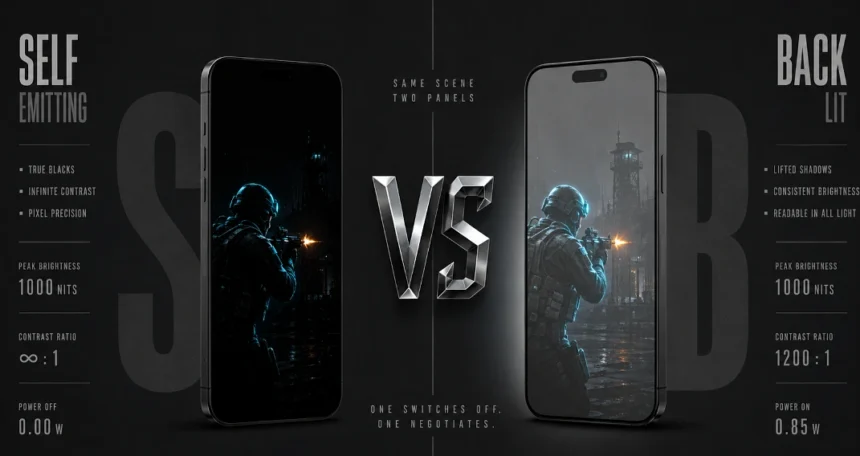
AMOLED and LCD are not doing the same job, even when the brightness numbers look similar, because one has been built around pixels that make their own light while the other is still passing a backlight through liquid crystal.
AMOLED pixels make their own light and can switch themselves off for black. An LCD is different: the backlight stays on behind the glass, and the crystals are asked to block it well enough to fake a dark scene.
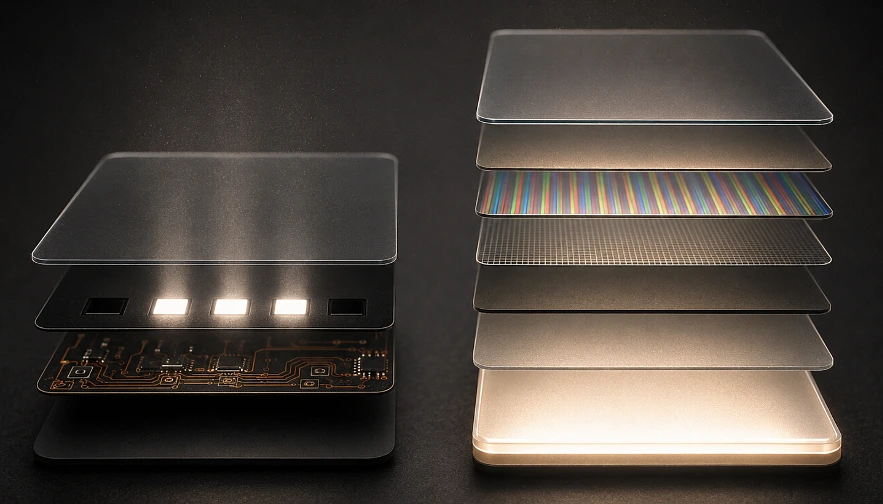
One panel can go properly dark. The other is still negotiating with a lamp, and that small physical fact follows you into every game you open.
Why AMOLED Motion Looks Cleaner During Fast Camera Swipes
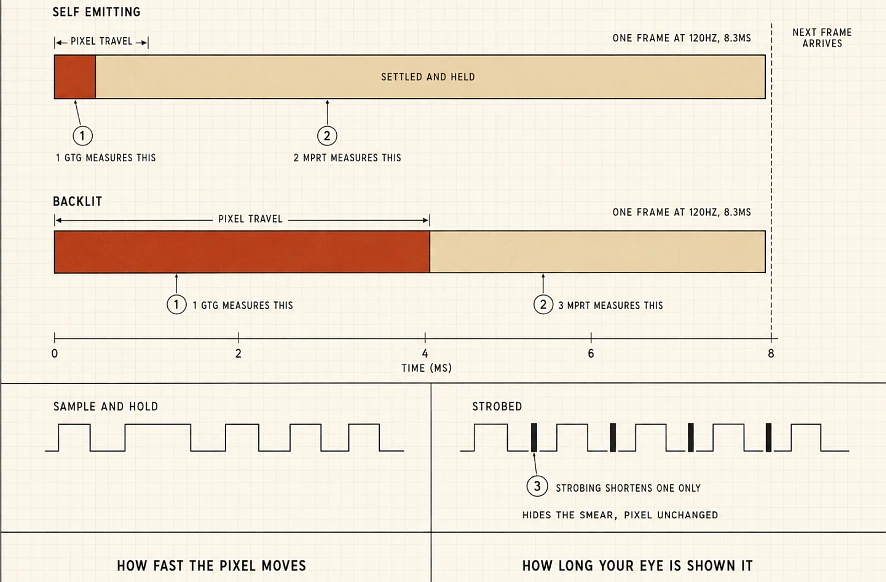
A pixel does not change colour instantly, even if marketing pages have made it sound that way for years. On AMOLED the shift is mostly electrical, so by the time your swipe has crossed the map the subpixels have usually settled. On a typical IPS LCD the crystals are still turning into place, and because that movement is physical, it is slower than a charge changing state.
AMOLED grey-to-grey transition: roughly 0.1 milliseconds in many panels. LCD grey-to-grey transition: often 4 to 8 milliseconds.
That gap is easy to ignore in a menu and hard to unsee in a match. When Call of Duty Mobile throws the camera across the map, an AMOLED pixel has often arrived before your eye has finished reading the frame, while an LCD pixel may still be between colours when the next frame is served. The trail is not always a dramatic ghost; sometimes it is a crosshair that looks softer, a character edge that will not quite lock, a UI marker that seems to be dragged rather than moved.
The spec sheet confusion that keeps costing people money:
Most gaming LCD panels still advertise a “1ms response time” as if it were the pixel itself, but the number is usually MPRT rather than grey-to-grey, and those two measurements are not describing the same event.
Blur Busters has been explaining the difference for years, and it is worth keeping separate because one measures the pixel’s journey while the other measures how long your eye is allowed to see the result:
- GtG (Grey-to-Grey) follows the pixel itself, asking how long it takes to move from one shade to another before the next instruction arrives.
- MPRT (Moving Picture Response Time) is about visibility rather than speed, because even a perfect pixel is held in front of you for the length of the refresh cycle on a sample-and-hold display.
At 120Hz that frame is shown for about 8.3 milliseconds, no matter how quickly the pixel might have switched, because 1000ms divided by 120 is the time your eye is being given.
To bring the visible number down, manufacturers insert black frames or strobe the backlight, and that is where many heroic “1ms MPRT” claims have come from. The pixels themselves are still taking roughly 4-8ms to finish a GtG move. The strobe can hide the smear from your eyes, but it has not made the crystal rotate faster.
AMOLED has less need for that disguise because the pixel response is already close to the frame time; once the transition has finished, the blur that remains is mostly the frame being held, not the pixel struggling to arrive.
On a phone held twenty centimetres from your face, these artefacts are harder to excuse than they would be on a monitor across a desk, because the nearer screen gives your eye more detail to judge and any drag that might have been minor on a 27-inch panel becomes the thing you keep noticing.
Why Dark Game Maps Actually Look Different on the Two Panel Types
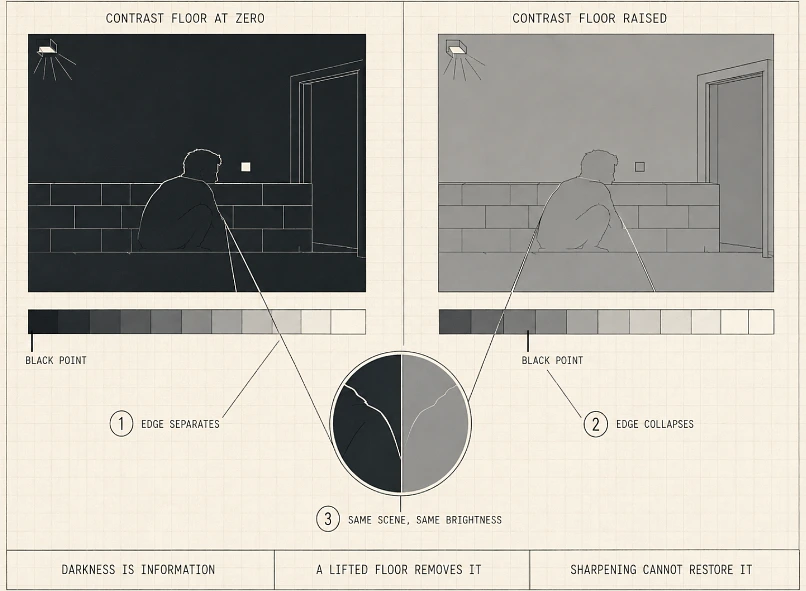
AMOLED contrast ratio: approximately 1,000,000 to 1. LCD contrast ratio: approximately 1,000 to 1.
AMOLED gets there because a black pixel is off, not dimmed, not filtered, simply off. LCD has never been able to copy that trick, because the backlight is still burning behind the panel while the crystals try to close the curtain. What you are shown as “black” is really light that has been blocked as well as the layer can manage, so dark scenes keep a grey floor under them.
In PUBG Mobile, this changes information, not just mood. Erangel at dusk, Vikendi in fog, Livik after dark: an enemy can be crouched against a wall that AMOLED treats as empty space, while the character still catches enough edge light to separate. On LCD the wall and the player are lifted by the same glow, and the contrast that should have exposed them is squeezed until they blend.
A pixel that cannot switch off will leak into scenes that were built around darkness, and no amount of sharpening can remove a backlight that has not been selectively disabled.
The same thing happens with saturated art. Genshin Impact bursts, Honkai Star Rail ability glows, and gold-heavy games such as slots depend on black staying out of the way; once the background has been lifted, the colours are still bright but they have lost the darkness that was supposed to make them feel expensive.
Why a Higher Hz Number Does Not Guarantee Smoother Motion
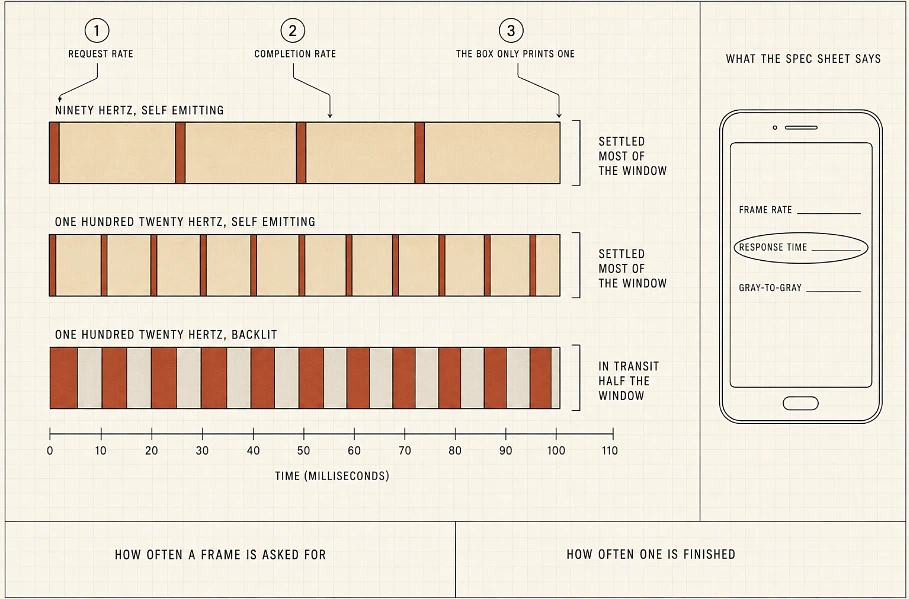
A 120Hz screen is making a promise every 8.3 milliseconds, but it is not promising that the pixels have finished obeying it. If the panel is still travelling when the next refresh begins, part of that frame is spent between the old colour and the new one, which is why a number on a box can look clean while motion still feels dirty.
AMOLED pixels usually complete their move early enough that the image can sit settled for most of the window; LCD pixels are more likely to be caught mid-journey, and the eye reads that as softness even when the refresh rate is higher.
120Hz tells you how often the screen asks for a new frame. It does not tell you how quickly the pixels have finished drawing the last one.
That is how a 90Hz AMOLED can look calmer than a 120Hz LCD during fast play: the lower number feels wrong until the swipe starts, and then the panel with near-instant response is the one keeping the frame tidy. Two phones may both claim 120Hz, but if one is spending part of every frame between states, the spec sheet has told you the request rate and hidden the completion rate.
AMOLED Still Has Three Weaknesses That Matter for Mobile Gaming
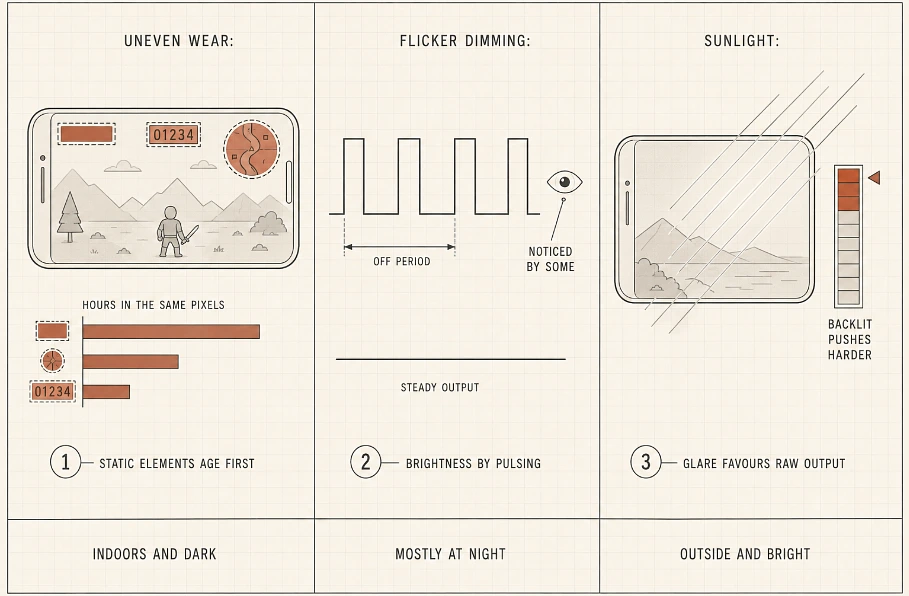
- Burn-in has not gone away, because a HUD that sits in the same place for hundreds of hours is asking some subpixels to age faster than their neighbours. Health bars, minimaps and score counters are the usual suspects, and some AMOLED panels have even been tuned to slow transitions slightly as protection, which saves wear but can take the edge off the speed that made the panel attractive.
- PWM dimming is the quieter problem. Many AMOLED phones lower brightness by flickering rapidly rather than by reducing output smoothly, and while plenty of players will never notice, sensitive users can finish a low-brightness session with tired eyes or a headache they cannot quite explain.
- Budget LCDs can still win outdoors. A cheaper backlight can be driven hard when sunlight is fighting the screen, and if your gaming happens near windows, in cars or outside between things, that ordinary brightness may matter more than perfect black. AMOLED has improved at lower prices, but it has not completely caught the cheap LCD trick of pushing through glare.
AMOLED has reached mid-range pricing now, with phones under $300 shipping 90Hz or 120Hz panels, so the decision is no longer reserved for flagship buyers. If most of your play happens indoors, at night, with dark maps and fast camera work, AMOLED will usually be the panel that makes the game feel cleaner. If flicker bothers you, or if you spend hours outside in direct light, well, the easy answer becomes less easy.