
MobileMall BlogMobileMall BlogMobileMall Blog
  • #Explore
  • Business
  • Technology
    • Gaming
    • Headphones
    • Laptops
    • Mobile Accessories
    • Home Networking
    • PCs
    • Printers
    • Smart Watches
    • Speakers
    • Streaming Devices
    • Tablets
    • Wearables
    • Smart Office
  • Security
  • Buying Guides
  • Contribute
Reading: Google Maps Now Lets You Ask Gemini Anything About Any Place, Plus a Full Navigation Redesign
Share
Font ResizerAa
MobileMall BlogMobileMall Blog
Font ResizerAa
  • #Explore
  • Business
  • Technology
  • Security
  • Buying Guides
  • Contribute
  • #Explore
  • Business
  • Technology
    • Gaming
    • Headphones
    • Laptops
    • Mobile Accessories
    • Home Networking
    • PCs
    • Printers
    • Smart Watches
    • Speakers
    • Streaming Devices
    • Tablets
    • Wearables
    • Smart Office
  • Security
  • Buying Guides
  • Contribute
2025 © Mobilemall. All Rights Reserved.
Home » Blog » Google Maps Now Lets You Ask Gemini Anything About Any Place, Plus a Full Navigation Redesign
GoogleTechnology

Google Maps Now Lets You Ask Gemini Anything About Any Place, Plus a Full Navigation Redesign

Peter Brandt (Google Guy)
Last updated: March 13, 2026 11:59 am
Peter Brandt (Google Guy)
Share
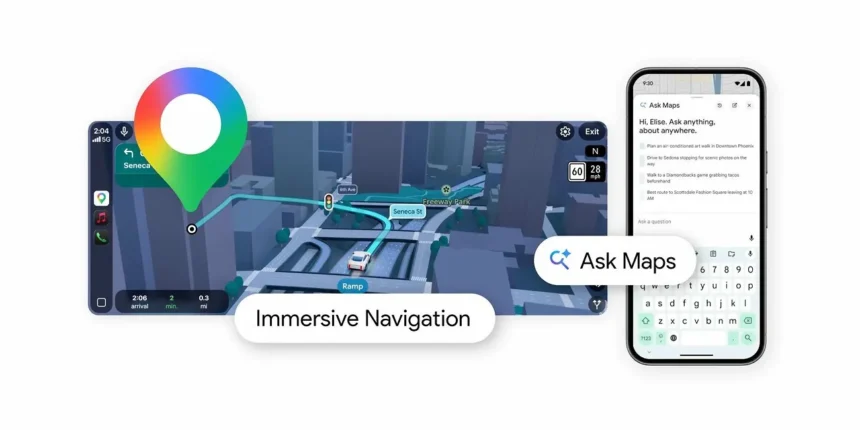
Google Maps Ask Maps with Gemini
SHARE

Google brought Gemini into Maps back in November, and now it’s pushing the AI side of things further with a feature called Ask Maps. Pretty self-explanatory — you tap the Ask Maps button, type or say whatever you need, and Gemini answers you in a conversational back-and-forth right inside the app.

The pitch from Google is that Gemini can handle questions a traditional map never could. Where can I charge my phone nearby? Is there a public tennis court somewhere around here that has lights? That sort of thing. Gemini pulls from data on over 300 million places and taps into reviews from the 500 million people who contribute to the Maps community. It also personalizes results based on your search history and saved places, so what surfaces for you should actually be relevant to you.

https://fdn.gsmarena.com/imgroot/news/26/03/google-gemini-ask-maps-immersive-navigation/gsmarena_001.mp4

Once you get an answer, you’re not stuck in a dead end either. You can book a restaurant reservation from the same conversation, save places to a list, share them with someone, or just hit navigate and go. It feeds straight into the rest of Maps without making you jump between screens.

https://fdn.gsmarena.com/imgroot/news/26/03/google-gemini-ask-maps-immersive-navigation/gsmarena_002.mp4

The bigger deal might be Immersive Navigation, which Google is calling its most significant Maps update in over a decade. The whole navigation view has been redesigned with a 3D perspective that renders buildings, overpasses, and terrain around you as you drive. When it matters, the map highlights lane markings, crosswalks, traffic lights, and stop signs so you’re not guessing which lane to be in at a complicated intersection.

Google says this spatial awareness comes from Gemini models analyzing fresh Street View and aerial imagery to build an accurate picture of what’s actually along your route. The view zooms smartly and makes buildings transparent when they’d block your sightline, so you can see what’s coming up ahead.

https://fdn.gsmarena.com/imgroot/news/26/03/google-gemini-ask-maps-immersive-navigation/gsmarena_003.mp4

Voice guidance got an upgrade too — more natural-sounding directions instead of the robotic turn-by-turn style. And Maps now tells you about route trade-offs before you commit. A longer route with lighter traffic versus a faster one with a toll, for instance, so you can decide what matters more to you on that particular drive.

Real-time disruption alerts pop up during your trip, and before you even leave, you can preview your destination and surroundings through Street View and get parking suggestions. When you’re close, Maps highlights the building entrance, parking nearby, and which side of the street you need to be on. That last part alone is worth something if you’ve ever circled a block three times because the entrance was on the opposite side from where you pulled up.

Availability is the catch. Ask Maps is rolling out now in the US and India on Android and iOS, with nothing announced yet for other countries. Immersive Navigation launches today across the US, and Google says it’ll expand over the coming months to eligible iOS and Android devices, CarPlay, Android Auto, and cars with Google built-in.

What it is AIFF and how to play it on your Mobile Phone?
Google Extends OS Upgrade Support to Five Years for Pixel 6, Pixel 7, and Pixel Fold
Snapdragon 8 Elite Gen 5: Early Performance Numbers Show Impressive Gains
Google I/O: Annual Developers Conference to be held on May 10 at Shoreline Amphitheatre
Tanzohub: Platform for Learning and Creating in Tech

Sign Up For Daily Newsletter

Be keep up! Get the latest breaking news delivered straight to your inbox.
[mc4wp_form]
By signing up, you agree to our Terms of Use and acknowledge the data practices in our Privacy Policy. You may unsubscribe at any time.
Share This Article
Facebook Copy Link Print
Share
ByPeter Brandt (Google Guy)
Follow:
Peter Brandt - Group Product Manager - Pixel ML Software. With years of experience in the tech industry, Peter has established himself as a top-notch writer with a passion for all things Google. Peter's articles are packed with valuable information and actionable advice, helping readers stay ahead of the curve in this ever-changing digital landscape.
Previous Article Apple iPhone Fold iPhone Fold: US Pricing, RAM, and Storage Details Leaked
Next Article Instagram encrypted chats Instagram Is Dropping Encrypted Chats

Latest News

iOS 27 Beta 4 iPhone Ultra
iOS 27 Beta 4 Code Is Talking About an iPhone With Two Batteries, and That Means the iPhone Ultra
Apple News
Samsung Galaxy Unpacked
How to Watch Samsung’s Galaxy Unpacked Live From London on 22 July
Samsung
download any twitter video with xdownloader
Xdownloader: Guide To Download Twitter Video On Your Phone Without An App
Tips & Tricks
Samsung Galaxy Z Fold8 camera
Samsung Is Reportedly Betting Bigger on the Galaxy Z Fold8 Wide Than the Ultra and Flip8
News Samsung
Sound Better on Video Calls and Webinars From Home
How to Sound Better on Video Calls and Webinars From Home
Accessories
iPhone 18 Pro variable aperture
Diagnostics log from the Tata hack confirms it: iPhone 18 Pro gets variable aperture
Apple News
Why Serious Detectorists Now Carry a Phone in One Pocket and a Pinpointer in the Other
Tech Lifestyle
RedMagic Astra 2
RedMagic Astra 2 Goes Global: Steam Games on Android, Starting at $749
News Tablets

You Might also Like

5G Rugged Projector Phone
Smartphone

5G Rugged Projector Phone –  Here’s Why Someone Would Pick This?

Sagar Bakre
Sagar Bakre
16 Min Read
Tech Trends in Business
BusinessTechnology

Top 3 Tech Trends in Business in 2021

Sophie Douglas
Sophie Douglas
4 Min Read
compress pdf
Technology

How to Compress PDF File on Mobile?

Liron Segev (Tech Geek)
7 Min Read

About us

Mobilemall.co blog is an informative and engaging platform that offers readers the latest news and insights on mobile phones and accessories. The blog covers a wide range of topics, including product reviews, industry trends, and tips on how to get the most out of your mobile device.

Contact Us:
[email protected]

Categories Link

  • Business
  • Mobile
  • Technology
  • Gaming
  • Phone Review
  • Android

Must Read

Best Rugged Phone
Best Rugged Phone with Built-in Projector in 2026
Smartphone
Galaxy S27 Ultra camera
Galaxy S27 Ultra probably isn’t getting that horizontal camera bar
News Samsung

Quick Links

  • Privacy Policy
  • Tech Write For Us
  • Contact Us
  • Facebook
  • Instagram
  • YouTube
  • LinkedIn
2026 © Mobilemall. All Rights Reserved.
Go to mobile version
Welcome Back!

Sign in to your account

Username or Email Address
Password

Lost your password?

Not a member? Sign Up