
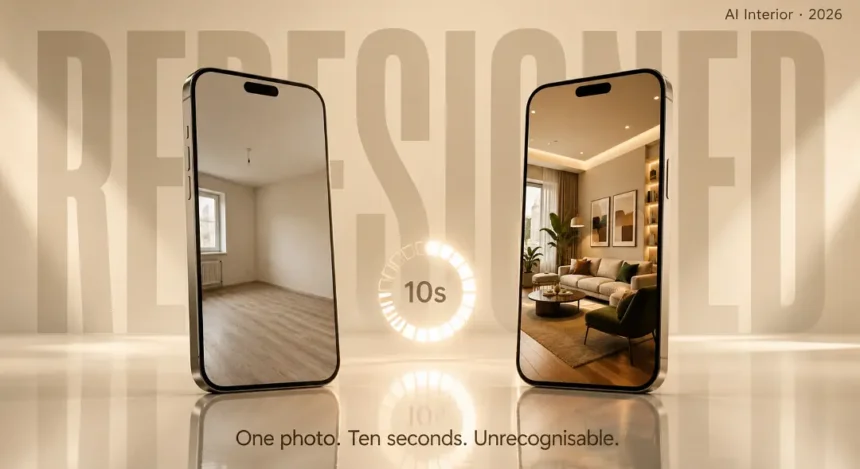
It’s weird to upload a picture of a bedroom that you would never want to have in an Architectural Digest spread and then get a bedroom back that looks like it belongs in an Architectural Digest spread. The same walls, the same windows, the same odd corner where the radiator has been installed too far out – and all at once, it seems someone has spent forty thousand dollars on it. The ceiling height is correct. Shadows correspond to the hour of the day that the picture was taken. Even light that shines through the window is at the right angle on the new furniture.
How is a phone app doing this from a single photograph?
That question is worth answering properly because the technology behind it explains both why these tools work so well for certain things and why they completely fall apart for others.
Apps like AI Remodel — which has crossed 1 million users doing exactly this kind of room transformation — are built on the same AI models that power Midjourney and DALL-E. But they are using that technology in a specific way that is different from just generating random images from a text prompt, and understanding that difference is what helps you actually get useful results instead of wasting an afternoon on outputs that look pretty but make no practical sense.
What Happens Between the Upload and the Result
When you take a photo of your empty room and you ask the app to design my room, the app is not just looking at the picture the way you look at it. A computer vision system is mapping the spatial structure of the room from that single flat image — identifying where the walls end and the floor begins, calculating the depth of the space from perspective lines, locating windows and doors as structural elements, figuring out where the natural light source is based on shadow direction.
All of that happens before any redesign starts. The app needs to understand the geometry of your room so it knows what to keep and what to replace.
Here is the quick version of the pipeline:
- Computer vision reads your photo and builds a spatial map — walls, floor, ceiling, windows, doors, light sources
- Segmentation separates the room into layers — structural elements (keep these) vs surface elements (replace these)
- Inpainting via a diffusion model “destroys” the surface layer and regenerates it in whatever style you selected
- The structural bones stay locked — wall angles, window positions, room proportions, perspective, lighting direction
- Output renders in roughly 10 seconds on most apps, some as fast as 3-4 seconds
The result looks like a photograph and not like a digital overlay because the AI was trained on billions of interior photos. It has seen living rooms from every angle, in every lighting condition, with every style of furniture. When it puts a new sofa in your room, it knows what shadow that sofa should cast given where your window is. When it changes your walls to dark green, it adjusts how the ambient light bounces off the new color. Your brain reads the output as real because the AI has essentially memorized what “real” looks like at a pixel level.
Diffusion Models vs GANs — Two Ways Apps Rebuild Your Room
Not all room design apps use the same approach under the hood and the difference affects what you get back.
Diffusion models — which are used in the creation of the likes Midjourney, DALL-E and Stable Diffusion, add noise to an image until it becomes completely static and then teach themselves how to remove that noise. When you upload your room photo, the model injects noise into the components that you wish to modify (the furniture, walls, decoration) and retains the components that you wish to preserve (room structure, windows, proportions, etc.). Then, it gradually denoises the image, following your style instructions if you provided any, until you get a clean, redesigned image.
This results in photorealistic images with a large amount of variation: same room, same prompt, you may generate noticeably different images. This can be helpful when exploring options – seeing different interpretations, not just one answer.
GANs — Generative Adversarial Networks — take a different path. Two neural networks compete with each other. One generates the room design, the other evaluates it and says “that does not look real enough, try again.” They go back and forth hundreds of times in milliseconds until the generator fools the critic. GAN outputs tend to be sharper and more consistent but with less creative variation than diffusion models.
Most current apps use diffusion-based approaches because the quality and flexibility have surpassed GANs for this specific use case. The trade-off is that diffusion models occasionally hallucinate details — adding a window that was not there, or slightly shifting a door position — which is why the best apps include structural anchoring systems to keep the room geometry locked in place.
What These Apps Can Actually Do Well Right Now
Single-room visualization is where this technology genuinely delivers value that saves real money. Not conceptual value, not “interesting demo” value — actual practical value where the output directly informs a decision you would otherwise make blind.
- Wall color testing is probably the most immediately useful thing. You want to know if dark green walls would work in your bedroom? Upload, specify, get a photorealistic preview in twelve seconds. Compare it with navy blue, with terracotta, with keeping the white but changing the trim color. That process used to cost either a designer consultation, a long Photoshop session, or buying three sample pots and painting test patches on your wall. Now it costs nothing and takes a minute.
- Furniture scale and placement catches mistakes before they become expensive returns. That sectional sofa looks great online but will it actually fit your living room without blocking the walkway to the kitchen? Upload your room, describe the piece, see it placed in context. The proportions are approximate, not measured to the centimeter, but close enough to tell you whether a piece is dramatically wrong for the space.
- Style exploration for people who know they want something different but cannot articulate what. “Modern farmhouse” means something different to every person who says it. Uploading your actual kitchen and generating it in Scandinavian, Industrial, Mid-Century Modern, Japandi, and Coastal side by side gives you a concrete visual comparison instead of a Pinterest board of other people’s houses that may or may not translate to your space.
- Virtual staging for real estate is a whole separate use case that has taken off. Empty apartment photos look terrible in listings. AI-staged versions with furniture and decor placed realistically help buyers visualize the space and, according to multiple real estate reports, properties with staged photos sell faster and for higher prices than unstaged equivalents.
Where the Technology Hits Its Limits
An App Store review of AI Remodel that stood out to me — a user spent several hours trying to just add a couch or a painting to their existing room and could not get it to work without the app also changing the room configuration, adding extra windows, or shifting door positions. They concluded it is great for major remodel concepts but not for simple item-by-item changes.
That review captures the current limitation perfectly. These models think in terms of complete room transformations, not surgical edits. They understand “make this bedroom Mid-Century Modern” much better than “add one specific armchair next to the existing bookshelf without changing anything else.” The diffusion process regenerates entire surface layers — asking it to change only one small element while keeping everything else pixel-perfect is fighting against how the technology fundamentally works.
Other common limitations worth knowing:
- Added structural elements that were not in the original — extra windows, phantom doors, walls that shifted position. The structural anchoring is good but not perfect.
- Proportions can be slightly off — a generated dining table might be 10-15% too large or too small relative to the chairs around it. Close enough for concept, not close enough for ordering.
- Lighting inconsistencies in some generations — shadows falling in impossible directions, reflections that do not match the light source in your original photo.
- Style bleed — you ask for Minimalist and get Minimalist-with-random-Bohemian-cushions because the training data had overlap between style categories.
As pointed out in a study by the Macau University of Science and Technology and published in Frontiers of Architectural Research, current diffusion models have a problem with “pixel-level alignment with indoor structure” — that is, they may “drift from the exact geometry of your room when they are supposed to preserve it. They offered to solve this by creating an Interior Design Control Network, but that research hasn’t been incorporated into consumer applications.
The Practical Workflow That Gets the Best Results
Based on how the technology actually behaves, here is what works and what wastes your time:
- Shoot at eye level, not from above or at an angle. Straight perspective lines give the AI the clearest spatial data to work with. Wide-angle phone cameras can distort proportions — step back further instead of going wider if you can.
- Natural daylight produces the best outputs because the AI has been trained predominantly on professionally lit interior photos, most of which use natural light. Overhead fluorescents create flat lighting that the model has less reference data for.
- Be specific with your style prompt. “Modern” is too broad. “Warm modern with walnut wood tones, linen textures, matte black fixtures” gives the diffusion model more to anchor on and produces more coherent results.
- Generate multiple times. Diffusion models produce different outputs each run. Your third or fourth generation is often better than your first because you start refining what you ask for based on what came back.
- Use it for concept direction, not final specification. Show the output to a contractor or designer as a starting point for conversation, not as a blueprint to execute exactly. The colors will be approximate, the proportions suggestive, the furniture conceptual.
Houzz reported that 31% of design firms are already using AI tools in their daily workflow, and 66% believe the technology will significantly change the industry within five years. The gap between “interesting novelty” and “professional tool” is closing fast, but it has not closed yet.
The technology is not replacing designers or contractors. It is replacing the guesswork that used to sit between “I think I want something different” and “I just spent eight thousand dollars and I hate it.”