It can be frustrating when important contact numbers suddenly disappear from your phone. Possible causes range from accidental deletion and a failed update to syncing issues. The fact is that losing contact can disrupt your daily routine in unexpected ways. It directly affects productivity when you can’t reach out to clients, follow up with colleagues, or even call family members.
Missed appointments and delayed tasks due to communication breakdowns can pile up to make things worse. That’s why this guide helps you find a quick and reliable iPhone data recovery approach. Keep reading for the best way to retrieve deleted contacts.
Part 1. Why iCloud or Gmail Sync May Not Help?
You might be under the impression that since you synced the contacts, they are secure. Sometimes, even after trying the usual methods like iCloud or Gmail, your deleted contacts may still be missing. That can be confusing, but there are a few reasons why those services don’t always work the way we expect. Knowing them will help in learning how to retrieve deleted contacts on iPhone.
In many cases, there’s simply a delay in syncing. For example, when contacts are deleted, and the device hasn’t synced yet, the changes won’t reflect right away across all platforms. But once the sync completes, the contacts might disappear everywhere. Another common issue is that some users don’t have contact sync turned on at all, so there’s no backup to recover from in the first place.
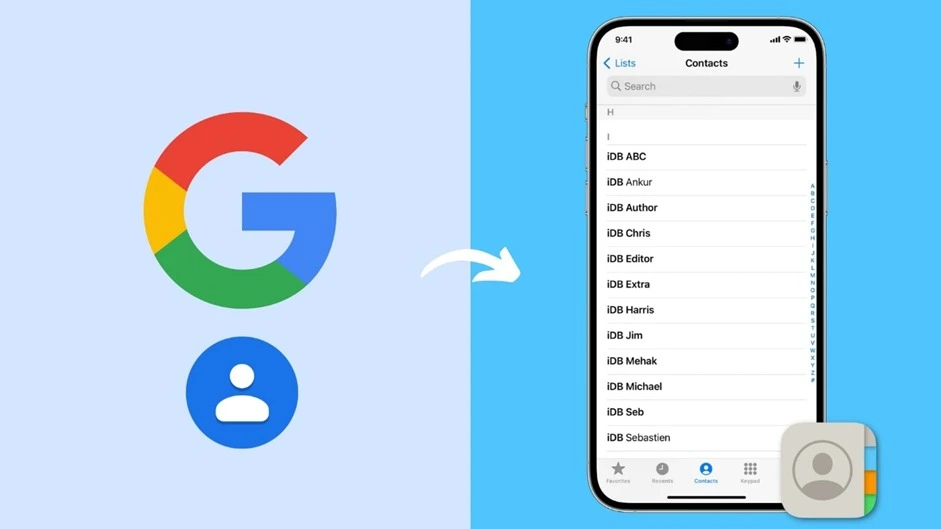
When contacts are saved directly on the phone rather than in your Gmail or iCloud account, those services won’t have a copy to restore. That is why relying on sync alone may not be enough when trying to recover lost contacts.
Part 2. Using Data Recovery Software for Contact Retrieval
As you deal with the syncing services’ failure to bring your contacts back, there’s still hope through iPhone data recovery software. Here is how it is a good approach for recovering your deleted iOS contacts:
1. Scans Internal iOS Databases
The software searches deep within your iPhone’s storage to locate deleted contact entries that haven’t been permanently erased yet. This method doesn’t rely on backups and can find data that the system no longer displays.
2. Previews of Recoverable Contacts
Before restoring anything, it shows you a list of contacts it found, including names and phone numbers. That helps you double-check and choose only the entries you actually want to bring back.
3. Supports Selective Recovery
You don’t need to recover all deleted items; just pick the important ones. Doing that saves time and avoids cluttering your contact list with unneeded information.
4. Works Without Any Backup
Even if you have never turned on iCloud or Gmail sync, the tool can still find contact traces stored locally. It gives you a second chance to retrieve what you thought was lost forever.
5. Straightforward Approach
Most tools guide you through a few simple steps with easy-to-follow instructions. You don’t need to be tech-savvy to complete the recovery process successfully.
Part 3. Dr.Fone – Data Recovery in Action: Restore Contacts Without Resetting
When looking for a tool that’s powerful enough to recover lost contacts, it’s helpful to go with one that’s trusted by many users worldwide. That’s where Dr.Fone – Data Recovery (iOS) stands out. It offers a smart and effective way to bring your deleted contacts back, even if you don’t have any backup and don’t want to risk wiping your current data.
This program is designed with a clean interface, making the whole process smooth. Unlike methods that involve resetting your phone, Dr.Fone ensures that none of your current data is lost during recovery. It performs a quick but thorough scan of your device to let you locate and restore the missing contacts in just a few minutes. Here is how the best iPhone data recovery software works for recovering contacts:
Step 1. Begin by Choosing the Data Recovery
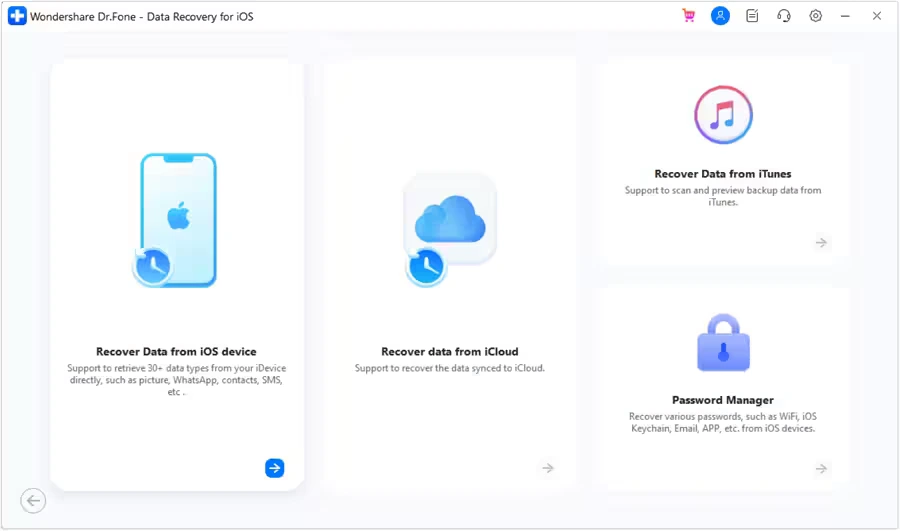
Run the software and go straight to the “Toolbox” section to tap “Data Recovery.” After that, pick “iOS” and opt for the “Recover Data from an iOS device” option.
Step 2. Scan Your iPhone for Missing Contacts
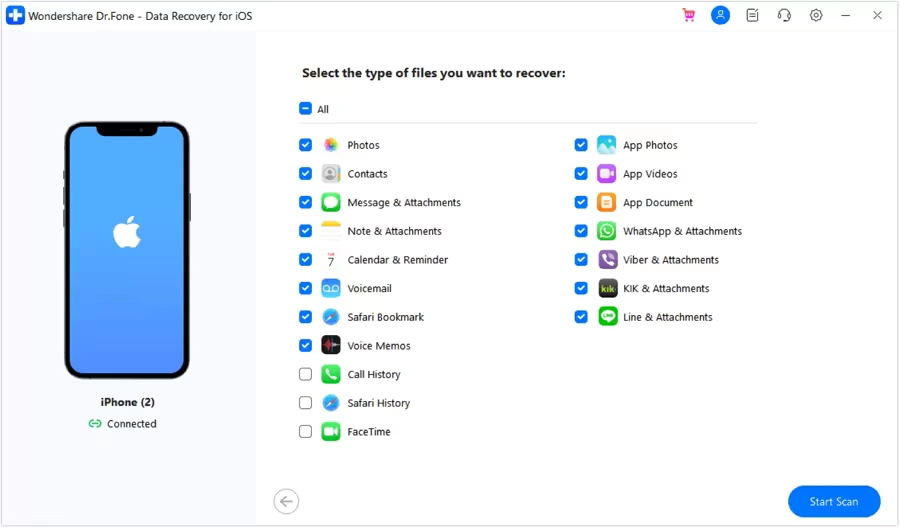
Once the iDevice is connected, select “Contacts” and press “Start Scan” so the tool can load the deleted content after searching.
Step 3. Wrap Up by Saving the Contacts
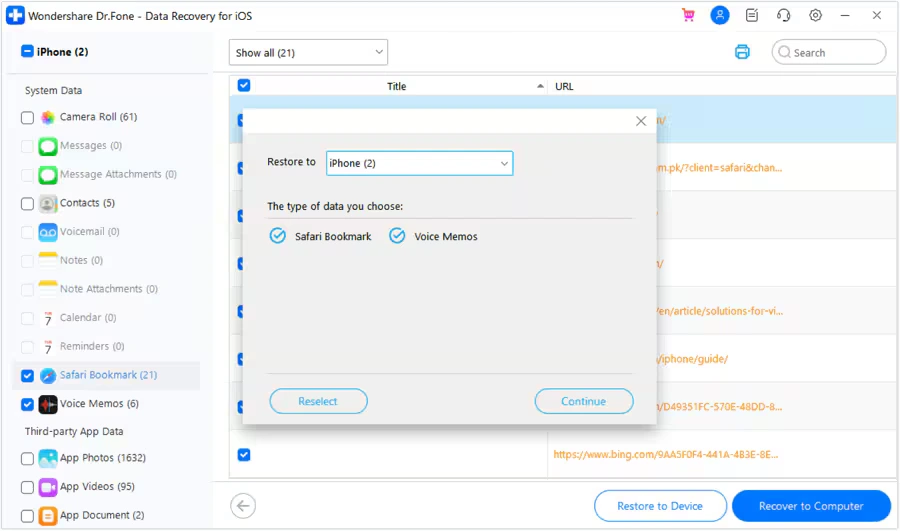
Before restoring the contacts on the phone, make sure “Find My” is turned off and use “Restore to Device.”
Part 4. Checklist: How to Keep Contacts Backed Up in the Future
After getting your lost contacts back, it is a good idea to take steps to help you avoid such issues. Described below is a helpful checklist to keep your contacts backed up properly:
- Enable iCloud contact sync to keep your contacts updated and stored in the cloud automatically.
- Turn on Gmail sync if you prefer it to enable contact syncing to create another backup layer.
- Use iTunes or Finder backups regularly to back up your entire phone to your computer for a full copy of your data, including contacts.
- Export contacts occasionally via a tool to export your list as a file and save it to email or cloud storage.
- Install a reliable data management app that lets you save contacts and other data separately, giving you more control.
Final Thoughts
In summary, losing contacts on your iPhone can disrupt both your personal and work life. That is especially the case when there’s no backup available through iCloud or Gmail. Luckily, with tools like Dr.Fone – Data Recovery (iOS), the task of retrieving them becomes simple and effective.
It offers a clean design, fast scanning, and no risk of losing existing data. Hence, when you ever face unexpected data loss, Dr.Fone is a reliable solution for iPhone data recovery.