At 9 AM, you are creating a mobile application, at noon, you are answering emails of investors, and at 3 PM, you are debugging software malfunctions on the server. Being a tech entrepreneur, you find yourself going back and forth between the different positions that would have fallen under different departments. The appropriate productivity tools automate the mundane chores in place of doing strategic decisions that can drive your business in the right direction.
Mordor Intelligence pegs the business productivity software market at roughly $110 billion in 2026, headed toward $195 billion by 2031. That’s not casual growth. Companies are structuring entire operations around these tools now, and tech startups that pick the wrong ones early end up doing painful migrations eighteen months in when nothing talks to anything else and half the team has quietly gone back to spreadsheets.
The Admin Problem
Nobody starts a tech company because they’re excited about payroll. But the second you bring on your first contractor or employee, admin work multiplies in ways that catch you off guard. Tracking hours, running payroll, staying on the right side of tax compliance each one is manageable alone, but stacked together they’ll swallow two or three full days a month. And getting this stuff wrong isn’t just inconvenient. Late payments or tax errors erode trust with the exact people you need to keep.
This is where researching HR platform alternatives actually matters for tech founders. You don’t need what a 500-person company needs. You need something that does the basics correctly without generating more admin work than it eliminates. Plenty of tools out there are built for smaller teams and price accordingly the trick is finding one before you’ve already wasted a quarter doing everything manually.
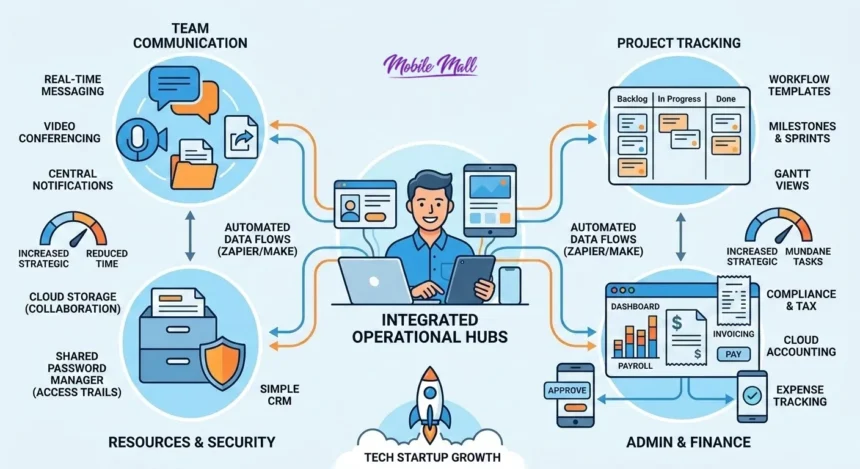
Invoicing and expense tracking sit right next to this. Cloud accounting tools that let you approve a reimbursement from your phone or send an invoice between meetings that’s table stakes now. What separates the good ones from the mediocre ones is whether they connect. Your HR platform feeding time data into your accounting software, your project tracker informing your invoicing that automatic flow means you’re not copy-pasting numbers between tabs at 11 PM.
Mobile access sounds like a checkbox feature until you’re at a conference and a contractor’s payment needs signing off, or you’re trying to pull up last month’s burn rate from an airport lounge. If the tool barely functions on a phone screen, you’ll discover that at the worst possible time.
How Teams Actually Communicate Now
Most tech teams run on real-time messaging for daily work. Email still exists for external stuff clients, investors, vendors but internally, channel-based messaging has basically taken over. You spin up a channel per project, share files without fighting attachment limits, and six months later you can actually search back and find that conversation where someone explained why the architecture decision was made.
The average company uses about 112 SaaS applications now, up from 80 in 2020, according to data compiled by Backlinko. Your messaging platform sits at the centre of that mess. If it integrates well with your other tools, it becomes a hub where notifications from project management, code repos, and monitoring systems all land in one place. If it doesn’t integrate well, congratulations you’ve added another silo.
Video conferencing that hooks into your calendar directly is a small thing that saves a surprising amount of daily friction. When you’re running four or five calls between clients and team syncs, the difference between “click join” and “dig through email for the link, discover it expired, generate a new one” compounds fast.
Notification management is where this whole category goes wrong for most teams, though. Every tool ships with notifications turned on by default. Slack pings, email alerts, project management reminders, monitoring warnings unmanaged, it becomes impossible to focus for twenty minutes without something interrupting. The fix is setting this up early and being deliberate about it. Urgent channels from clients always break through. Internal discussions batch into scheduled check-ins. Keywords like “down” or “payment failed” bypass quiet hours. Nobody does this proactively and everyone wishes they had.
Tracking Projects Without Losing Your Mind
Kanban boards, sprint planning views, Gantt charts pick whatever matches how your brain works. The format matters less than having one central place where you can glance and know what’s stuck, who’s overloaded, and what’s about to miss its deadline. Your non-technical co-founder or your marketing contractor should be able to understand project status without asking an engineer to translate.
Layer time tracking on top and things get interesting. You start noticing that a certain type of project consistently takes 40% longer than you estimated. Or that one phase of client onboarding eats twice the hours you budgeted. That kind of data reshapes how you price future work and where your next hire should go.
Templating workflows saves more mental energy than people realise. Once your client onboarding process is dialled in welcome email, kickoff call, access provisioning, first milestone turn it into a template that fires automatically for each new client. Recurring tasks for weekly reporting or monthly infrastructure checks just appear on schedule. Setting this up takes a boring afternoon. Skipping it means reinventing the same process every single time.
Other Tools Worth the Subscription
A few more categories start mattering as you grow past the founding team:
- CRM: Even a simple one. Log who you talked to, what you discussed, when to follow up. The “I’ll just remember” approach stops working around your fifth active prospect.
- Cloud storage: Real-time collaboration on docs and designs. Proper version history. No more “deck_FINAL_v4_actuallyFinal.pptx” floating around.
- Accounting software: Built for small businesses. Generates invoices, categorises expenses, produces financial reports you can actually read without an accounting degree.
- Password manager: Your team shares access to hosting, analytics, payment processors, social accounts. A shared Google Doc of passwords with a bookmark everyone has is not security. It’s a liability.
Don’t stack all of these on in the same week. You’ll end up with a dozen subscriptions and nobody fully using any of them. Identify where you’re currently bleeding the most time or making the most errors. Fix that one. Then move to the next.
Choosing Tools That Won’t Trap You
Small businesses under 200 employees average about 42 SaaS applications. That number climbs quickly once you start growing, and migrating off a tool after two years of built-up data and team habits is genuinely miserable work.
Pricing deserves more scrutiny than most founders give it. What happens at fifteen users? Some platforms scale gracefully. Others have cliffs where a single feature you depend on suddenly requires jumping to a tier that costs three times as much. Check this before committing, not after you’ve onboarded the whole team.
Data export matters enormously. If a platform makes it awkward or incomplete to get your data out, that’s a deliberate lock-in strategy. You’re the customer you should be able to leave cleanly whenever you want.
Free trials only work if you test with real tasks. Don’t just click around the dashboard for ten minutes. Run an actual project through it. Have someone on your team use it for a full week. Problems with any tool surface during real work, never during a demo.
Reviews from companies your size are far more useful than enterprise case studies. A tool that shines for a 200-person marketing department can be absurdly overcomplicated for a five-person dev team building their first product.
And check the mobile app during the trial. Properly check it try approving something, try creating a task, try pulling a report. Some companies treat mobile as decoration.
Connecting Everything Together
Integration determines whether your tools form a system or just a collection of apps that each hold a piece of the picture you need. When a client fills out a contact form and that automatically creates a CRM entry, notifies your team channel, and adds a follow-up task that’s the system working. When you have to manually create each of those things yourself, that’s a collection of apps pretending to be useful.
Automation platforms like Zapier or Make bridge the gaps between tools that don’t natively connect. Invoice triggers when project status hits “completed.” New customer email goes straight into your marketing list. Critical files duplicate across storage providers for backup. These connections add up.
Waste is worth watching, though. Flexera’s 2024 State of ITAM Report found wasted IT spend sitting between 20% and 30% across organisations, with SaaS specifically seeing around 20% wasted on unused or underutilised licenses. For a startup counting every dollar, subscribing to tools that don’t get used properly is money you could’ve spent on an extra contractor or a marketing experiment.
| Tool Category | What It Covers | Typical Timing |
|---|---|---|
| HR/Payroll | Employee management, tax, time tracking | First hire |
| Team Messaging | Daily communication, file sharing, video | Day one |
| Project Management | Tasks, sprints, workflows, reporting | When projects overlap |
| CRM | Leads, follow-ups, pipeline | First paying customers |
| Accounting | Invoicing, expenses, financial reports | Immediately |
| Password Manager | Credential sharing, access audit trails | When team shares any login |
| Automation | Cross-app workflows, triggered actions | When manual entry gets old |
Starting Without Overdoing It
Gartner forecasts worldwide SaaS spending reaching $299 billion in 2025, a 19.2% jump from the year before. Companies are throwing money at software. But spending more on tools has never automatically meant getting more done plenty of organisations pay for overlapping products that solve the same problem slightly differently while nobody on the team uses either one fully.
Start with four or five tools that address whatever is currently eating the most time or causing the most mistakes. Communication, project tracking, accounting, a password manager, and whatever HR setup fits your team size. That covers the operational basics for an early-stage tech company without creating a sprawl problem on day one.
When something specific starts hurting deals slipping because follow-ups aren’t tracked, design feedback scattered across five different threads, onboarding taking twice as long as it should add a tool that fixes that exact pain. Not before.