
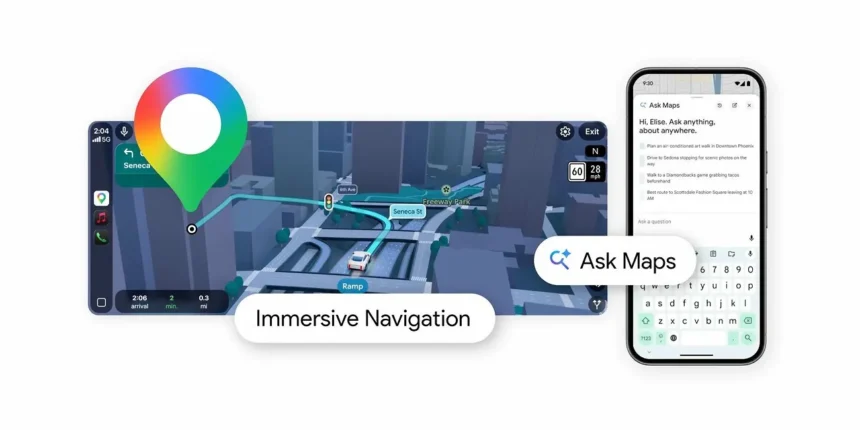
Google brought Gemini into Maps back in November, and now it’s pushing the AI side of things further with a feature called Ask Maps. Pretty self-explanatory — you tap the Ask Maps button, type or say whatever you need, and Gemini answers you in a conversational back-and-forth right inside the app.
The pitch from Google is that Gemini can handle questions a traditional map never could. Where can I charge my phone nearby? Is there a public tennis court somewhere around here that has lights? That sort of thing. Gemini pulls from data on over 300 million places and taps into reviews from the 500 million people who contribute to the Maps community. It also personalizes results based on your search history and saved places, so what surfaces for you should actually be relevant to you.
Once you get an answer, you’re not stuck in a dead end either. You can book a restaurant reservation from the same conversation, save places to a list, share them with someone, or just hit navigate and go. It feeds straight into the rest of Maps without making you jump between screens.
The bigger deal might be Immersive Navigation, which Google is calling its most significant Maps update in over a decade. The whole navigation view has been redesigned with a 3D perspective that renders buildings, overpasses, and terrain around you as you drive. When it matters, the map highlights lane markings, crosswalks, traffic lights, and stop signs so you’re not guessing which lane to be in at a complicated intersection.
Google says this spatial awareness comes from Gemini models analyzing fresh Street View and aerial imagery to build an accurate picture of what’s actually along your route. The view zooms smartly and makes buildings transparent when they’d block your sightline, so you can see what’s coming up ahead.
Voice guidance got an upgrade too — more natural-sounding directions instead of the robotic turn-by-turn style. And Maps now tells you about route trade-offs before you commit. A longer route with lighter traffic versus a faster one with a toll, for instance, so you can decide what matters more to you on that particular drive.
Real-time disruption alerts pop up during your trip, and before you even leave, you can preview your destination and surroundings through Street View and get parking suggestions. When you’re close, Maps highlights the building entrance, parking nearby, and which side of the street you need to be on. That last part alone is worth something if you’ve ever circled a block three times because the entrance was on the opposite side from where you pulled up.
Availability is the catch. Ask Maps is rolling out now in the US and India on Android and iOS, with nothing announced yet for other countries. Immersive Navigation launches today across the US, and Google says it’ll expand over the coming months to eligible iOS and Android devices, CarPlay, Android Auto, and cars with Google built-in.