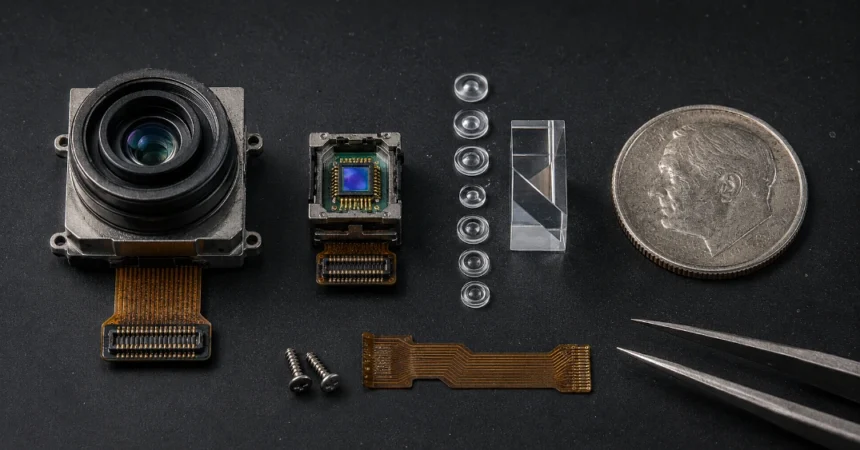
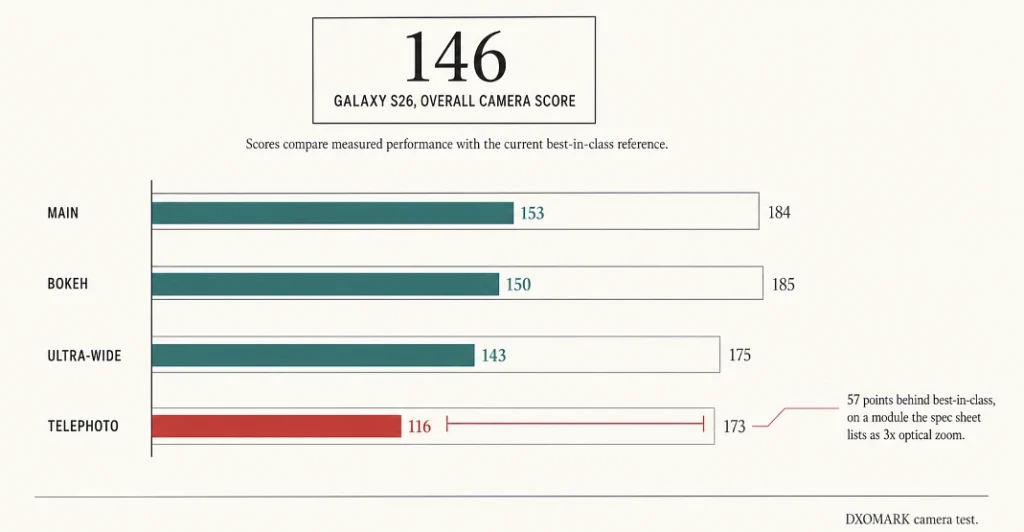
Samsung’s Galaxy S26 scored 146 points in DXOMARK’s camera test, putting it 44th on the leaderboard, behind several older flagships. A current flagship. The telephoto module is the worst offender at 116 points, held back by a 1/3.94-inch sensor that simply cannot gather much light, even though the spec sheet advertises 3x optical zoom like every rival does.
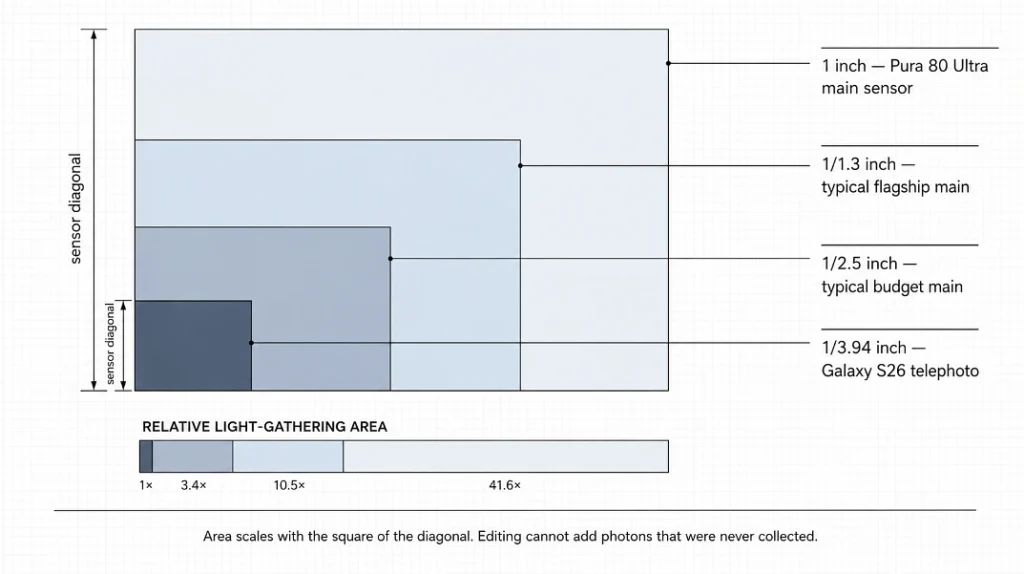
AI photo editing fixes noise, colour casts and clutter after the shot, but it cannot recover detail the sensor never recorded. If a spec sheet can mislead you on a phone that expensive, it can definitely mislead you at 20,000 rupees. So the useful question isn’t which numbers are bigger. It’s what actually goes wrong in your photos, how much of it software fixes afterwards with tools like Nano Banana Pro, and where the fixing stops working.
Two phones with the same 50MP label can finish 30 points apart
Megapixels describe how finely a sensor slices the light it receives, not how much light arrives or what the phone does with it afterwards.
Look at the top of the rankings. Huawei’s Pura 80 Ultra leads DXOMARK on 175 points, built around a one-inch main sensor with variable aperture. The iPhone 17 Pro sits at 168, but its scorecard splits hard: 185 for outdoor shooting, the best in the top 20, against 135 for zoom, the weakest in the top ten. Same phone. Two very different answers depending on what you point it at.
That spread is the whole problem with buying on headline numbers. Sensor size, image signal processor, and the tuning a company layers on top all pull in different directions, and none of it appears in a comparison table.
Your phone edits every photo before you ever see it
This part surprises people. The picture in your gallery was never a single exposure.
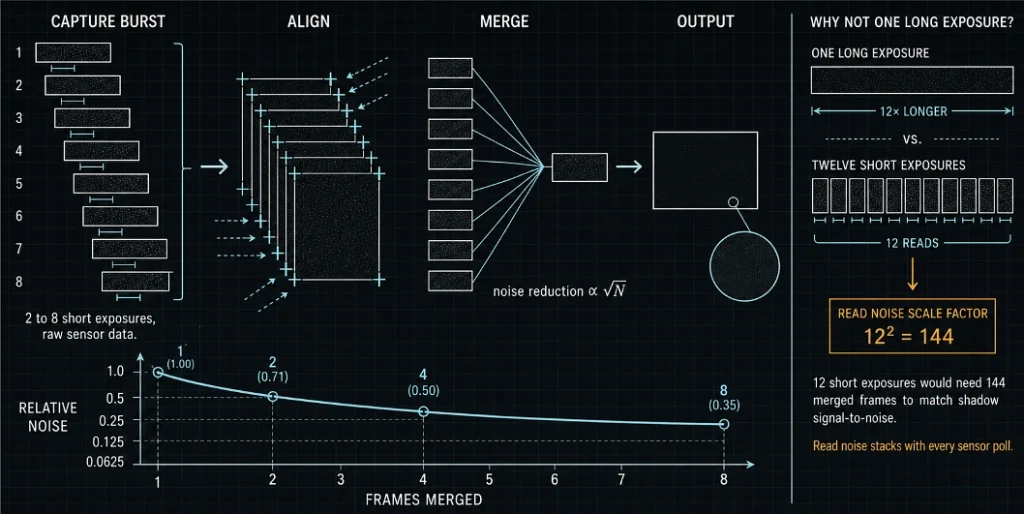
Google’s HDR+ system takes a burst of short exposures, aligns them, and averages the colour at each pixel position across the whole stack, borrowing a trick astronomers call lucky imaging. The pipeline merges between two and eight frames, working straight off the raw sensor data instead of the phone’s standard single-frame processor. Averaging frames cuts noise roughly in proportion to the square root of how many you merge, which is why phones stack rather than just holding the shutter open.
Why not one long exposure instead? Because you’d get motion blur, and because of a nasty bit of maths. Google’s researchers worked out that splitting a long exposure into 12 short ones would need 144 merged frames to match the original signal-to-noise ratio in the shadows. Read noise stacks up every time the sensor is polled.
None of this is free. It costs processing power, and that’s precisely where cheaper phones economise. Burst processing exists because small smartphone cameras are physically limited in how much light they can capture, so a budget device is fighting the same physics with a weaker referee.
What’s actually worth fixing afterwards
Editing used to mean sliders and patience. AI tools changed the input method more than anything else, letting you describe a change in plain language instead of hunting for the right curve. Nano Banana Pro, Google’s Gemini 3 Pro Image model, outputs up to 4096×4096 and can blend as many as 14 reference images into one scene, which is far beyond what a phone gallery app offers.
Low-light noise, the big one
Indoor and evening shots are where cheap sensors fall apart, and it’s rarely just grain. You get smearing, because the phone’s own noise reduction has already flattened fine texture trying to clean up the mess. Post-capture denoising works better than in-camera denoising for one reason: it isn’t running against a shutter deadline. There’s no half-second budget to respect. That said, a denoiser cannot rebuild texture the sensor never resolved, and pushing it hard leaves skin looking like plastic. Restraint beats maximum strength almost every time here.
Colour casts
Warm bulbs next to a window confuse auto white balance constantly, and the phone picks one light source to trust. Correcting the whole frame afterwards is the single fastest improvement most people can make to indoor photos.
Clutter and small enlargements
Object removal handles the stranger who wandered into frame. Upscaling helps when a marketplace listing or a print needs more pixels than the original file has. Both are genuinely better than they were two years ago. Neither is magic.
AI-edited photos now carry a watermark you can’t see
Here’s something almost nobody mentions in editing guides, and it matters most for exactly the people editing resale listings.
Google embeds SynthID digital watermarks into every image created or edited with Gemini 3 Pro Image. It sits in the pixel data, survives normal handling, has no effect on visible quality, and cannot be switched off. Google has also added a check inside the Gemini app where you upload a picture and ask whether its own AI made it. On top of that, free and Google AI Pro tier users get a visible Gemini sparkle stamped on the image as well, removed only for AI Ultra subscribers and inside AI Studio.
For a holiday photo, irrelevant. For a phone you’re selling on OLX or Amazon, think it through. Cleaning up the lighting on a product shot is fine and normal. Editing out a scratch on the back panel is a different thing entirely, and the file itself now carries a marker saying it was touched. Buyers who receive something that doesn’t match the listing tend to leave that in writing.
The point where no amount of editing helps
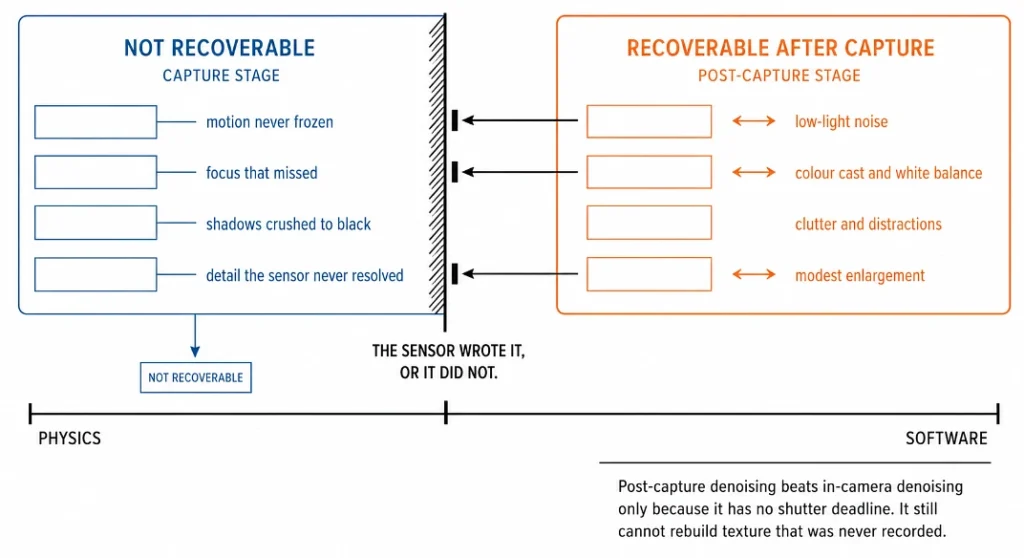
Editing repairs what was recorded. It cannot supply what wasn’t.
Motion that wasn’t frozen, focus that missed, shadows crushed to pure black in ordinary daylight, all of that is information the sensor never wrote to the file. Google is candid about its own limits too: the company notes that masked editing, big lighting changes such as turning day into night, and blending several images can produce unnatural results, visual artefacts, or disjointed scenes.
DXOMARK makes a related point from the testing side. Their analysts warn that while computational photography lifts sharpness, dynamic range and detail, too much processing produces images that look artificial and detached from the actual scene. Anyone who has seen an over-sharpened night photo with wax-figure faces knows the look.
Before buying, pull up sample shots from the model you’re considering, taken in plain daylight. If those look soft or grainy, that’s the hardware talking, and no editing pass later will change it. If they look decent and only the indoor shots struggle, you’re in the territory where software genuinely closes the gap.
Most people shooting on a mid-range phone are getting maybe 70 percent of what their hardware can do, because they’re comparing spec sheets instead of fixing white balance. That gap is free to close. The one between a 1/3.94-inch sensor and a one-inch sensor is not.