
MobileMall BlogMobileMall BlogMobileMall Blog
  • #Explore
  • Business
  • Technology
    • Gaming
    • Headphones
    • Laptops
    • Mobile Accessories
    • Home Networking
    • PCs
    • Printers
    • Smart Watches
    • Speakers
    • Streaming Devices
    • Tablets
    • Wearables
    • Smart Office
  • Security
  • Buying Guides
  • Contribute
Reading: To Use Apple Intelligence Features You’ll Need To Join The Waitlist
Share
Font ResizerAa
MobileMall BlogMobileMall Blog
Font ResizerAa
  • #Explore
  • Business
  • Technology
  • Security
  • Buying Guides
  • Contribute
  • #Explore
  • Business
  • Technology
    • Gaming
    • Headphones
    • Laptops
    • Mobile Accessories
    • Home Networking
    • PCs
    • Printers
    • Smart Watches
    • Speakers
    • Streaming Devices
    • Tablets
    • Wearables
    • Smart Office
  • Security
  • Buying Guides
  • Contribute
2025 © Mobilemall. All Rights Reserved.
Home » Blog » To Use Apple Intelligence Features You’ll Need To Join The Waitlist
Apple

To Use Apple Intelligence Features You’ll Need To Join The Waitlist

Carter (Apple Boy)
Last updated: November 11, 2025 9:53 am
Carter (Apple Boy)
Share
Apple Intelligence Features
SHARE

Contents

  1. Here are 12 ways you can use Apple Intelligence:
  2. Limited Access and Waitlists
  3. Apple Intelligence compatibility list
  4. Act Fast or Miss Out?

Apple unveiled its ambitious AI plans, cleverly dubbed Apple Intelligence (AI for short!). While the features are still pending, rumors suggest they might drop as soon as July with the public beta release of iOS 18 and iPadOS 18. But here’s the catch: not everyone will get to experience Apple Intelligence right away.

Here are 12 ways you can use Apple Intelligence:

ChatGPT on iPhone and Mac for Free:

  • Access ChatGPT directly from Siri and ask any question.
  • Need help with your documents? Just ask ChatGPT.
  • Share photos with ChatGPT for suggestions.
  • Create images and text within your documents using ChatGPT.

A Brand New, AI-powered Siri:

  • Siri now has a cool new glowing light when activated.
  • Talk to Siri naturally, and it will understand everything you say.
  • Siri gets deeper meanings, like knowing who your daughter is or where your office is located.

Apple Intelligence for Your Files:

  • Ask about a document sent by a colleague last week.
  • Play a podcast your friend recommended.
  • Find photos with specific people in them.

Find Documents and Autofill Forms:

  • Filling out a form? Just ask Siri to find a personal document like your driver’s license and autofill the details for you.

On-Screen Awareness and In-App Actions:

  • Command Siri to find photos of you wearing a green jacket.
  • Ask Siri to edit a photo and make it pop.
  • Summarize a document and email it to a colleague.

New AI-powered Text Editing on Mac:

  • Generate new text effortlessly.
  • Proofread and edit your text.
  • Change the tone of your text with ease.

Clean Up Images:

  • Remove unwanted objects or people in the background of your images using AI.

Find How a Feature Works:

  • Not sure what a feature is called? Describe what you want to do, and Siri will give you instructions.

Genmoji:

  • Generate custom emojis in seconds.
  • Create emojis that look just like you or your friends.

Image Playground:

  • Generate images on your device with AI in seconds and share them across your apps.

Image Wand:

  • Convert rough sketches into high-quality images.

AI-powered Call Transcripts:

  • Transcribe your calls, turn them into summaries, and share them across your apps and emails.

Limited Access and Waitlists

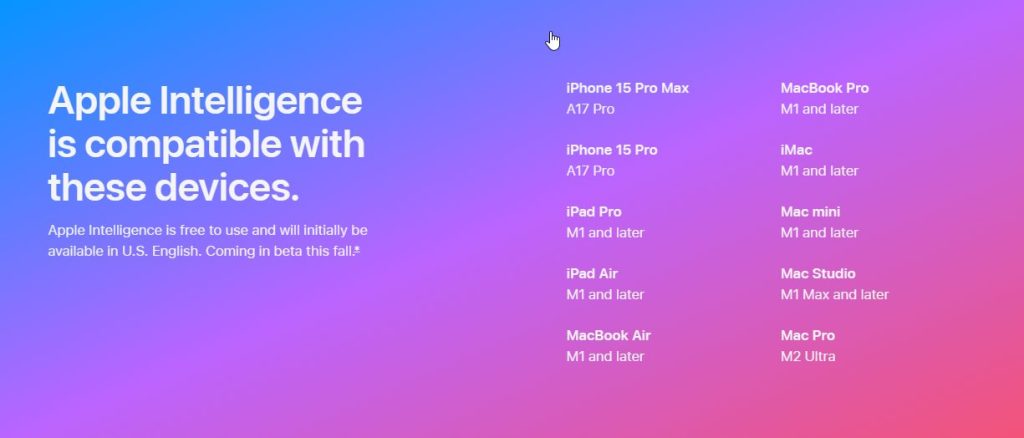
Initially, only the iPhone 15 Pro and Pro Max will support Apple Intelligence, thanks to hardware limitations. But that’s not all – Apple is also introducing a waitlist for access to these features! You’ll need to sign up and hope to get selected for the “limited preview” phase. This info comes straight from iOS 18 code, where mentions of a waitlist and “limited preview” were uncovered.

Apple Intelligence compatibility list
Act Fast or Miss Out?

If you want to be among the first to try Apple Intelligence, be prepared to act quickly! Even with iOS 18 on a supported iPhone, you might be left waiting for who knows how long if you don’t make the cut.

Do you know: Elon Musk expressed strong concerns and criticism regarding the partnership between Apple and OpenAI. He called the deal “an unacceptable security violation” and threatened to ban Apple devices at his companies if Apple integrates OpenAI at the operating system level. Musk argued that Apple’s decision to integrate OpenAI’s technology could compromise the security and privacy of Apple devices, stating that Apple “isn’t smart enough to make their own AI” but somehow trusts OpenAI to protect user data. He also suggested that Apple’s partnership with OpenAI could lead to the sharing of user data with third parties without user consent, likening the integration to spyware.


MagicOS 9.0 Now Available for Public Beta Testing, Courtesy of Honor
Iphone Apple clarifies Siri feature that asks users to pick a music app
iOS 26.3 Beta 1: Android transfers get easier, EU gets third-party wearable notifications
Apple to fix 120Hz Screen Refresh Rates in third-party apps
iOS 16.1: Battery Percentage Now Available on All Face ID iPhones

Sign Up For Daily Newsletter

Be keep up! Get the latest breaking news delivered straight to your inbox.
[mc4wp_form]
By signing up, you agree to our Terms of Use and acknowledge the data practices in our Privacy Policy. You may unsubscribe at any time.
Share This Article
Facebook Copy Link Print
Share
ByCarter (Apple Boy)
Follow:
I am the Owner of HexaCore. I just love using Apple devices. Yes iPhone, a MacBook, Airbuds and an Apple Watch. I love their sleek designs and unqiue ideas. Writing about Apple products and updates is my hobby now.
Previous Article Revolutionizing-E-Commerce_-The-Rise-of-3D-Services Revolutionizing E-Commerce: The Rise of 3D Services
Next Article How to Create Manual Sitemaps For Large Custom Websites How to Create Manual Sitemaps For Large Custom Websites

Latest News

iOS 27 Beta 4 iPhone Ultra
iOS 27 Beta 4 Code Is Talking About an iPhone With Two Batteries, and That Means the iPhone Ultra
Apple News
Samsung Galaxy Unpacked
How to Watch Samsung’s Galaxy Unpacked Live From London on 22 July
Samsung
download any twitter video with xdownloader
Xdownloader: Guide To Download Twitter Video On Your Phone Without An App
Tips & Tricks
Samsung Galaxy Z Fold8 camera
Samsung Is Reportedly Betting Bigger on the Galaxy Z Fold8 Wide Than the Ultra and Flip8
News Samsung
Sound Better on Video Calls and Webinars From Home
How to Sound Better on Video Calls and Webinars From Home
Accessories
iPhone 18 Pro variable aperture
Diagnostics log from the Tata hack confirms it: iPhone 18 Pro gets variable aperture
Apple News
Why Serious Detectorists Now Carry a Phone in One Pocket and a Pinpointer in the Other
Tech Lifestyle
RedMagic Astra 2
RedMagic Astra 2 Goes Global: Steam Games on Android, Starting at $749
News Tablets

You Might also Like

iPhone 16 Pro Users Report Touchscreen Issues
AppleNews

iPhone 16 Pro Users Report Touchscreen Issues Shortly After Release.

Carter (Apple Boy)
Carter (Apple Boy)
1 Min Read
Iphone 18 leak
ApplePhone Leak

iPhone 18 Leak Points to 12GB RAM Boost

Carter (Apple Boy)
Carter (Apple Boy)
3 Min Read
Apple iPhone SE 2025
AppleiOS

Apple to Launch Redesigned iPhone SE Without Home Button in 2025

Carter (Apple Boy)
Carter (Apple Boy)
2 Min Read

About us

Mobilemall.co blog is an informative and engaging platform that offers readers the latest news and insights on mobile phones and accessories. The blog covers a wide range of topics, including product reviews, industry trends, and tips on how to get the most out of your mobile device.

Contact Us:
[email protected]

Categories Link

  • Business
  • Mobile
  • Technology
  • Gaming
  • Phone Review
  • Android

Must Read

Best Rugged Phone
Best Rugged Phone with Built-in Projector in 2026
Smartphone
Galaxy S27 Ultra camera
Galaxy S27 Ultra probably isn’t getting that horizontal camera bar
News Samsung

Quick Links

  • Privacy Policy
  • Tech Write For Us
  • Contact Us
  • Facebook
  • Instagram
  • YouTube
  • LinkedIn
2026 © Mobilemall. All Rights Reserved.
Go to mobile version
Welcome Back!

Sign in to your account

Username or Email Address
Password

Lost your password?

Not a member? Sign Up